







Question: Notes: PLEASE ANSWER THIS QUESTION USING THE PROCESSING APPLICATION. CHECK THE BOOK ON CHEGG CALLED LEARNING PROCESING. PEOPLE HAEV ANSWERED USING NETBEANS AND THE CODING
Notes:
PLEASE ANSWER THIS QUESTION USING THE PROCESSING APPLICATION. CHECK THE BOOK ON CHEGG CALLED LEARNING PROCESING. PEOPLE HAEV ANSWERED USING NETBEANS AND THE CODING IS DIFFERENT FROM NETBEANS PLEASE AND THANK YOU. This is my email if you have any further questions.
laughterakerele@yahoo.com
Name your sketches using your name, the assignment number, and the question number, exactly as in this example: LastnameFirstnameA1Q1. Your programs must run upon download to receive any marks. Submit one pde file for each question. Assignments must follow the programming standards document published on the course website on Moodle. These assignments are your chance to learn the material for the exams. Code your assignments independently. We use software to compare all submitted assignments to each other and pursue academic dishonestly vigorously. Q1: Static Automobile (Material from Week 2) - 7 marks Write a non-active Processing program (containing no setup() or draw() functions) which will draw an automobile in the canvas. You can draw any type of automobile (car, SUV, truck, bus, etc.) you like. Be creative. The rules for the automobile are: It must contain at least 6 shapes (ellipses, rectangles, quad, or other shapes). It must contain at least one line, at least one ellipse or circle, and at least one square, rectangle, triangle, or quadrilateral (quad). It should contain several different colours. It should be roughly centered in the canvas. Dont make it too complex no more than 16 shapes. You should use a standard 500 x 500 canvas. Your automobile must be capable of being drawn in any size, and in any position in the canvas (in question 2 and 3 your automobile will change size and move). This must be controlled by constants at the top of your program. All X coordinates, Y coordinates, heights, widths, and colours, must be defined by constants. You will probably need at least 10 or more depending on how complex your automobile is. The X and Y coordinates should be specified relative to the centre of the window. This will make the following questions much easier. Heights and widths will be in pixels. All of your drawing commands should use your constants, the built-in height and width variables, and perhaps simple numbers like 1 or 2. No other numbers. For example, the rectangle that forms the lower body of the car was drawn with the statement below. rect(width/2-CAR_WIDTH/2, height/2, LOWER_BODY_WIDTH, LOWER_BODY_HEIGHT); DEPARTMENT AND COURSE NUMBER: COMP 1010 If some calculation is needed many times in many statements, do it only once and store the result in a variable. Then, use that variable many times. For example, a better version of the above statement would be the one below, where centreX and centreY were pre-calculated, since those values were needed many times to draw the entire car. rect(centreX-CAR_WIDTH/2, centreY, LOWER_BODY_WIDTH, LOWER_BODY_HEIGHT);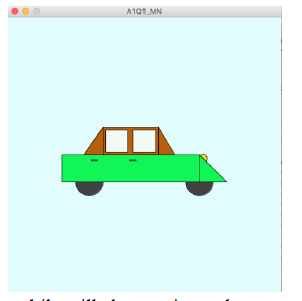
A101_MN A101_MN
Step by Step Solution
There are 3 Steps involved in it

Get step-by-step solutions from verified subject matter experts
 Study Help