







Question: OBJECT ORIENTED design in JAVA. This needs to be added to code here. import java.util.Scanner; abstract class Shape { protected double perimeter; public abstract void
OBJECT ORIENTED design in JAVA. This needs to be added to code here.
import java.util.Scanner;
abstract class Shape { protected double perimeter;
public abstract void calculatePerimeter(double[] sides);
public double getPerimeter() { return perimeter; } }
class Rectangle extends Shape { @Override public void calculatePerimeter(double[] sides) { perimeter = 2 * (sides[0] + sides[1]); } }
class Square extends Shape { @Override public void calculatePerimeter(double[] sides) { perimeter = 4 * sides[0]; } }
class Circle extends Shape { @Override public void calculatePerimeter(double[] sides) { perimeter = Math.PI * sides[0]; } }
class Triangle extends Shape { @Override public void calculatePerimeter(double[] sides) { perimeter = sides[0] + sides[1] + sides[2]; } }
public class NeonTubingCalculator { public static void main(String[] args) { Scanner scanner = new Scanner(System.in);
System.out.println(" Welcome to Nick's Neon Tubing Calculator");
double totalLength = 0;
while (true) { System.out.println(" (R)ectangle, (S)quare, (C)ircle, (T)riangle, (L)ine or (Q)uit?"); String shapeType = scanner.next();
if (shapeType.equalsIgnoreCase("Q")) { break; }
Shape shape = null;
switch (shapeType.toUpperCase()) { case "R": shape = new Rectangle(); System.out.print("Enter Height and Width of Rectangle: "); break; case "S": shape = new Square(); System.out.print("Enter Height of Square: "); break; case "C": shape = new Circle(); System.out.print("Enter Diameter of Circle: "); break; case "T": shape = new Triangle(); System.out.print("Enter Sides of Triangle: "); break; case "L": System.out.print("Enter Length of Line: "); double lineLength = scanner.nextDouble(); totalLength += lineLength; break; default: System.out.println("Invalid shape type. Try again."); continue; }
if (shape != null) { double[] sides = new double[3];
for (int i = 0; i
shape.calculatePerimeter(sides);
System.out.printf("The perimeter of the %s is %.1f ", shape.getClass().getSimpleName(), shape.getPerimeter());
totalLength += shape.getPerimeter(); } }
System.out.println(" Shapes Needed"); System.out.printf("%.1f - rectangle ", 37.0); System.out.printf("%.1f - circle ", 37.7); System.out.printf("%.1f - line ", totalLength); System.out.printf("%.1f Total Length ", 74.7); System.out.println("Thank You"); } }
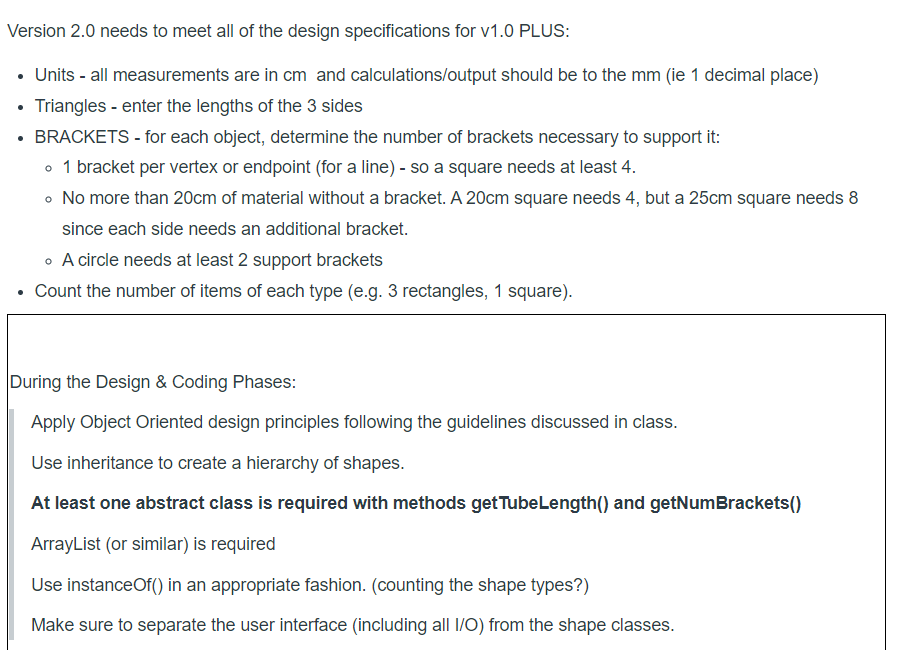
Version 2.0 needs to meet all of the design specifications for v1.0 PLUS: - Units - all measurements are in cm and calculations/output should be to the mm (ie 1 decimal place) - Triangles - enter the lengths of the 3 sides - BRACKETS - for each object, determine the number of brackets necessary to support it: - 1 bracket per vertex or endpoint (for a line) - so a square needs at least 4. - No more than 20cm of material without a bracket. A 20cm square needs 4 , but a 25cm square needs 8 since each side needs an additional bracket. - A circle needs at least 2 support brackets - Count the number of items of each type (e.g. 3 rectangles, 1 square). During the Design \& Coding Phases: Apply Object Oriented design principles following the guidelines discussed in class. Use inheritance to create a hierarchy of shapes. At least one abstract class is required with methods get TubeLength() and getNumBrackets() ArrayList (or similar) is required Use instanceOf() in an appropriate fashion. (counting the shape types?) Make sure to separate the user interface (including all I/O) from the shape classes
Step by Step Solution
There are 3 Steps involved in it

Get step-by-step solutions from verified subject matter experts
 Study Help