







Question: Object Oriented Programming The question that I am looking for is the 9.8 and 9.9 Please write the code in C++ and answer all the
Object Oriented Programming
The question that I am looking for is the 9.8 and 9.9
Please write the code in C++ and answer all the question
Also provide the sample output screenshots
Time Class:
#include using namespace std; class ComplexNumber { private: int realPart; int imagPart; public: ComplexNumber(int r = 0, int i = 0): realPart(r), imagPart(i) {}; void setComplex(void) { cout > this->realPart; cin >> this->imagPart; } ComplexNumber add(const ComplexNumber& c) { ComplexNumber comp; comp.realPart = this->realPart + c.realPart; comp.imagPart = this->imagPart + c.imagPart; return comp; } ComplexNumber subtract(const ComplexNumber& c) { ComplexNumber comp; comp.realPart = this->realPart - c.realPart; comp.imagPart = this->imagPart - c.imagPart; return comp; } void printComplex(void) { cout realPart imagPart
9.7 (Enhancing Class Time) Modify the Time class (Figs. 9.89.9) to include a tick member function that increments the time stored in a Time object by one second. The Time object should always remain in a consistent state. Write a program that tests the tick member function in a loop that prints the time in standard format during each iteration of the loop to illustrate that the tick member function works correctly. Be sure to test the following cases:
a) Incrementing into the next minute.
b) Incrementing into the next hour.
c) Incrementing into the next day (i.e., 11:59:59 PM to 12:00:00 AM).
(9.7)
1.Incrementing into next minute:
#include using namespace std; class Time { private: int hours; // 0 to 23 int minutes; // 0 to 59 public: // required constructors Time(){ hours = 0; minutes = 0; } Time(int h, int m){ hours = h; minutes = m; } // method to display time void displayTime() { cout = 60) { ++hours; minutes -= 60; } // return old original value return T; } }; int main() { Time T1(11, 59), T2(10,40); ++T1; // increment T1 T1.displayTime(); // display T1 ++T1; // increment T1 again T1.displayTime(); // display T1 T2++; // increment T2 T2.displayTime(); // display T2 T2++; // increment T2 again T2.displayTime(); // display T2 return 0; } 2.Incrementing into the next hour:
#include #include #include // Needed for exception handling #include "Time.h" using namespace std; Time::Time(int h, int m, int s) { // Call setters to perform input validation setHour(h); setMinute(m); setSecond(s); } int Time::getHour() const { return hour; } void Time::setHour(int h) { // with input validation if (h >= 0 && h = 0 && m = 0 && s 3.incrementing into the Next Day:
#include using std::setfill; using std::setw; #include "Time.h" // include definition of class Time from Time.h // Time constructor initializes each data member to zero; // ensures that Time objects start in a consistent state Time::Time( int hr, int min, int sec ) { setTime( hr, min, sec ); // validate and set time } // end Time constructor // set new Time value using universal time; ensure that // the data remains consistent by setting invalid values to zero void Time::setTime( int h, int m, int s ) { setHour( h ); // set private field hour setMinute( m ); // set private field minute setSecond( s ); // set private field second } // end function setTime // set hour value void Time::setHour( int h ) { hour = ( h >= 0 && h = 0 && m = 0 && s 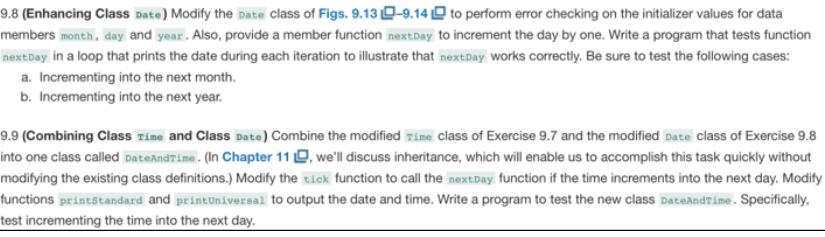
9.8 (Enhancing Class Date) Modify the Date class of Figs. 9.13 -9.14 to perform error checking on the initializer values for data members month, day and year. Also, provide a member function nextDay to increment the day by one. Write a program that tests function nextDay in a loop that prints the date during each iteration to illustrate that next Day works correctly. Be sure to test the following cases a. Incrementing into the next month. b. Incrementing into the next year 9.9 (Combining Class Time and Class Date) Combine the modified rime class of Exercise 9.7 and the modified Date class of Exercise 9.8 into one class called DateAndrime. (In Chapter 11D,we'll discuss inheritance, which will enable us to accomplish this task quickly without modifying the existing class definitions.) Modify the tick function to call the nextDay function if the time increments into the next day. Modify functions printstandard and printUniversal to output the date and time. Write a program to test the new class DateAndTime. Specifically, test incrementing the time into the next day. 9.8 (Enhancing Class Date) Modify the Date class of Figs. 9.13 -9.14 to perform error checking on the initializer values for data members month, day and year. Also, provide a member function nextDay to increment the day by one. Write a program that tests function nextDay in a loop that prints the date during each iteration to illustrate that next Day works correctly. Be sure to test the following cases a. Incrementing into the next month. b. Incrementing into the next year 9.9 (Combining Class Time and Class Date) Combine the modified rime class of Exercise 9.7 and the modified Date class of Exercise 9.8 into one class called DateAndrime. (In Chapter 11D,we'll discuss inheritance, which will enable us to accomplish this task quickly without modifying the existing class definitions.) Modify the tick function to call the nextDay function if the time increments into the next day. Modify functions printstandard and printUniversal to output the date and time. Write a program to test the new class DateAndTime. Specifically, test incrementing the time into the next day Step by Step Solution
There are 3 Steps involved in it

Get step-by-step solutions from verified subject matter experts
 Study Help