







Question: /****** Object: Table Vendors ******/CREATE TABLE Vendors(VendorID int IDENTITY(1,1) NOT NULL,VendorName varchar(50) NOT NULL,VendorAddress1 varchar(50) NULL,VendorAddress2 varchar(50) NULL,VendorCity varchar(50) NOT NULL,VendorState char(2) NOT NULL,VendorZipCode varchar(20)
/****** Object: Table Vendors ******/CREATE TABLE Vendors(VendorID int IDENTITY(1,1) NOT NULL,VendorName varchar(50) NOT NULL,VendorAddress1 varchar(50) NULL,VendorAddress2 varchar(50) NULL,VendorCity varchar(50) NOT NULL,VendorState char(2) NOT NULL,VendorZipCode varchar(20) NOT NULL,VendorPhone varchar(50) NULL,VendorContactLName varchar(50) NULL,VendorContactFName varchar(50) NULL,DefaultTermsID int NOT NULL,DefaultAccountNo int NOT NULL, CONSTRAINT PK_Vendors PRIMARY KEY CLUSTERED(VendorID ASC )
/****** Object: Table Invoices ******/CREATE TABLE Invoices(InvoiceID int IDENTITY(1,1) NOT NULL,VendorID int NOT NULL,InvoiceNumber varchar(50) NOT NULL,InvoiceDate smalldatetime NOT NULL,InvoiceTotal money NOT NULL,PaymentTotal money NOT NULL,CreditTotal money NOT NULL,TermsID int NOT NULL,InvoiceDueDate smalldatetime NOT NULL,PaymentDate smalldatetime NULL, CONSTRAINT PK_Invoices PRIMARY KEY CLUSTERED (InvoiceID ASC ))
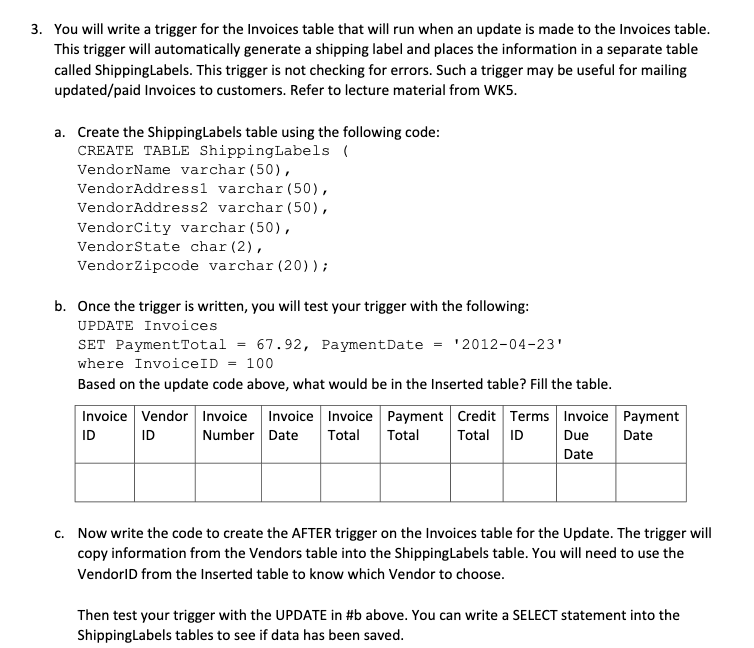
3. You will write a trigger for the Invoices table that will run when an update is made to the Invoices table. This trigger will automatically generate a shipping label and places the information in a separate table called ShippingLabels. This trigger is not checking for errors. Such a trigger may be useful for mailing updated/paid Invoices to customers. Refer to lecture material from WK5. a. Create the shippingLabels table using the following code: CREATE TABLE ShippingLabels ( VendorName varchar(50), VendorAddressl varchar(50), VendorAddress2 varchar(50), VendorCity varchar(50), Vendorstate char (2), VendorZipcode varchar (20)); b. Once the trigger is written, you will test your trigger with the following: UPDATE Invoices SET PaymentTotal = 67.92, PaymentDate = '2012-04-23 where InvoiceID = 100 Based on the update code above, what would be in the Inserted table? Fill the table. Invoice Vendor Invoice Invoice Invoice Payment Credit Terms Invoice Payment ID ID Number Date Total Total ID Due Date Date Total C. Now write the code to create the AFTER trigger on the Invoices table for the Update. The trigger will copy information from the Vendors table into the ShippingLabels table. You will need to use the Vendorld from the Inserted table to know which Vendor to choose. Then test your trigger with the UPDATE in #b above. You can write a SELECT statement into the ShippingLabels tables to see if data has been saved. 3. You will write a trigger for the Invoices table that will run when an update is made to the Invoices table. This trigger will automatically generate a shipping label and places the information in a separate table called ShippingLabels. This trigger is not checking for errors. Such a trigger may be useful for mailing updated/paid Invoices to customers. Refer to lecture material from WK5. a. Create the shippingLabels table using the following code: CREATE TABLE ShippingLabels ( VendorName varchar(50), VendorAddressl varchar(50), VendorAddress2 varchar(50), VendorCity varchar(50), Vendorstate char (2), VendorZipcode varchar (20)); b. Once the trigger is written, you will test your trigger with the following: UPDATE Invoices SET PaymentTotal = 67.92, PaymentDate = '2012-04-23 where InvoiceID = 100 Based on the update code above, what would be in the Inserted table? Fill the table. Invoice Vendor Invoice Invoice Invoice Payment Credit Terms Invoice Payment ID ID Number Date Total Total ID Due Date Date Total C. Now write the code to create the AFTER trigger on the Invoices table for the Update. The trigger will copy information from the Vendors table into the ShippingLabels table. You will need to use the Vendorld from the Inserted table to know which Vendor to choose. Then test your trigger with the UPDATE in #b above. You can write a SELECT statement into the ShippingLabels tables to see if data has been saved
Step by Step Solution
There are 3 Steps involved in it

Get step-by-step solutions from verified subject matter experts
 Study Help