







Question: Objective: Practice Visual Basic Programming to develop applicstions using function and sub procedure. Task #2: Develop an application with Figure 2 user-interface using Functions (calculate

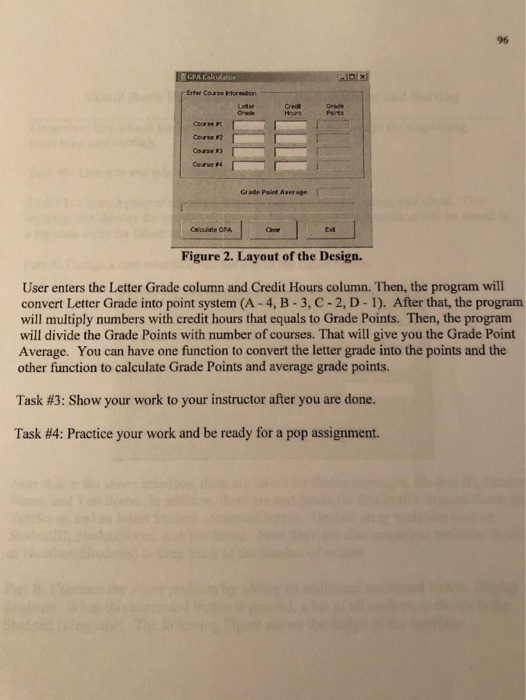
Task #2: Develop an application with Figure 2 user-interface using Functions (calculate grade point, grade average, and check textbox entries. GPA calculator Enter Course Information Court Course 2 Courses Course Gradie Point Average Calouate CPA Figure 2. Layout of the Design. User enters the Letter Grade column and Credit Hours column. Then, the program will convert Letter Grade into point system (A-4, B-3, C-2, D-1). After that, the program will multiply numbers with credit hours that equals to Grade Points. Then, the program will divide the Grade Points with number of courses. That will give you the Grade Point Average. You can have one function to convert the letter grade into the points and the other function to calculate Grade Points and average grade points. Task #3: Show your work to your instructor after you are done. Task #4: Practice your work and be ready for a pop assignment
Step by Step Solution
There are 3 Steps involved in it

Get step-by-step solutions from verified subject matter experts
 Study Help