







Question: ` ` ` Objective: read names from two different files into your program and write each name to a single new file. Please make sure
Objective: read names from two different files into your program and write each name to a single
new file.
Please make sure you download the namelisttxt & namelisttxt input files from the assignment page in
Canvas and place them in the same folder as your program:
Input files:
nameslisttxt & nameslisttxt Each file contains a list of unique names.
Note: before reading each file, you need to read the file name. Your code should work
correctly if input files are renamed!
Output file:
Output all names to an output file
Note: you will need to read the name of the output file.
Write a program that reads the names from the two input files and writes the names to the output file:
a Ask the user to input the file name and path of the first input file.
i Use a tryexcept block to open all input before processing.
ii If the file cannot be opened, display the appropriate error message, and require the user to
reenter the file name and path.
iii. Continue looping until the user has entered in a valid file name and path.
b Ask the user to input the file name and path of the second input file.
i Use a tryexcept block to open all input before processing.
ii If the file cannot be opened, display the appropriate error message, and require the user to
reenter the file name and path.
iii. Continue looping until the user has entered in a valid file name and path.
c Ask the user to input the file name and path of the output file.
i Use a tryexcept block to verify that the output file can be created before processing.
ii If the file cannot be created, display the appropriate error message, and require the user to
reenter the file name and path.
iii. Continue looping until the user has entered in a valid file name and path.
CMSY Lab
Files and Exceptions
d Processing:
i Use a tryexcept block to read from the input files and write to the output file.
ii Read all the names from one input file at a time. Write the names to the output file.
You must use a while loop to process the first input file nameslisttxt and write to
the output file.
You must use a for loop to process the second input file nameslisttxt and write to
the output file.
Each line in each input file is one name.
iii. Each name must be written on a separate line in the output file.
iv There must be no blank lines between names in the output files.
e All input files and the output file must be closed after all names have been processed.
Rubric: The rubric is located on the assignment page in Canvas. Please review the rubric to
make sure you meet all of the requirements for this lab.
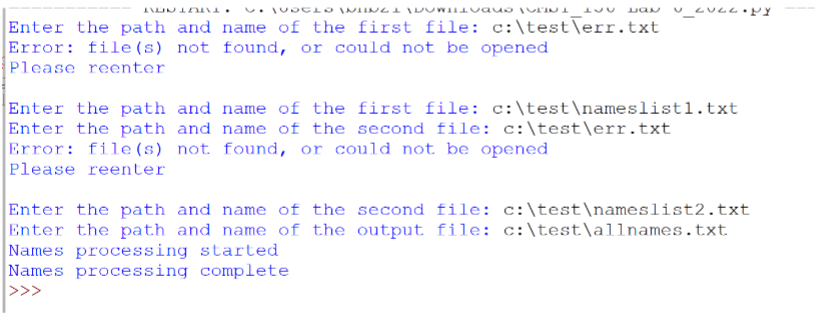
Enter the path and name of the first file: c:testTerrtxt
Error: files not found, or could not be opened
Please reenter
Enter the path and name of the first file: c:test
ameslistl.txt
Enter the path and name of the second file: c:testerrtxt
Error: files not found, or could not be opened
Please reenter
Enter the path and name of the second file: c:test
ameslisttxt
Enter the path and name of the output file: c:testallnamestxt
Names processing started
Names processing complete
Step by Step Solution
There are 3 Steps involved in it
1 Expert Approved Answer
Step: 1 Unlock

Question Has Been Solved by an Expert!
Get step-by-step solutions from verified subject matter experts
Step: 2 Unlock
Step: 3 Unlock
 Study Help