







Question: Objectives Implementing a reliable transport protocol Getting to see in practice how a reliable transport protocol such as TCP is working General Instructions: Make sure
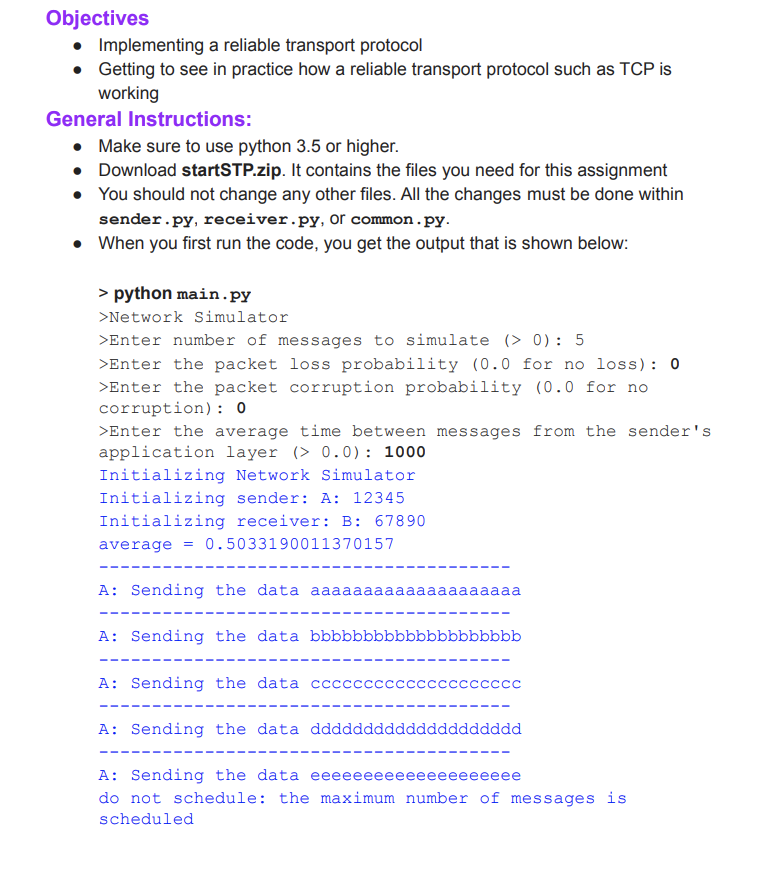
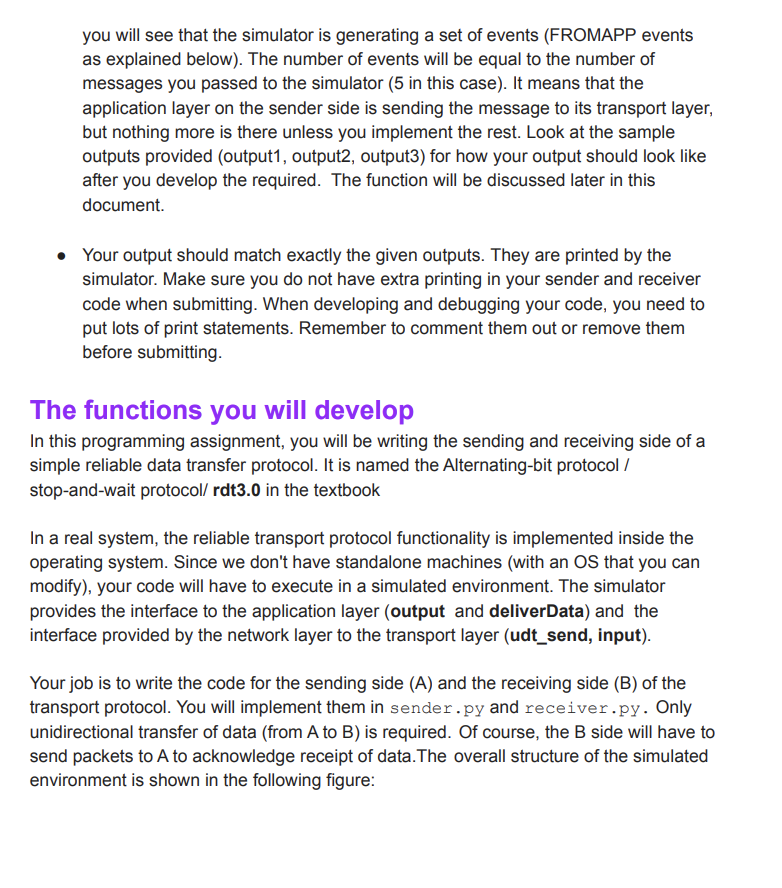
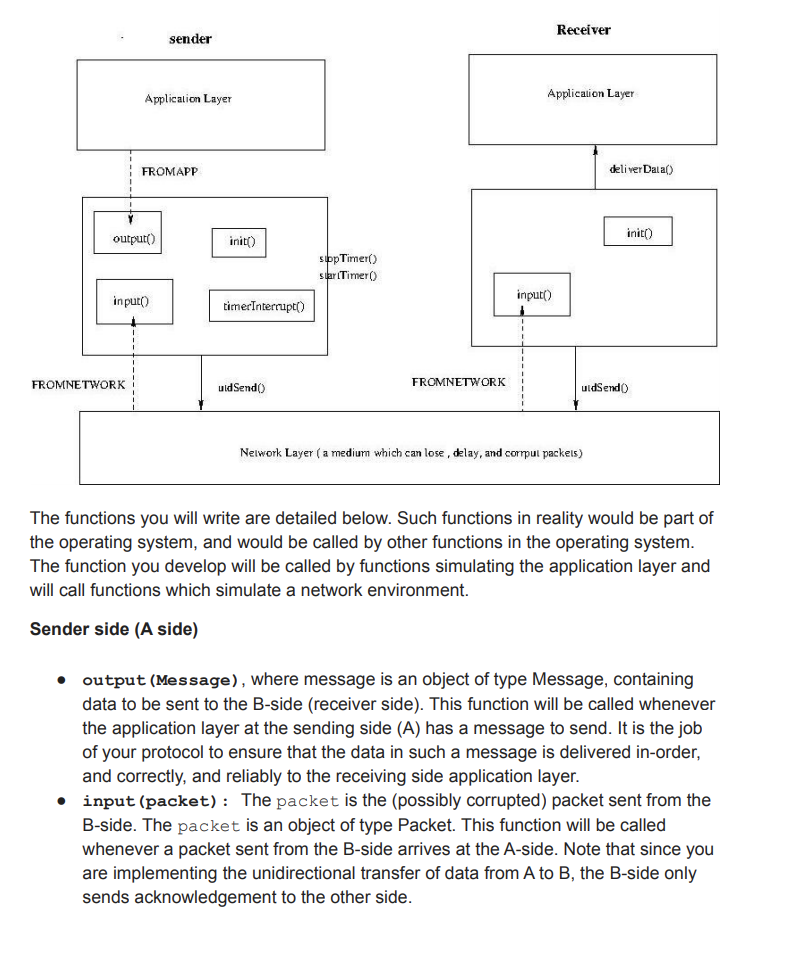
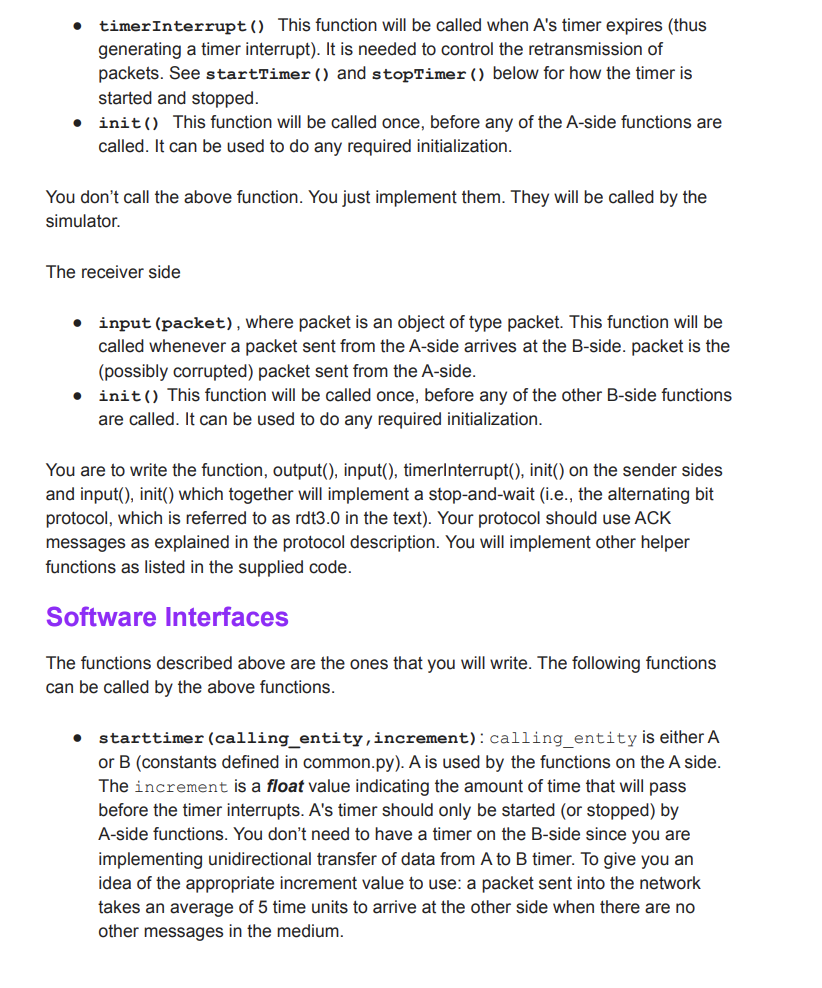
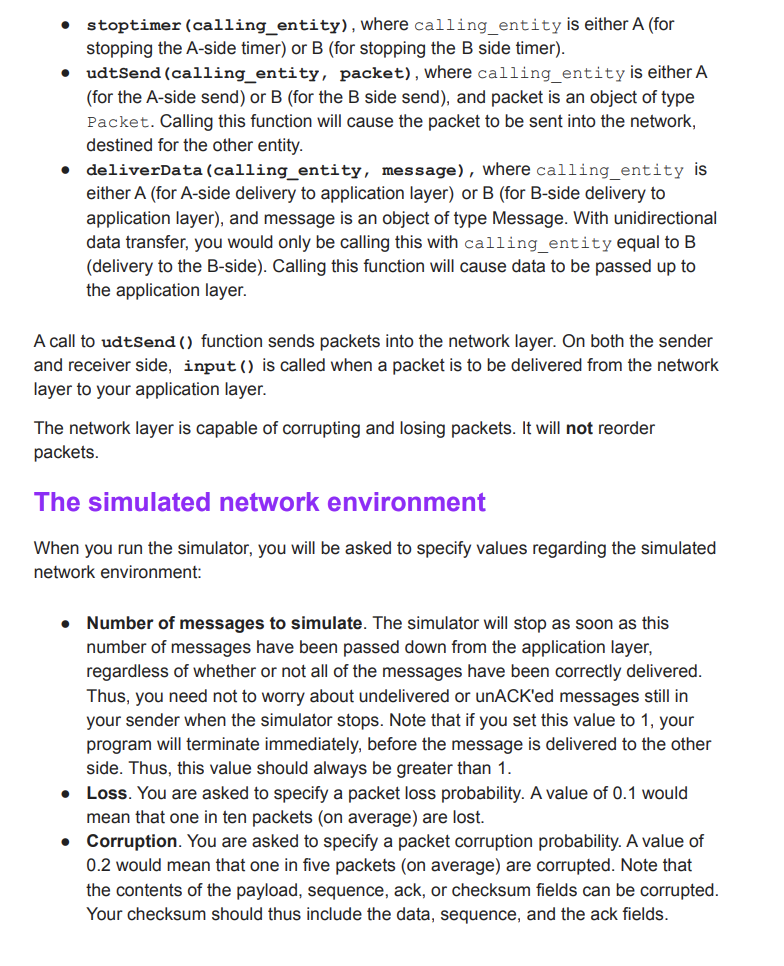
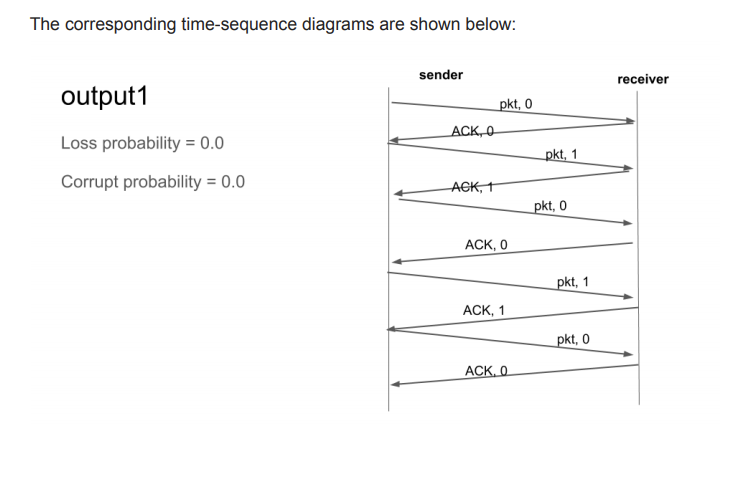
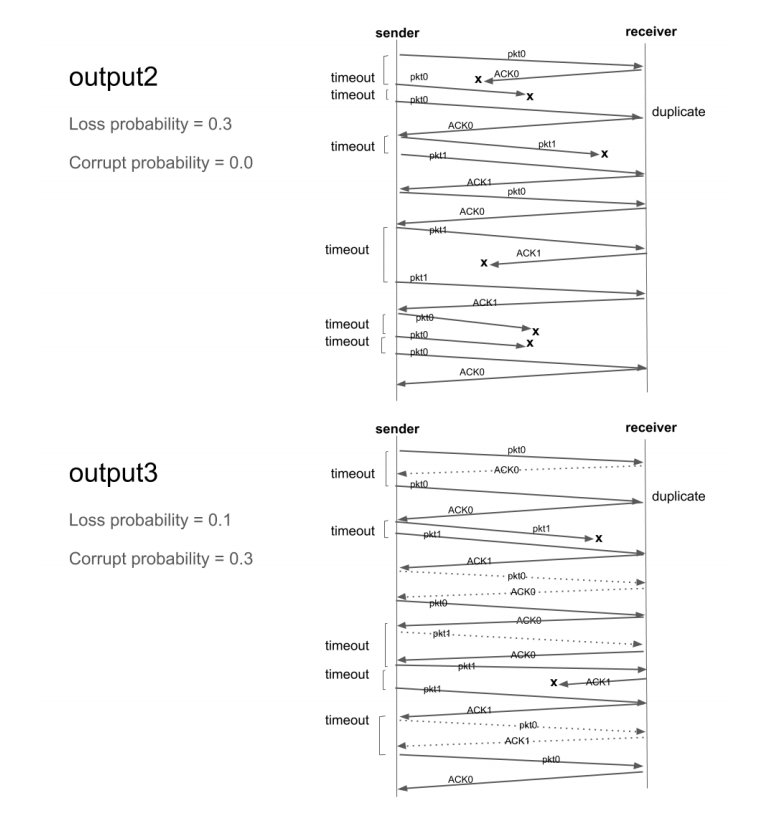
Objectives Implementing a reliable transport protocol Getting to see in practice how a reliable transport protocol such as TCP is working General Instructions: Make sure to use python 3.5 or higher. Download startSTP.zip. It contains the files you need for this assignment You should not change any other files. All the changes must be done within sender.py, receiver.py, or common.py. When you first run the code, you get the output that is shown below: > python main.py >Network Simulator >Enter number of messages to simulate (>0): 5 >Enter the packet loss probability (0.0 for no loss): 0 >Enter the packet corruption probability (0.0 for no corruption): 0 >Enter the average time between messages from the sender's application layer (> 0.0): 1000 Initializing Network Simulator Initializing sender: A: 12345 Initializing receiver: B: 67890 average = 0.5033190011370157 A: Sending the data aaaaaaaaaaaaaaaaaaaa A: Sending the data bbbbbbbbbbbbbbbbbbbb A: Sending the data cccc ccccccccc A: Sending the data ddddddd ddddddddddd A: Sending the data eeeeeeeeeeeeeeeeeeee do not schedule: the maximum number of messages is scheduled you will see that the simulator is generating a set of events (FROMAPP events as explained below). The number of events will be equal to the number of messages you passed to the simulator (5 in this case). It means that the application layer on the sender side is sending the message to its transport layer, but nothing more is there unless you implement the rest. Look at the sample outputs provided (output1, output2, output3) for how your output should look like after you develop the required. The function will be discussed later in this document. Your output should match exactly the given outputs. They are printed by the simulator. Make sure you do not have extra printing in your sender and receiver code when submitting. When developing and debugging your code, you need to put lots of print statements. Remember to comment them out or remove them before submitting. The functions you will develop In this programming assignment, you will be writing the sending and receiving side of a simple reliable data transfer protocol. It is named the Alternating-bit protocol / stop-and-wait protocol/ rdt3.0 in the textbook In a real system, the reliable transport protocol functionality is implemented inside the operating system. Since we don't have standalone machines (with an OS that you can modify), your code will have to execute in a simulated environment. The simulator provides the interface to the application layer (output and deliverData) and the interface provided by the network layer to the transport layer (udt_send, input). Your job is to write the code for the sending side (A) and the receiving side (B) of the transport protocol. You will implement them in sender.py and receiver.py. Only unidirectional transfer of data (from A to B) is required. Of course, the B side will have to send packets to A to acknowledge receipt of data. The overall structure of the simulated environment is shown in the following figure: Receiver sender Application Layer Application Layer FROMAPP deliver Dalal) Y output) init) init() slipp Timer) slar (Timer) input input() timer Interrupt() FROMNETWORK uid Sendo) FROMNETWORK uldSend Nelwork Layer ( a medium which can lose, delay, and corpul packels) The functions you will write are detailed below. Such functions in reality would be part of the operating system, and would be called by other functions in the operating system. The function you develop will be called by functions simulating the application layer and will call functions which simulate a network environment. Sender side (A side) output (Message), where message is an object of type Message, containing data to be sent to the B-side (receiver side). This function will be called whenever the application layer at the sending side (A) has a message to send. It is the job of your protocol to ensure that the data in such a message is delivered in order, and correctly, and reliably to the receiving side application layer. input (packet): The packet is the (possibly corrupted) packet sent from the B-side. The packet is an object of type Packet. This function will be called whenever a packet sent from the B-side arrives at the A-side. Note that since you are implementing the unidirectional transfer of data from A to B, the B-side only sends acknowledgement to the other side. . timerInterrupt() This function will be called when A's timer expires (thus generating a timer interrupt). It is needed to control the retransmission of packets. See startTimer() and stopTimer () below for how the timer is started and stopped. init(). This function will be called once, before any of the A-side functions are called. It can be used to do any required initialization. . You don't call the above function. You just implement them. They will be called by the simulator. The receiver side . input (packet), where packet is an object of type packet. This function will be called whenever a packet sent from the A-side arrives at the B-side. packet is the (possibly corrupted) packet sent from the A-side. init() This function will be called once, before any of the other B-side functions are called. It can be used to do any required initialization. . You are to write the function, output(), input(), timerinterrupt(), init() on the sender sides and input(), init() which together will implement a stop-and-wait (i.e., the alternating bit protocol, which is referred to as rdt3.0 in the text). Your protocol should use ACK messages as explained in the protocol description. You will implement other helper functions as listed in the supplied code. Software Interfaces The functions described above are the ones that you will write. The following functions can be called by the above functions. starttimer (calling_entity, increment): calling_entity is either A or B (constants defined in common.py). A is used by the functions on the A side. The increment is a float value indicating the amount of time that will pass before the timer interrupts. A's timer should only be started (or stopped) by A-side functions. You don't need to have a timer on the B-side since you are implementing unidirectional transfer of data from A to B timer. To give you an idea of the appropriate increment value to use: a packet sent into the network takes an average of 5 time units to arrive at the other side when there are no other messages in the medium. . stoptimer (calling_entity), where calling_entity is either A (for stopping the A-side timer) or B (for stopping the B side timer). udtSend (calling_entity, packet), where calling_entity is either A (for the A-side send) or B (for the B side send), and packet is an object of type Packet. Calling this function will cause the packet to be sent into the network, destined for the other entity. deliverData (calling_entity, message), where calling_entity is either A (for A-side delivery to application layer) or B (for B-side delivery to application layer), and message is an object of type Message. With unidirectional data transfer, you would only be calling this with calling_entity equal to B (delivery to the B-side). Calling this function will cause data to be passed up to the application layer. A call to udtsend() function sends packets into the network layer. On both the sender and receiver side, input() is called when a packet is to be delivered from the network layer to your application layer. The network layer is capable of corrupting and losing packets. It will not reorder packets. The simulated network environment When you run the simulator, you will be asked to specify values regarding the simulated network environment: Number of messages to simulate. The simulator will stop as soon as this number of messages have been passed down from the application layer, regardless of whether or not all of the messages have been correctly delivered. Thus, you need not to worry about undelivered unACK'ed messages still in your sender when the simulator stops. Note that if you set this value to 1, your program will terminate immediately, before the message is delivered to the other side. Thus, this value should always be greater than 1. Loss. You are asked to specify a packet loss probability. A value of 0.1 would mean that one in ten packets (on average) are lost. Corruption. You are asked to specify a packet corruption probability. A value of 0.2 would mean that one in five packets (on average) are corrupted. Note that the contents of the payload, sequence, ack, or checksum fields can be corrupted. Your checksum should thus include the data, sequence, and the ack fields. . Average time between messages from the sender's application layer. You can set this value to any non-zero, positive value. Note that the smaller the value you choose, the faster packets will be arriving to your sender. You should choose a very large value for the average time between messages from the sender's application layer, so that your sender is never called while it still has an outstanding, unacknowledged message it is trying to send to the receiver. I'd suggest you choose a value of 1000. You should also perform a check in your sender to make sure that when output() is called, there is no message currently in transit. If there is, you can simply ignore (drop) the data being passed to the output() function. Trace Setting a tracing value of 1 or 2 will print out useful information about what is going on inside the simulation (e.g., what's happening to packets and timers). A tracing value of 0 will turn this off. A tracing value greater than 2 will display all sorts of odd messages that are for the simulator. A tracing value of 2 may be helpful to you in debugging your code. You should keep in mind that implementers of real transport protocols do not have underlying networks that provide such nice information about what is going to happen to their packets! Sample outputs: In addition to the simulator code, two sample outputs are provided. The number of messages in each run that generated each output is 5. output1: loss probability=0.0, corruption probability=0.0 o shows a trace of protocol when the underlying layer is reliable (no loss or corruption, and tracing level is one. output2: loss probability=0.3, corruption probability=0.0 o shows a trace of protocol when the loss probability is 0.1, corruption probability is zero, and tracing level is one. output3: loss probability=0.1, corruption probability=0.3 o shows a trace of protocol when the loss probability is 0.1, corruption probability is zero, and tracing level is one. The corresponding time-sequence diagrams are shown below: receiver output1 sender pkt, o ACK,O Loss probability = 0.0 pkt, 1 Corrupt probability = 0.0 ACK, 1 pkt, o ACK, O pkt, 1 ACK, 1 pkt, o sender receiver pkto output2 pkto ACKO timeout timeout pkto duplicate Loss probability = 0.3 ACKO timeout [ pkt 1 pkli Corrupt probability = 0.0 ACK1 pkto ACKO timeout ACK1 pkt1 ACK1 timeout pkte akto X timeout [ akto ACKO sender receiver pkto output3 timeout -ACKO akto duplicate ACKO Loss probability = 0.1 timeout [ pkt1 pkt X Corrupt probability = 0.3 ACK1 pkto - phie AGKO pkt timeout timeout ACKO XAKT ACK1 timeout pkt. ACK1 pkt ACKO Objectives Implementing a reliable transport protocol Getting to see in practice how a reliable transport protocol such as TCP is working General Instructions: Make sure to use python 3.5 or higher. Download startSTP.zip. It contains the files you need for this assignment You should not change any other files. All the changes must be done within sender.py, receiver.py, or common.py. When you first run the code, you get the output that is shown below: > python main.py >Network Simulator >Enter number of messages to simulate (>0): 5 >Enter the packet loss probability (0.0 for no loss): 0 >Enter the packet corruption probability (0.0 for no corruption): 0 >Enter the average time between messages from the sender's application layer (> 0.0): 1000 Initializing Network Simulator Initializing sender: A: 12345 Initializing receiver: B: 67890 average = 0.5033190011370157 A: Sending the data aaaaaaaaaaaaaaaaaaaa A: Sending the data bbbbbbbbbbbbbbbbbbbb A: Sending the data cccc ccccccccc A: Sending the data ddddddd ddddddddddd A: Sending the data eeeeeeeeeeeeeeeeeeee do not schedule: the maximum number of messages is scheduled you will see that the simulator is generating a set of events (FROMAPP events as explained below). The number of events will be equal to the number of messages you passed to the simulator (5 in this case). It means that the application layer on the sender side is sending the message to its transport layer, but nothing more is there unless you implement the rest. Look at the sample outputs provided (output1, output2, output3) for how your output should look like after you develop the required. The function will be discussed later in this document. Your output should match exactly the given outputs. They are printed by the simulator. Make sure you do not have extra printing in your sender and receiver code when submitting. When developing and debugging your code, you need to put lots of print statements. Remember to comment them out or remove them before submitting. The functions you will develop In this programming assignment, you will be writing the sending and receiving side of a simple reliable data transfer protocol. It is named the Alternating-bit protocol / stop-and-wait protocol/ rdt3.0 in the textbook In a real system, the reliable transport protocol functionality is implemented inside the operating system. Since we don't have standalone machines (with an OS that you can modify), your code will have to execute in a simulated environment. The simulator provides the interface to the application layer (output and deliverData) and the interface provided by the network layer to the transport layer (udt_send, input). Your job is to write the code for the sending side (A) and the receiving side (B) of the transport protocol. You will implement them in sender.py and receiver.py. Only unidirectional transfer of data (from A to B) is required. Of course, the B side will have to send packets to A to acknowledge receipt of data. The overall structure of the simulated environment is shown in the following figure: Receiver sender Application Layer Application Layer FROMAPP deliver Dalal) Y output) init) init() slipp Timer) slar (Timer) input input() timer Interrupt() FROMNETWORK uid Sendo) FROMNETWORK uldSend Nelwork Layer ( a medium which can lose, delay, and corpul packels) The functions you will write are detailed below. Such functions in reality would be part of the operating system, and would be called by other functions in the operating system. The function you develop will be called by functions simulating the application layer and will call functions which simulate a network environment. Sender side (A side) output (Message), where message is an object of type Message, containing data to be sent to the B-side (receiver side). This function will be called whenever the application layer at the sending side (A) has a message to send. It is the job of your protocol to ensure that the data in such a message is delivered in order, and correctly, and reliably to the receiving side application layer. input (packet): The packet is the (possibly corrupted) packet sent from the B-side. The packet is an object of type Packet. This function will be called whenever a packet sent from the B-side arrives at the A-side. Note that since you are implementing the unidirectional transfer of data from A to B, the B-side only sends acknowledgement to the other side. . timerInterrupt() This function will be called when A's timer expires (thus generating a timer interrupt). It is needed to control the retransmission of packets. See startTimer() and stopTimer () below for how the timer is started and stopped. init(). This function will be called once, before any of the A-side functions are called. It can be used to do any required initialization. . You don't call the above function. You just implement them. They will be called by the simulator. The receiver side . input (packet), where packet is an object of type packet. This function will be called whenever a packet sent from the A-side arrives at the B-side. packet is the (possibly corrupted) packet sent from the A-side. init() This function will be called once, before any of the other B-side functions are called. It can be used to do any required initialization. . You are to write the function, output(), input(), timerinterrupt(), init() on the sender sides and input(), init() which together will implement a stop-and-wait (i.e., the alternating bit protocol, which is referred to as rdt3.0 in the text). Your protocol should use ACK messages as explained in the protocol description. You will implement other helper functions as listed in the supplied code. Software Interfaces The functions described above are the ones that you will write. The following functions can be called by the above functions. starttimer (calling_entity, increment): calling_entity is either A or B (constants defined in common.py). A is used by the functions on the A side. The increment is a float value indicating the amount of time that will pass before the timer interrupts. A's timer should only be started (or stopped) by A-side functions. You don't need to have a timer on the B-side since you are implementing unidirectional transfer of data from A to B timer. To give you an idea of the appropriate increment value to use: a packet sent into the network takes an average of 5 time units to arrive at the other side when there are no other messages in the medium. . stoptimer (calling_entity), where calling_entity is either A (for stopping the A-side timer) or B (for stopping the B side timer). udtSend (calling_entity, packet), where calling_entity is either A (for the A-side send) or B (for the B side send), and packet is an object of type Packet. Calling this function will cause the packet to be sent into the network, destined for the other entity. deliverData (calling_entity, message), where calling_entity is either A (for A-side delivery to application layer) or B (for B-side delivery to application layer), and message is an object of type Message. With unidirectional data transfer, you would only be calling this with calling_entity equal to B (delivery to the B-side). Calling this function will cause data to be passed up to the application layer. A call to udtsend() function sends packets into the network layer. On both the sender and receiver side, input() is called when a packet is to be delivered from the network layer to your application layer. The network layer is capable of corrupting and losing packets. It will not reorder packets. The simulated network environment When you run the simulator, you will be asked to specify values regarding the simulated network environment: Number of messages to simulate. The simulator will stop as soon as this number of messages have been passed down from the application layer, regardless of whether or not all of the messages have been correctly delivered. Thus, you need not to worry about undelivered unACK'ed messages still in your sender when the simulator stops. Note that if you set this value to 1, your program will terminate immediately, before the message is delivered to the other side. Thus, this value should always be greater than 1. Loss. You are asked to specify a packet loss probability. A value of 0.1 would mean that one in ten packets (on average) are lost. Corruption. You are asked to specify a packet corruption probability. A value of 0.2 would mean that one in five packets (on average) are corrupted. Note that the contents of the payload, sequence, ack, or checksum fields can be corrupted. Your checksum should thus include the data, sequence, and the ack fields. . Average time between messages from the sender's application layer. You can set this value to any non-zero, positive value. Note that the smaller the value you choose, the faster packets will be arriving to your sender. You should choose a very large value for the average time between messages from the sender's application layer, so that your sender is never called while it still has an outstanding, unacknowledged message it is trying to send to the receiver. I'd suggest you choose a value of 1000. You should also perform a check in your sender to make sure that when output() is called, there is no message currently in transit. If there is, you can simply ignore (drop) the data being passed to the output() function. Trace Setting a tracing value of 1 or 2 will print out useful information about what is going on inside the simulation (e.g., what's happening to packets and timers). A tracing value of 0 will turn this off. A tracing value greater than 2 will display all sorts of odd messages that are for the simulator. A tracing value of 2 may be helpful to you in debugging your code. You should keep in mind that implementers of real transport protocols do not have underlying networks that provide such nice information about what is going to happen to their packets! Sample outputs: In addition to the simulator code, two sample outputs are provided. The number of messages in each run that generated each output is 5. output1: loss probability=0.0, corruption probability=0.0 o shows a trace of protocol when the underlying layer is reliable (no loss or corruption, and tracing level is one. output2: loss probability=0.3, corruption probability=0.0 o shows a trace of protocol when the loss probability is 0.1, corruption probability is zero, and tracing level is one. output3: loss probability=0.1, corruption probability=0.3 o shows a trace of protocol when the loss probability is 0.1, corruption probability is zero, and tracing level is one. The corresponding time-sequence diagrams are shown below: receiver output1 sender pkt, o ACK,O Loss probability = 0.0 pkt, 1 Corrupt probability = 0.0 ACK, 1 pkt, o ACK, O pkt, 1 ACK, 1 pkt, o sender receiver pkto output2 pkto ACKO timeout timeout pkto duplicate Loss probability = 0.3 ACKO timeout [ pkt 1 pkli Corrupt probability = 0.0 ACK1 pkto ACKO timeout ACK1 pkt1 ACK1 timeout pkte akto X timeout [ akto ACKO sender receiver pkto output3 timeout -ACKO akto duplicate ACKO Loss probability = 0.1 timeout [ pkt1 pkt X Corrupt probability = 0.3 ACK1 pkto - phie AGKO pkt timeout timeout ACKO XAKT ACK1 timeout pkt. ACK1 pkt ACKO
Step by Step Solution
There are 3 Steps involved in it

Get step-by-step solutions from verified subject matter experts
 Study Help