







Question: Objectives Introduction to Assembly language commands Logic instructions and or xor not Logical Instructions and Set rax: 0xa0a0a0a0 rbx: 0xb0b0b0b And rax with rbx Print
Objectives
Introduction to Assembly language commands
Logic instructions and or xor not
Logical Instructions
and
Set rax: 0xa0a0a0a0
rbx: 0xb0b0b0b
And rax with rbx
Print the result
rax: 0xa0a0a0a0
rbx: 0xb0b0b0b0
And rax with rbx
Print the result
or
Set rax: 0xa0a0a0a0
rbx: 0xb0b0b0b
or rax with rbx
Print the result
rax: 0xa0a0a0a0
rbx: 0xb0b0b0b0
or rax with rbx
Print the result
xor
Set
rax: 0xa0a0a0a0
rbx: 0xb0b0b0b
xor rax with rbx
Print the result
rax: 0xa0a0a0a0
rbx: 0xb0b0b0b0
xor rax with rbx
Print the result
not
Set rax: 0xa0a0a0a0
rbx: 0xb0b0b0b
not rax
not rbx
Print the results
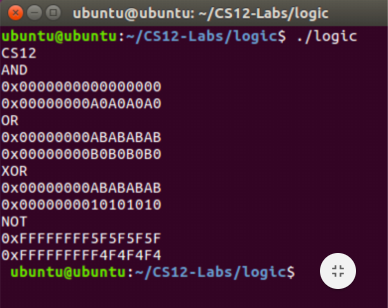
O ubuntu@ubuntu:-/CS12-Labs/logic ubuntu@ubuntu: /CS12-Labs/logic$ /logic CS12 AND 0x0000000000000000 6x00000000 OR 0x00000000ABABABAB XOR 0x00000000ABABABAB 0x0000000010101010 NOT OxFFFFFFFF5F5F5F5F OxFFFFFFFFF4F4F4F4 ubuntu@ubuntu:-/CS12-Labs/logics O ubuntu@ubuntu:-/CS12-Labs/logic ubuntu@ubuntu: /CS12-Labs/logic$ /logic CS12 AND 0x0000000000000000 6x00000000 OR 0x00000000ABABABAB XOR 0x00000000ABABABAB 0x0000000010101010 NOT OxFFFFFFFF5F5F5F5F OxFFFFFFFFF4F4F4F4 ubuntu@ubuntu:-/CS12-Labs/logics
Step by Step Solution
There are 3 Steps involved in it

Get step-by-step solutions from verified subject matter experts
 Study Help