Question: Objectives L Use IF, TODAY, NOW functions Create formulas using Relative Referencing, Absolute Referencing, and Mixed Referencing Perform What-If Analysis Inserting Rows and Columns Reinforce
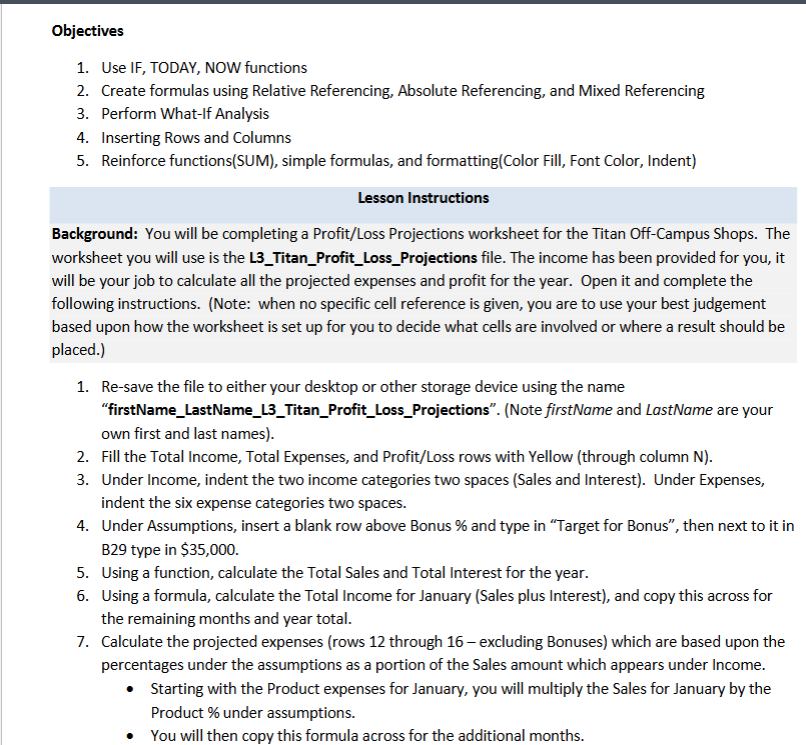
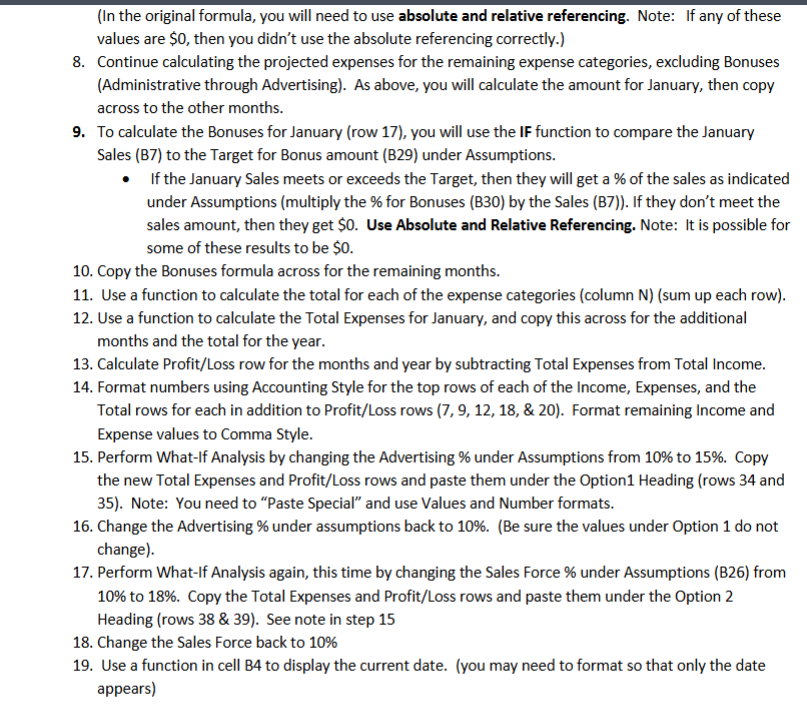
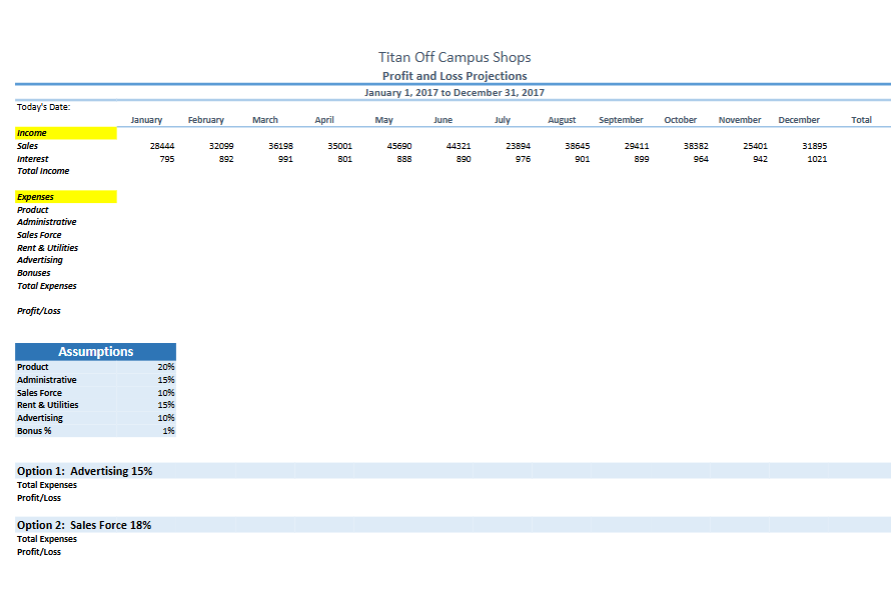
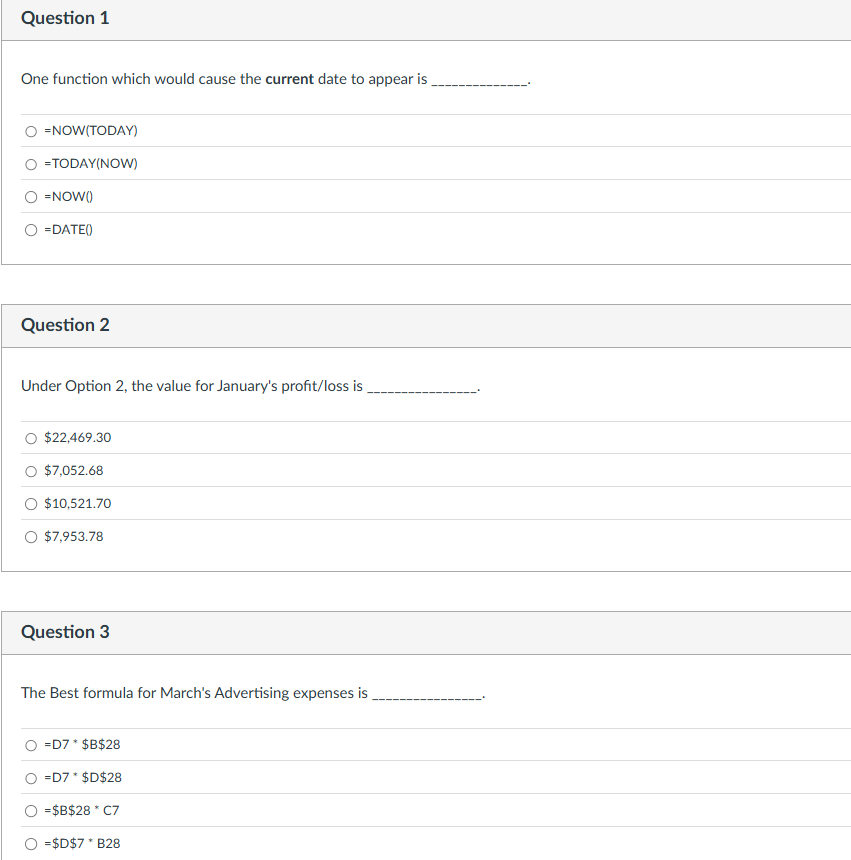
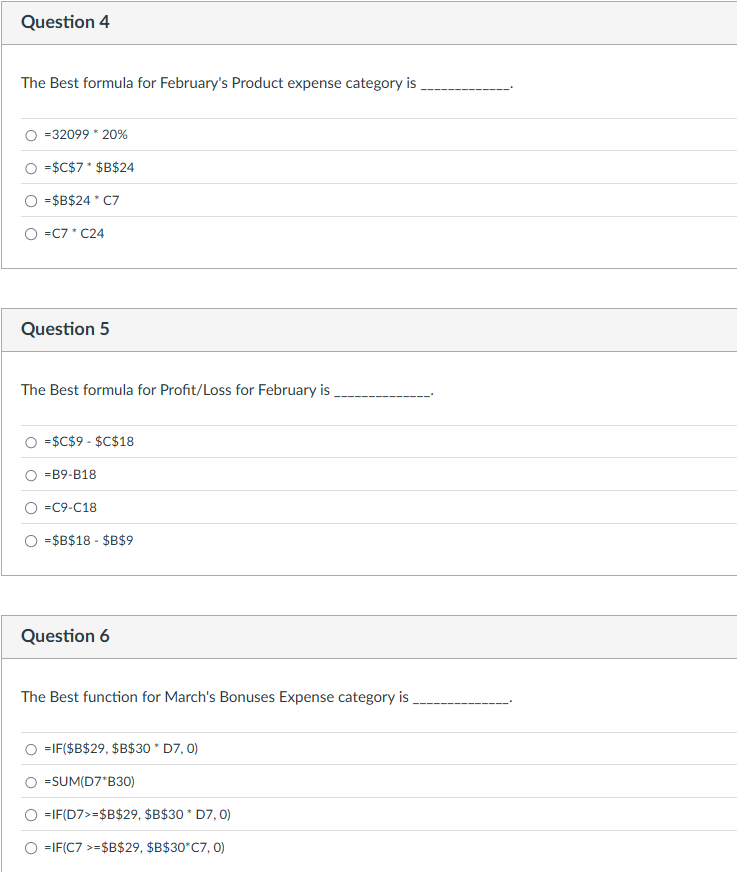
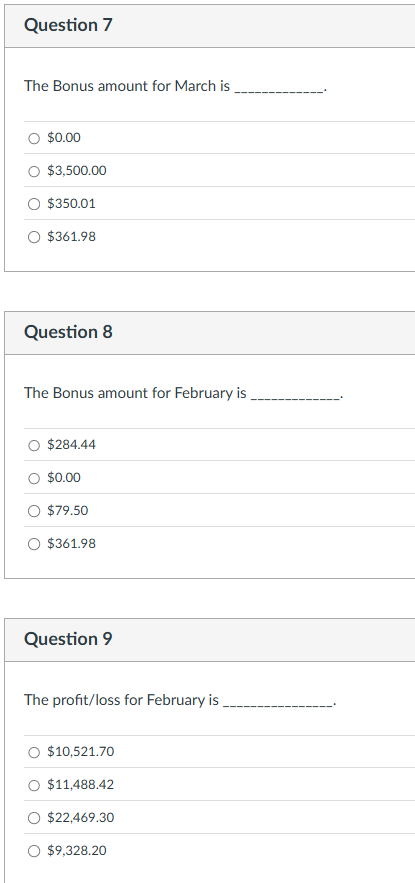
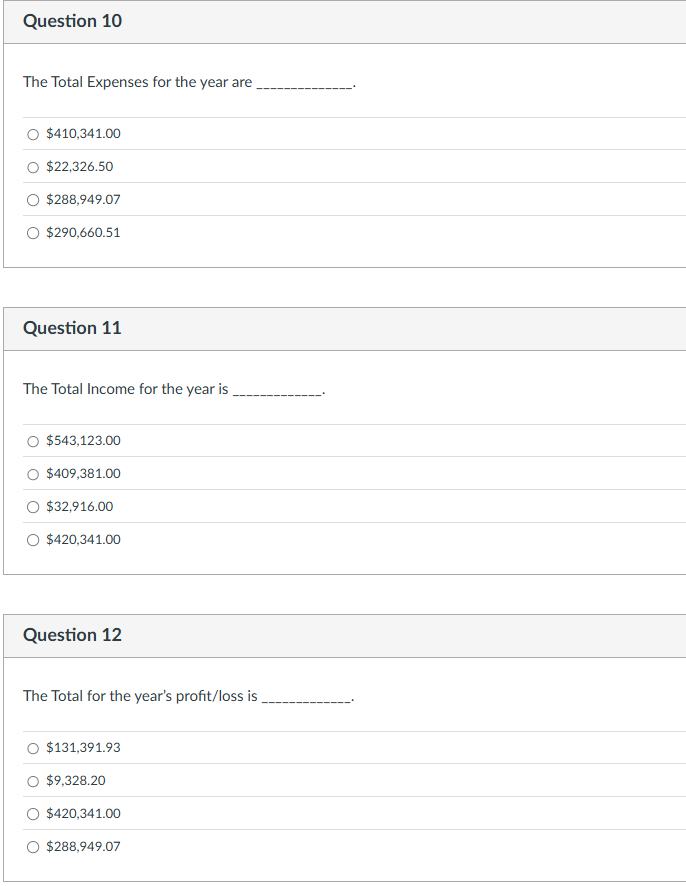
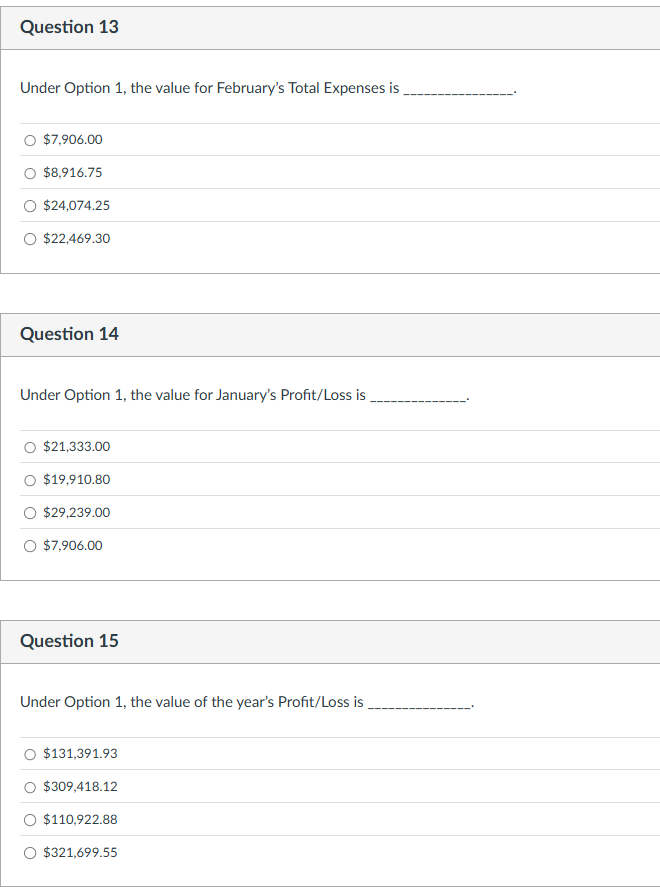
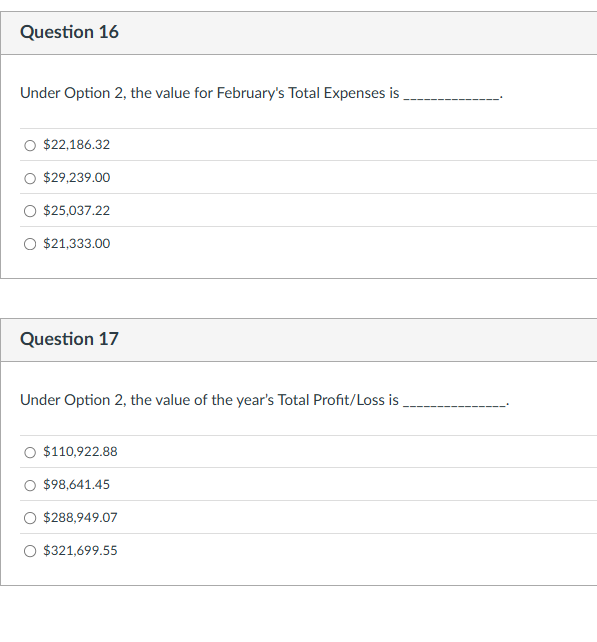
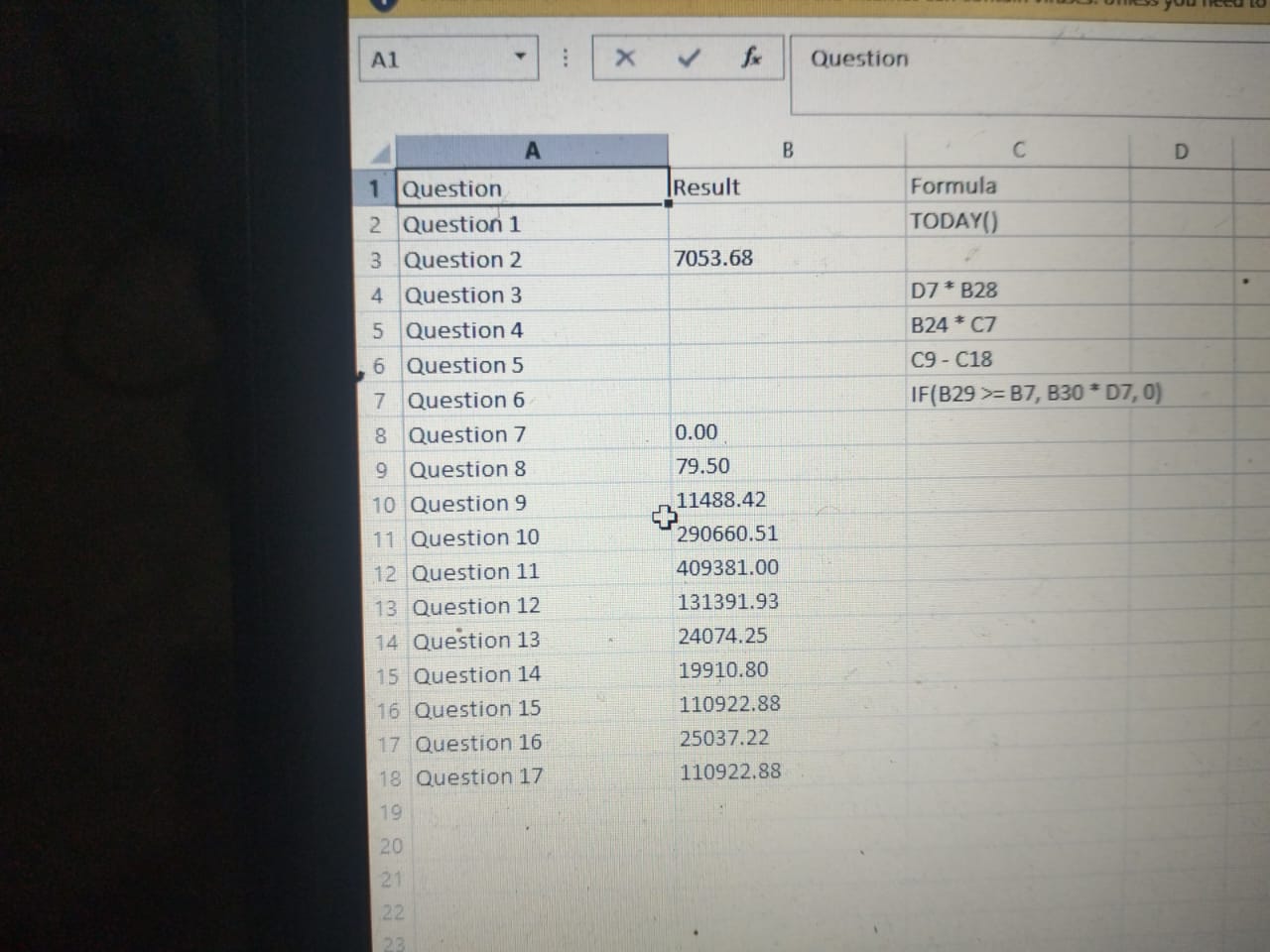
Objectives L Use IF, TODAY, NOW functions Create formulas using Relative Referencing, Absolute Referencing, and Mixed Referencing Perform What-If Analysis Inserting Rows and Columns Reinforce functions(SUM), simple formulas, and formatting(Color Fill, Font Color, Indent) Lesson Instructions Background: You will be completing a Profit/Loss Projections worksheet for the Titan Off-Campus Shops. The worksheet you will use is the L3_Titan_Profit_Loss_Projections file. The income has been provided for you, it will be your job to calculate all the projected expenses and profit for the year. Open it and complete the following instructions. (Note: when no specific cell reference is given, you are to use your best judgement based upon how the worksheet is set up for you to decide what cells are involved or where a result should be placed.) 1. Re-save the file to either your desktop or other storage device using the name \"firstName_LastName_L3_Titan_Profit_Loss_Projections\". (Note firstName and LastName are your own first and last names). Fill the Total Income, Total Expenses, and Profit/Loss rows with Yellow (through column NJ). Under Income, indent the two income categories two spaces (Sales and Interest). Under Expenses, indent the six expense categories two spaces. Under Assumptions, insert a blank row above Bonus % and type in \"Target for Bonus\{In the original formula, you will need to use absolute and relative referencing. Note: If any of these values are 50, then you didn't use the absolute referencing correctly.) 8. Continue calculating the projected expenses for the remaining expense categories, excluding Bonuses {Administrative through Advertising). As above, you will calculate the amount for January, then copy across to the other months. 9. To calculate the Bonuses for January (row 17), you will use the IF function to compare the January Sales (B7) to the Target for Bonus amount (B29) under Assumptions. e |f the January Sales meets or exceeds the Target, then they will get a % of the sales as indicated under Assumptions (multiply the % for Bonuses (B30) by the Sales (B7)). If they don't meet the sales amount, then they get 50. Use Absolute and Relative Referencing. Note: It is possible for some of these results to be 50. 10. Copy the Bonuses formula across for the remaining months. 11. Use a function to calculate the total for each of the expense categories (column N) (sum up each row). 12. Use a function to calculate the Total Expenses for January, and copy this across for the additional months and the total for the year. 13, Calculate Profit/Loss row for the months and year by subtracting Total Expenses from Total Income. 14. Format numbers using Accounting Style for the top rows of each of the Income, Expenses, and the Total rows for each in addition to Profit/Loss rows (7, 9, 12, 18, & 20). Format remaining Income and Expense values to Comma Style. 15. Perform What-If Analysis by changing the Advertising % under Assumptions from 10% to 15%. Copy the new Total Expenses and Profit/Loss rows and paste them under the Option1 Heading (rows 34 and 35). Note: You need to \"Paste Special\" and use Values and Number formats. 16. Change the Advertising % under assumptions back to 10%. (Be sure the values under Option 1 do not change). 17. Perform What-If Analysis again, this time by changing the Sales Force % under Assumptions (B26) from 10% to 18%. Copy the Total Expenses and Profit/Loss rows and paste them under the Option 2 Heading (rows 38 & 39). See note in step 15 18. Change the Sales Force back to 10% 19. Use a function in cell B4 to display the current date. (you may need to format so that only the date appears) Titan Off Campus Shops Profit and Loss Projections January 1, 2017 to December 31, 2017 Today's Date: March April May June July August September October November December Total January February Income 38382 25401 31895 Sales 28444 32099 36198 35001 45690 44321 23894 38645 29411 991 801 838 890 976 901 899 964 942 1021 Interest 795 892 Total Income Expenses Product Administrative Sales Force Rent & Utilities Advertising Bonuses Total Expenses Profit/Loss Assumptions Product 209 Administrative 15% sales Force 10% Rent & Utilities 15% Advertising 10% Bonus 96 19% Option 1: Advertising 15% Total Expenses Profit/Loss Option 2: Sales Force 18% Total Expenses Profit/LossQuestion 1 One function which would cause the current date to appearis __ O =NOW(TODAY) O =TODAY[NOW) O =NOw(] (O =DATE() Question 2 Under Option 2, the value for January's profit/loss is O $22,469.30 O $7.052.68 O $10,521.70 0 $7.953.78 Question 3 The Best formula for March's Advertising expenses is O =D7* 5B5%28 O =D7 " $D%28 O =$B%28 * C7 (O =3D%7 " B28 Question 4 The Best formula for February's Product expense category is O =32099 * 20% O =$C$7 *$B$24 O =$B$24 * C7 O =C7 *C24 Question 5 The Best formula for Profit/Loss for February is O =$C$9 - $C$18 O =89-B18 O =C9-C18 O =$B$18 - $8$9 Question 6 The Best function for March's Bonuses Expense category is O =IF($8$29, $8$30 * D7, 0) O =SUM(D7*B30) O =IF(D7>=$8$29, $8$30 * D7, 0) O =IF(C7 >=$B$29, $8$30*C7, 0)Question 7 The Bonus amount for March is O $0.00 O $3,500.00 O $350.01 ) $361.98 Question 8 The Bonus amount for February is O $284.44 O $0.00 O $79.50 ) $361.98 Question 9 The profit/loss for February is O $10,521.70 O $11,488.42 ) $22,469.30 O $9,328.20 Question 10 The Total Expenses for the year are O $410,341.00 O $22,326.50 O $288,949.07 O $290,660.51 Question 11 The Total Income for the year is O $543,123.00 O $409,381.00 O $32,916.00 O $420,341.00 Question 12 The Total for the year's profit/loss is O $131,391.93 O $9,328.20 O $420,341.00 O $288,949.07Question 13 Under Option 1, the value for February's Total Expenses is ___ O $7.906.00 O $8,916.75 O $24,074.25 O $22,469.30 Question 14 Under Option 1, the value for January's Profit/Loss is O $21,333.00 O $19,910.80 ) $29,239.00 O $7.906.00 Question 15 Under Option 1, the value of the year's Profit/Loss is O $131.391.93 O $309,418.12 O $110922.88 O $321,699.55 Question 16 Under Option 2, the value for February's Total Expenses is O $22,186.32 O $29,239.00 O $25,037.22 O $21,333.00 Question 17 Under Option 2, the value of the year's Total Profit/Loss is O $110922.88 O $98,641.45 ) $288.949.07 O $321,699.55 A1 X V fx Question A B C D 1 Question Result Formula 2 Question 1 TODAY() 3 Question 2 7053.68 4 Question 3 D7 * B28 5 Question 4 B24 * C7 6 Question 5 C9 - C18 7 Question 6 IF(B29 >= B7, B30 * D7, 0) 8 Question 7 0.00 9 Question 8 79.50 10 Question 9 + 11488.42 11 Question 10 290660.51 12 Question 11 409381.00 13 Question 12 131391.93 14 Question 13 24074.25 15 Question 14 19910.80 16 Question 15 110922.88 17 Question 16 25037.22 18 Question 17 110922.88 19 20 21 22
Step by Step Solution
There are 3 Steps involved in it
1 Expert Approved Answer
Step: 1 Unlock
Question Has Been Solved by an Expert!
Get step-by-step solutions from verified subject matter experts
Step: 2 Unlock
Step: 3 Unlock
Students Have Also Explored These Related Accounting Questions!









 Study Help