







Question: Object-Oriented Programming Java. Any help please? **Hint - Use the Java Util Scanner class shown below to implement a User Prompt import java.util.Scanner; // import
Object-Oriented Programming Java. Any help please?
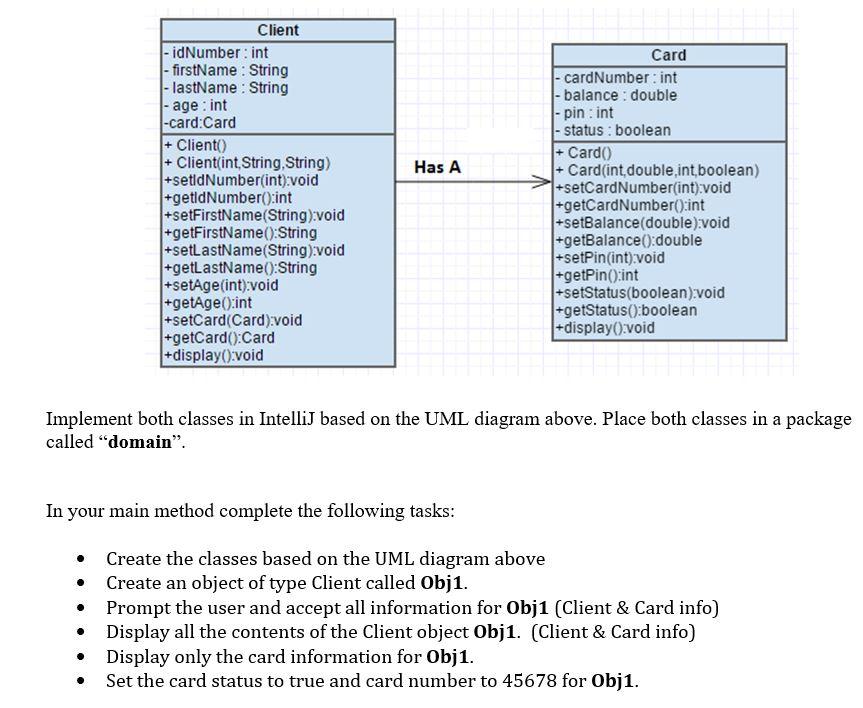
**Hint - Use the Java Util Scanner class shown below to implement a User Prompt
import java.util.Scanner; // import the Scanner class
class MyClass {
public static void main(String[] args) {
Scanner myObj = new Scanner(System.in);
String userName;
// Enter username and press Enter
System.out.println("Enter username");
userName = myObj.nextLine();
System.out.println("Username is: " + userName);
}
}
Has A Client - idNumber: int - firstName : String |- lastName: String - age : int -card:Card + Cliento) + Client(int, String, String) +setidNumber(int):void +getidNumber():int +setFirstName(String):void +getFirstName():String +setLastName(String):void +getLastName():String +setAge(int):void +getAge():int +setCard(Card):void +getCard():Card +display():void Card - cardNumber: int - balance : double - pin : int - status: boolean + Card) + Card(int double,int, boolean) +setCardNumber(int):void +getCardNumber():int +setBalance(double):void l+getBalance():double +setPin(int):void +getPin():int |+setStatus(boolean):void +getStatus():boolean +display():void Implement both classes in IntelliJ based on the UML diagram above. Place both classes in a package called "domain". In your main method complete the following tasks: . . Create the classes based on the UML diagram above Create an object of type Client called Obj1. Prompt the user and accept all information for Obj1 (Client & Card info) Display all the contents of the Client object Obj1. (Client & Card info) Display only the card information for Obj1. Set the card status to true and card number to 45678 for Obj1
Step by Step Solution
There are 3 Steps involved in it

Get step-by-step solutions from verified subject matter experts
 Study Help