







Question: ocation with Terminal-Digit Numbering Method Records Management Chapter 9 Supplementary Activity shelf sectiona 01 62 09 Primary (Shelf Na.) Comparing Consecutive, Middle-Digit, and Terminal-Digit Arrangements
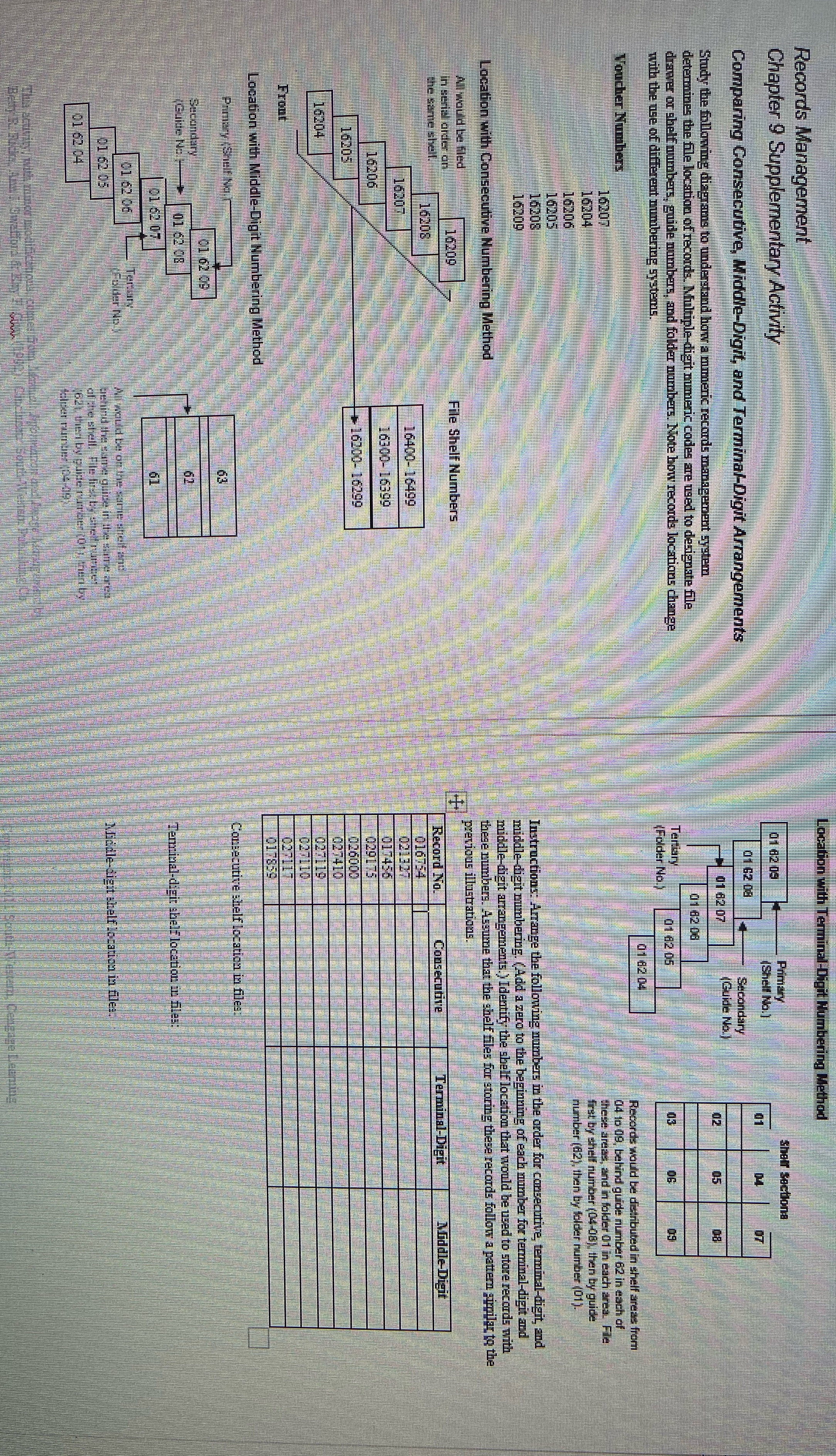
ocation with Terminal-Digit Numbering Method Records Management Chapter 9 Supplementary Activity shelf sectiona 01 62 09 Primary (Shelf Na.) Comparing Consecutive, Middle-Digit, and Terminal-Digit Arrangements 01 62 08 Secondary 01 62 07 Guide No. Study the following diagrams to understand how a mmmeric records management system 02 determines the file location of records. Multiple-digit numeric codes are used to designate file Q1 62 08 drawer or shelf numbers. ers, guide numbers, and folder numbers. Note how records locations change Tertiary with the use of different numbering systemis. Folder No.) 01 62 05 01 82 04 Voucher Numbers Records would be distributed in shelf areas from 04 10 09, behind guide number 62 in each of 16207 these areas, and in folder 01 in each area. File 16204 first by shelf number (04-08), then by guide 16206 number (62), then by felder number (01). 16205 16208 Instructions: Arrange the following numbers in the order for consecutive, terminal-digit, and 16209 middle-digit numbering. (Add a zero to the beginning of each number for terminal-digit and le-digit arrangements.) Identify the shelf location that would be used to store records with Location with Consecutive Numbering Method these numbers. Assume that the shelf files for storing these records follow a pattern similar to the All would be filed previous illustrations. In serial ardor 16209 7 File Shelf Numbers the same shell Record No. | Consecutive Terminal-Digit fiddle-Digit 16205 016754 16207 16400-16499 021327 16300-16390 01 456 16206 029175 16205 026000 027410 16204 0271 19 0271 10 0271 17 017859 Numbering Method Consecutive shelf location in files. 63 andary 101 62 09 01 2 08 Terminal-digit shelf location m 61 1 62 06 61 62 05 files ofpie shell. File Del by 01 62 4
Step by Step Solution
There are 3 Steps involved in it

Get step-by-step solutions from verified subject matter experts
 Study Help