







Question: odl) Could you please write the instructions step by step to do this problem? Retrieve the subpage lo web server: 172.16.219.10), Telnet to this web
odl) Could you please write the instructions step by step to do this problem?
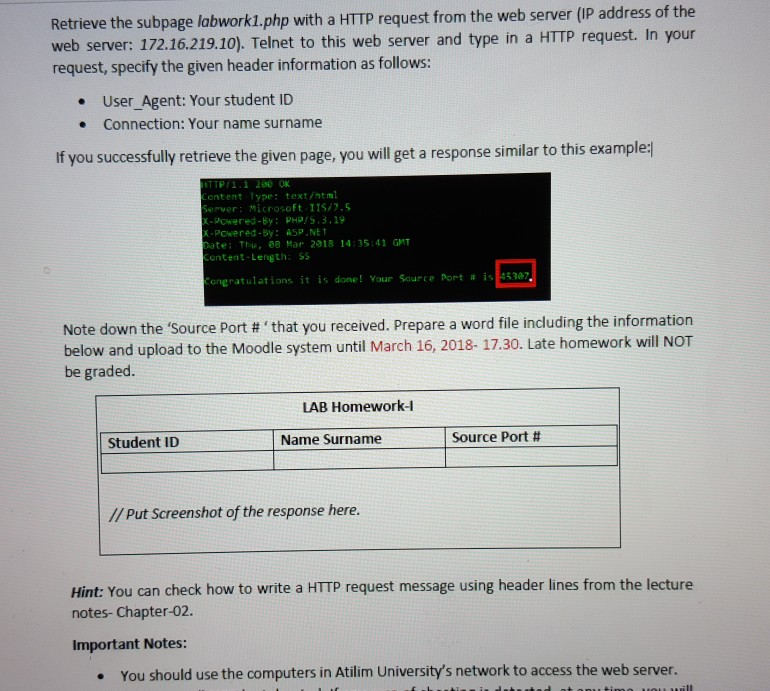
Retrieve the subpage lo web server: 172.16.219.10), Telnet to this web server and type in a HTTP request. In your request, specify the given header information as follows: bwork1.php with a HTTP request from the web server (IP address of the . User_Agent: Your student ID . Connection: Your name surname If you successfully retrieve the given page, you will get a response similar to this example: entent Type: text/html erver : Microsoft ITS7.5 Powered-By: PHP5,3.19 POwered-By: ASP.NE ate: Thu 88 Mar 2918 14:35:41 GMT ent nt-Length: SS 45387 ongratulations it is done! Your Source Port # Note down the 'Source Port # that you received, prepare a word file including the information below and upload to the Moodle system until March 16, 2018- 17.30. Late homework will NOT be graded. LAB Homework-l Student ID Name Surname Source Port # // Put Screenshot of the response here. Hint: You can check how to write a HTTP request message using header lines from the lecture notes-Chapter-02. Important Notes: You should use the computers in Atilim University's network to access the web server. . Retrieve the subpage lo web server: 172.16.219.10), Telnet to this web server and type in a HTTP request. In your request, specify the given header information as follows: bwork1.php with a HTTP request from the web server (IP address of the . User_Agent: Your student ID . Connection: Your name surname If you successfully retrieve the given page, you will get a response similar to this example: entent Type: text/html erver : Microsoft ITS7.5 Powered-By: PHP5,3.19 POwered-By: ASP.NE ate: Thu 88 Mar 2918 14:35:41 GMT ent nt-Length: SS 45387 ongratulations it is done! Your Source Port # Note down the 'Source Port # that you received, prepare a word file including the information below and upload to the Moodle system until March 16, 2018- 17.30. Late homework will NOT be graded. LAB Homework-l Student ID Name Surname Source Port # // Put Screenshot of the response here. Hint: You can check how to write a HTTP request message using header lines from the lecture notes-Chapter-02. Important Notes: You should use the computers in Atilim University's network to access the web server
Step by Step Solution
There are 3 Steps involved in it

Get step-by-step solutions from verified subject matter experts
 Study Help