







Question: Office Hours Emulation. 1: Write A Program to Finish Below Requirement You are to write code to help synchronize a professor and his/her students during
Office Hours Emulation.
1: Write A Program to Finish Below Requirement
You are to write code to help synchronize a professor and his/her students during office hours. The professor, of course, wants to take a nap if no students are around to ask questions; if there are students who want to ask questions, they must synchronize with each other and with the professor so that
(i) No more than a certain number of students can be in the office at the same time because the office has limited capacity.
(ii) Only one person is speaking at a time.
(iii) Each student question is answered by the professor.
(iv) No student asks another question before the professor is done answering the previous one.
(v) Once a student finishes asking all his/her questions, he/she must leave the office to make room for other students waiting outside the professors office.
You are to provide the following functions:
Professor(). This functions starts a thread that runs a loop calling AnswerStart() and AnswerDone(). See below for the specification of these two functions. AnswerStart() blocks when there are no students around.
Student(int id). This function creates a thread that represents a new student with identifier id that asks the professor one or more questions (the identifier given to your function can be expected to be greater or equal to zero and the first student's id is zero).
First, each student needs to enter the professors office by calling EnterOffice(). If the office is already full, the student must wait. After a student enters the office, he/she loops running the code QuestionStart() and QuestionDone() for the number of questions that he/she wants to ask. The number of questions is determined by calculating ( student identifier modulo 4 plus 1 ). That is, each student can ask between 1 and 4 questions, depending on the id. For example, a student with id 2 asks 3 questions, a student with id 11 asks 4 questions and a student with id 4 asks a single question. Once the student has got the answer for all his/her questions, he/she must call LeaveOffice(). As a result, another student waiting on EnterOffice() may be able to proceed.
AnswerStart (). The professor starts to answer a question of a student. Print ...
Professor starts to answer question for student x.
AnswerDone (). The professor is done answering a question of a student. Print ...
Professor is done with answer for student x.
EnterOffice (). It is the students turn to enter the professors office to ask questions. Print
Student x enters the office.
LeaveOffice (). The student has no more questions to ask, so he/she leaves the
professors office. Print
Student x leaves the office.
QuestionStart (). It is the turn of the student to ask his/her next question. Print ...
Student x asks a question.
(Wait to print out the message until it is really that student's turn. )
QuestionDone (). The student is satisfied with the answer to his most recent question. Print ...
Student x is satisfied.
Since the professor considers it rude for a student not to wait for an answer, QuestionDone() should not print anything until the professor has finished answering the question. A student can ask only one question each time. i.e., a student should not expect to ask all his/her questions in a contiguous batch. In other words, once a student gets the answer to one of his/her questions, he/she may have to wait for the next turn if another student starts to ask a question before he/she does.
In the above list, x is a placeholder for the student identifier.
Your program must accept one command line parameter that represents the total number of students coming to the professors office, and a second command line parameter that represents the capacity of the professors office (i.e., how many students can be in the office at the same time). For simplicity, you can assume that the Student threads are created at the ascending order of their identifiers.
Your program must validate the command line parameters to make sure that they are numeric values.
Your program must be able to run properly with any reasonable number of students (e.g., 200) and room capacity (e.g., 8, 20, 50).
Your program must show randomness of events. For example, groups of students entering office at various points in the simulation.
Your program must reach a completion state and terminate gracefully. A proper message should be output to indicate end of simulation,
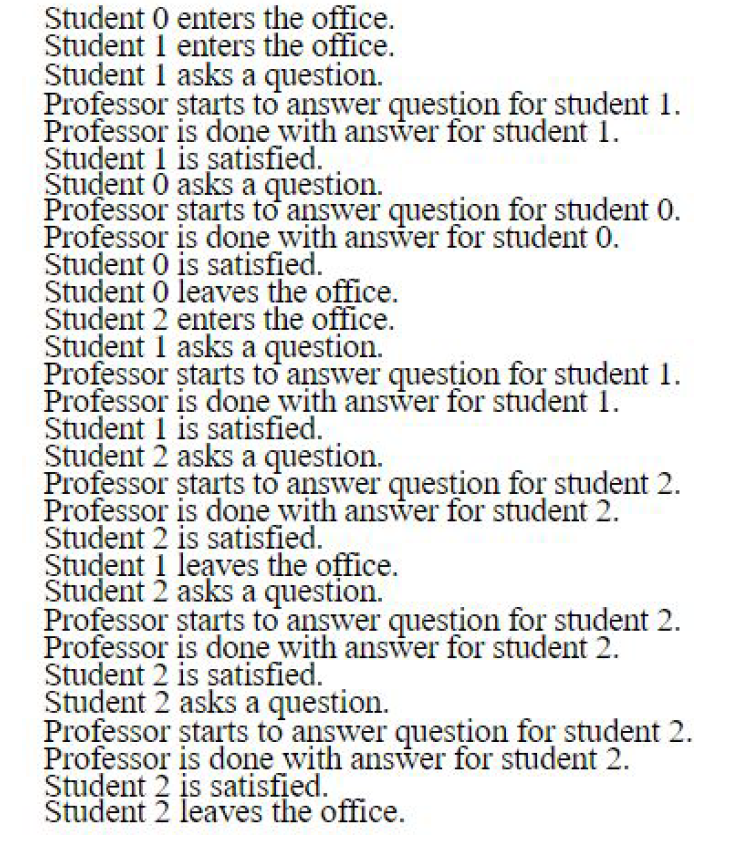
One acceptable output of your program is (assuming 3 students and a room capacity of 2):
2: Use an LKM (loadable kernel module) To Get Process Information
In this step, you will write an LKM for the Linux kernel that displays the following details for the Step 1 s process. You need to know how to install, remove and test the LKM. You also need to find the related build in system files which are related to process and thread. Then use them to get the process information.
The information includes:
(i) Process Name
(ii) Process ID
(iii) Parent Process ID
(iv) Number of Threads
Your source code, which you need to strictly follow the instructions listed below:
Student O enters the office. Student 1 enters the office. Student 1 asks a question. Professor starts to answer question for student 1. Professor is done with answer for student 1. Student 1 is satisfied. Student O asks a question. Professor starts to answer question for student 0. Professor is done with answer for student 0. Student O is satisfied. Student O leaves the office. Student 2 enters the office. Student 1 asks a question. Professor starts to answer question for student 1. Professor is done with answer for student 1. Student 1 is satisfied. Student 2 asks a question. Professor starts to answer question for student 2. Professor is done with answer for student 2. Student 2 is satisfied. Student 1 leaves the office. Student 2 asks a question. Professor starts to answer question for student 2. Professor is done with answer for student 2. Student 2 is satisfied. Student 2 asks a question. Professor starts to answer question for student 2. Professor is done with answer for student 2. Student 2 is satisfied. Student 2 leaves the office. Student O enters the office. Student 1 enters the office. Student 1 asks a question. Professor starts to answer question for student 1. Professor is done with answer for student 1. Student 1 is satisfied. Student O asks a question. Professor starts to answer question for student 0. Professor is done with answer for student 0. Student O is satisfied. Student O leaves the office. Student 2 enters the office. Student 1 asks a question. Professor starts to answer question for student 1. Professor is done with answer for student 1. Student 1 is satisfied. Student 2 asks a question. Professor starts to answer question for student 2. Professor is done with answer for student 2. Student 2 is satisfied. Student 1 leaves the office. Student 2 asks a question. Professor starts to answer question for student 2. Professor is done with answer for student 2. Student 2 is satisfied. Student 2 asks a question. Professor starts to answer question for student 2. Professor is done with answer for student 2. Student 2 is satisfied. Student 2 leaves the office
Step by Step Solution
There are 3 Steps involved in it

Get step-by-step solutions from verified subject matter experts
 Study Help