







Question: Oil changes are now divided into two types: Crankcase oil and transmission oil. In th Activity shown in Figure A, the user has selected two
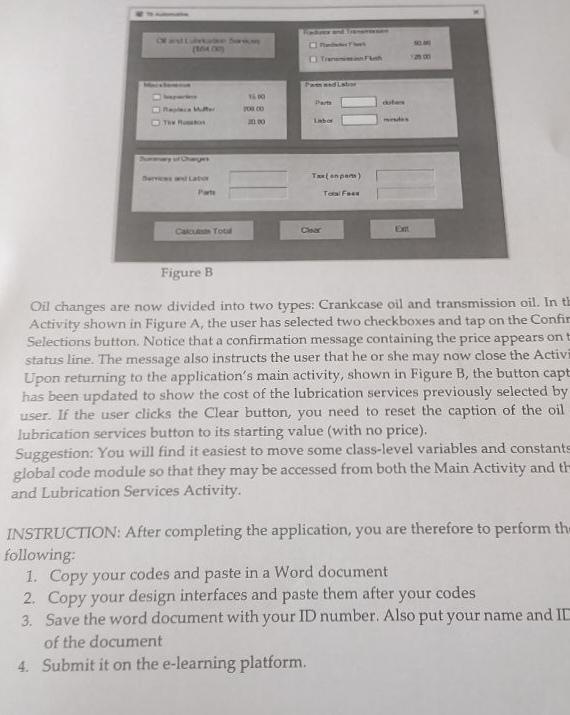
Oil changes are now divided into two types: Crankcase oil and transmission oil. In th Activity shown in Figure A, the user has selected two checkboxes and tap on the Confir Selections button. Notice that a confirmation message containing the price appears on t status line. The message also instructs the user that he or she may now close the Activi Upon returning to the application's main activity, shown in Figure B, the button capt has been updated to show the cost of the lubrication services previously selected by user. If the user clicks the Clear button, you need to reset the caption of the oil lubrication services button to its starting value (with no price). Suggestion: You will find it easiest to move some class-level variables and constants global code module so that they may be accessed from both the Main Activity and th and Lubrication Services Activity. INSTRUCTION: After completing the application, you are therefore to perform th following: 1. Copy your codes and paste in a Word document 2. Copy your design interfaces and paste them after your codes 3. Save the word document with your ID number. Also put your name and II of the document 4. Submit it on the e-learning platform. Oil changes are now divided into two types: Crankcase oil and transmission oil. In th Activity shown in Figure A, the user has selected two checkboxes and tap on the Confir Selections button. Notice that a confirmation message containing the price appears on t status line. The message also instructs the user that he or she may now close the Activi Upon returning to the application's main activity, shown in Figure B, the button capt has been updated to show the cost of the lubrication services previously selected by user. If the user clicks the Clear button, you need to reset the caption of the oil lubrication services button to its starting value (with no price). Suggestion: You will find it easiest to move some class-level variables and constants global code module so that they may be accessed from both the Main Activity and th and Lubrication Services Activity. INSTRUCTION: After completing the application, you are therefore to perform th following: 1. Copy your codes and paste in a Word document 2. Copy your design interfaces and paste them after your codes 3. Save the word document with your ID number. Also put your name and II of the document 4. Submit it on the e-learning platform
Step by Step Solution
There are 3 Steps involved in it

Get step-by-step solutions from verified subject matter experts
 Study Help