







Question: Okay I'm writing a Java program using Scene Builder, JavaFX and FXML. Im running into a problem being able to implement the tic tac toe
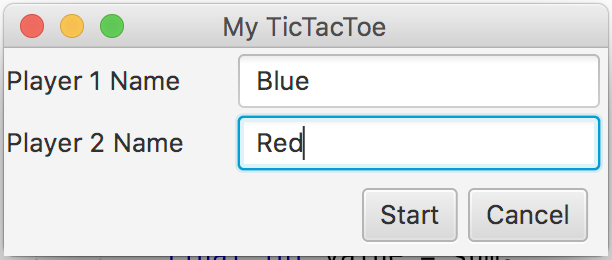
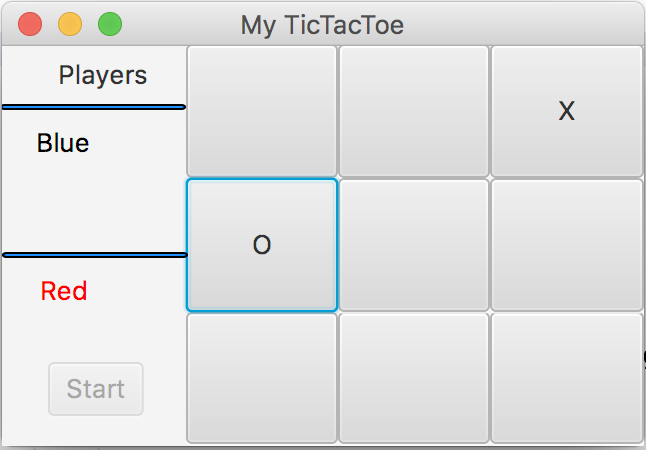
Okay I'm writing a Java program using Scene Builder, JavaFX and FXML. Im running into a problem being able to implement the tic tac toe portion on my second scene (GameController.java and Game.fxml). Here are some pictures of what Im trying to build:
1st scene
2nd scene (this is the scene Im having issues with)
Here is my code so far. I need to use two controllers and two FXMLsfor the assignment (required):
TTT.java
package ttt;
import javafx.application.Application; import javafx.fxml.FXMLLoader; import javafx.scene.Parent; import javafx.scene.Scene; import javafx.stage.Stage;
public class TTT extends Application { @Override public void start(Stage stage) throws Exception { Parent root = FXMLLoader.load(getClass().getResource("FXMLDocument.fxml")); Scene scene = new Scene(root); stage.setTitle("My TicTacToe"); stage.setScene(scene); stage.show(); }
public static void main(String[] args) { launch(args); } }
FXMLDocumentController.java
package ttt;
import java.io.IOException; import java.net.URL; import java.util.ResourceBundle; import java.util.logging.Level; import java.util.logging.Logger; import javafx.event.ActionEvent; import javafx.fxml.FXML; import javafx.fxml.FXMLLoader; import javafx.fxml.Initializable; import javafx.scene.Parent; import javafx.scene.Scene; import javafx.scene.control.Button; import javafx.scene.control.Label; import javafx.scene.control.TextField; import javafx.stage.Stage;
public class FXMLDocumentController implements Initializable { @FXML private TextField player1Name; @FXML private TextField player2Name; @FXML private Button closeButton; @FXML private Label warningLabel; @FXML private Button startButton; @FXML private void closeButtonAction() { Stage stage = (Stage) closeButton.getScene().getWindow(); stage.close(); } // Handles when start button is clicked @FXML private void handleButtonAction(ActionEvent event) { // If text field is filled out incorrectly then disable button if (player1Name.getText().trim().isEmpty() || player2Name.getText().trim().isEmpty()) { // Issue warning warningLabel.setText("WARNING: Enter player names."); startButton.setDisable(true); } else { // Get string values for passing to next scene String player1 = player1Name.getText(); String player2 = player2Name.getText(); FXMLLoader Loader = new FXMLLoader(); Loader.setLocation(getClass().getResource("Game.fxml")); try { Loader.load(); } catch (IOException ex) { Logger.getLogger(FXMLDocumentController.class.getName()).log(Level.SEVERE, null, ex); } GameController display = Loader.getController(); display.setPlayerName(player1, player2); Parent p = Loader.getRoot(); Stage stage = new Stage(); stage.setScene(new Scene(p)); // Display new stage name stage.setTitle("My TicTacToe"); stage.show(); } } @Override public void initialize(URL url, ResourceBundle rb) { // TODO } }
GameController.java
(for my second scene the actual game)
import java.net.URL; import java.util.ResourceBundle; import javafx.fxml.FXML; import javafx.fxml.Initializable; import javafx.scene.control.Label;
public class GameController implements Initializable {
@FXML private Label player1Name; @FXML private Label player2Name; @Override public void initialize(URL url, ResourceBundle rb) { // TODO } public void setPlayerName(String player1Name, String player2Name) { this.player1Name.setText(player1Name); this.player2Name.setText(player2Name); } }
FXMLDocument.fxml
Game.fxml
My TicTacToe Player 1 Name Blue Player 2 Name Red Start Cancel
Step by Step Solution
There are 3 Steps involved in it

Get step-by-step solutions from verified subject matter experts
 Study Help