Question: on access IDS 200 Fall 2020 Assignment 2 Due Friday 10/9/2020 60 points Instructions Deadline In order to receive full credit, this assignment must be
 on access
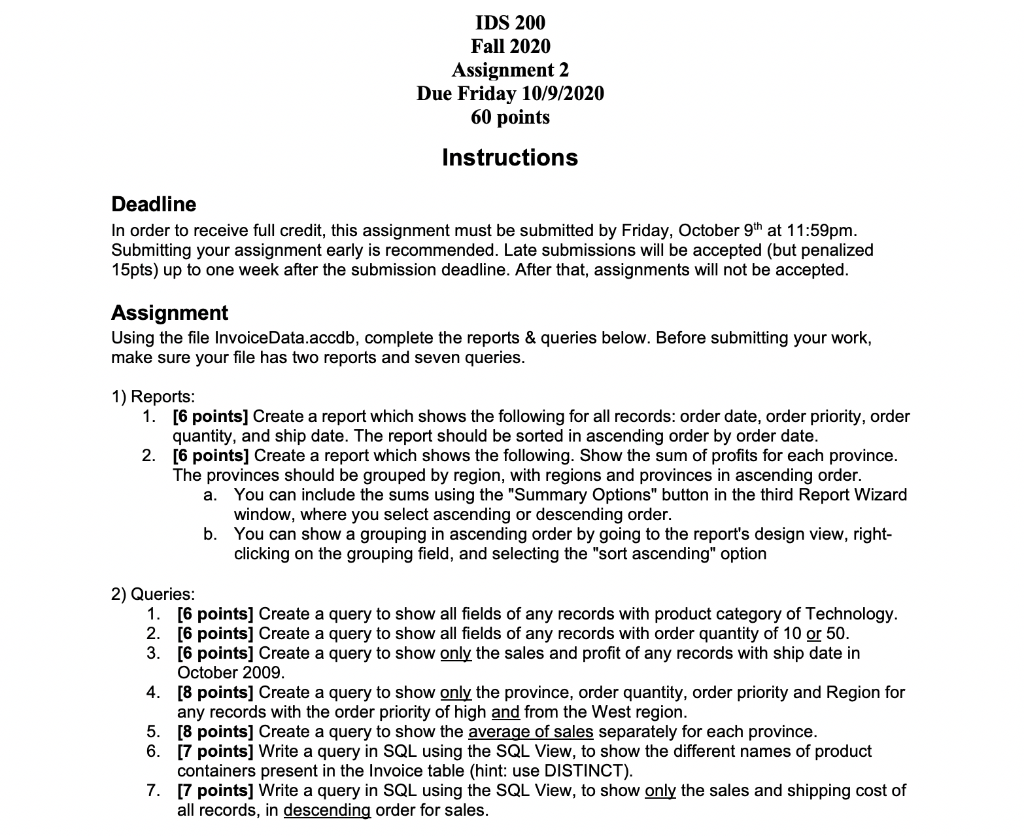
IDS 200 Fall 2020 Assignment 2 Due Friday 10/9/2020 60 points Instructions Deadline In order to receive full credit, this assignment must be submitted by Friday, October 9th at 11:59pm. Submitting your assignment early is recommended. Late submissions will be accepted (but penalized 15pts) up to one week after the submission deadline. After that, assignments will not be accepted. Assignment Using the file InvoiceData.accdb, complete the reports & queries below. Before submitting your work, make sure your file has two reports and seven queries. 1) Reports: 1. [6 points] Create a report which shows the following for all records: order date, order priority, order quantity, and ship date. The report should be sorted in ascending order by order date. 2. [6 points] Create a report which shows the following. Show the sum of profits for each province. The provinces should be grouped by region, with regions and provinces in ascending order. a. You can include the sums using the "Summary Options" button in the third Report Wizard window, where you select ascending or descending order. b. You can show a grouping in ascending order by going to the report's design view, right- clicking on the grouping field, and selecting the "sort ascending" option 2) Queries: 1. [6 points] Create a query to show all fields of any records with product category of Technology. 2. [6 points] Create a query to show all fields of any records with order quantity of 10 or 50. 3. [6 pointsj Create a query to show only the sales and profit of any records with ship date in October 2009 4. [8 points] Create a query to show only the province, order quantity, order priority and Region for any records with the order priority of high and from the West region. 5. [8 points] Create a query to show the average of sales separately for each province. 6. [7 points] Write a query in SQL using the SQL View, to show the different names of product containers present in the Invoice table (hint: use DISTINCT). 7. [7 points] Write a query in SQL using the SQL View, to show only the sales and shipping cost of all records, in descending order for sales. IDS 200 Fall 2020 Assignment 2 Due Friday 10/9/2020 60 points Instructions Deadline In order to receive full credit, this assignment must be submitted by Friday, October 9th at 11:59pm. Submitting your assignment early is recommended. Late submissions will be accepted (but penalized 15pts) up to one week after the submission deadline. After that, assignments will not be accepted. Assignment Using the file InvoiceData.accdb, complete the reports & queries below. Before submitting your work, make sure your file has two reports and seven queries. 1) Reports: 1. [6 points] Create a report which shows the following for all records: order date, order priority, order quantity, and ship date. The report should be sorted in ascending order by order date. 2. [6 points] Create a report which shows the following. Show the sum of profits for each province. The provinces should be grouped by region, with regions and provinces in ascending order. a. You can include the sums using the "Summary Options" button in the third Report Wizard window, where you select ascending or descending order. b. You can show a grouping in ascending order by going to the report's design view, right- clicking on the grouping field, and selecting the "sort ascending" option 2) Queries: 1. [6 points] Create a query to show all fields of any records with product category of Technology. 2. [6 points] Create a query to show all fields of any records with order quantity of 10 or 50. 3. [6 pointsj Create a query to show only the sales and profit of any records with ship date in October 2009 4. [8 points] Create a query to show only the province, order quantity, order priority and Region for any records with the order priority of high and from the West region. 5. [8 points] Create a query to show the average of sales separately for each province. 6. [7 points] Write a query in SQL using the SQL View, to show the different names of product containers present in the Invoice table (hint: use DISTINCT). 7. [7 points] Write a query in SQL using the SQL View, to show only the sales and shipping cost of all records, in descending order for sales









 Study Help