







Question: ON SQL DEVELOPER 1) List the plan number, count of the lines in the plan, and the sum of the resource cost for event plans
ON SQL DEVELOPER
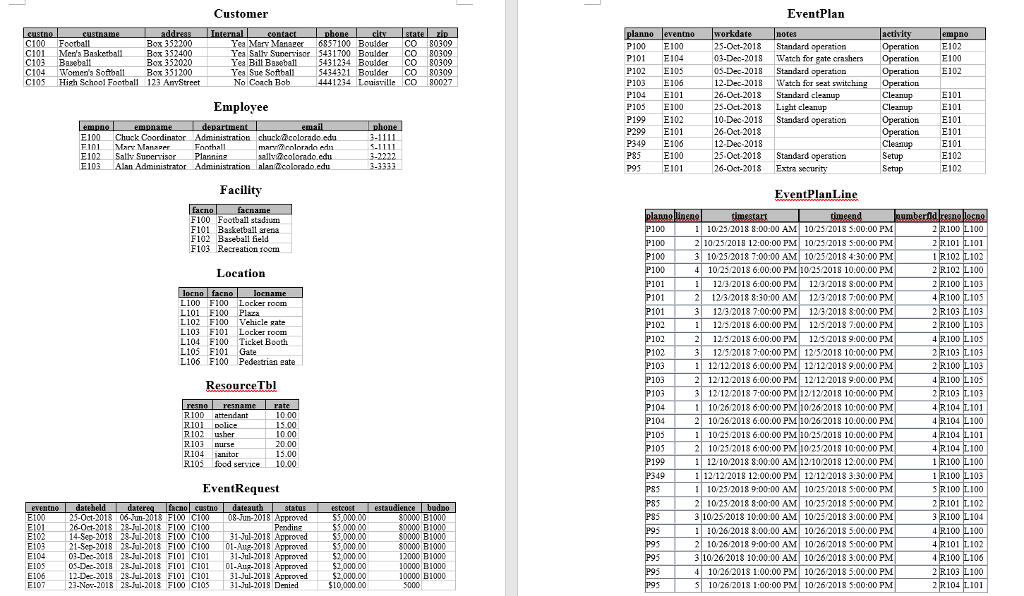
1)List the plan number, count of the lines in the plan, and the sum of the resource cost for event plans at the Basketball arena with a work date in December 2018. You should only include event plans with at least one event plan line. The resource cost is the number of hours times the number of resources times the rate of the resource. In Oracle, the number of hours can be computed as (TimeEnd TimeStart) * 24. You should use the entire expression inside the SUM function. Your query must not use the facility number (F101) of the basketball arena. Pretend that the user knows only the facility name, not the facility number. Thus, the WHERE clause should not have a condition involving the facility number compared to a constant (F101).
2)List the event number, date requested, date authorized, plan number, work date, and name of the supervising employee of events meeting the following conditions: (1) the date requested and date authorized are in July 2018, (2) the event request has Approved status, and (3) there is at least one event plan. Include a row in the result even if there is no supervising employee for the event plan.
3)List event plan details (event plan number, work date, activity, employee number, employee name, and employee department) along with the count of event plan lines, and count of unique resources used in associated event plan lines. Use meaningful names for computed columns. Include an event plan in the result even if the event plan does not have a supervising employee. Only include event plans with a work date in December 2018. Only include event plans using more than one unique resource. Order the result by event plan number.
4)Write SQL INSERT and UPDATE statements as specified. The first three INSERT statements are identical from modification problems in assignment 2 basic.
Insert a new row into the Facility table with facility name Swimming Pool.
Insert a new row in the Location table related to the Facility row in modification problem 1. The new row should have Gate for the location name.
Insert a new row in the Location table related to the Facility row in modification problem 1. The new row should have Locker Room for the location name.
Change the location name for all locations of the swimming pool facility. The new location name should be Door. You must not use the facility number of the swimming pool in your UPDATE statement. You also cannot reference specific location numbers in your UPDATE statement.
Delete the swimming pool facility and all related locations. When deleting the locations, you must not use the facility number of the swimming pool in your DELETE statement. Pretend that the user knows only the facility name, not the facility number. You also cannot reference specific location numbers in your DELETE statement. (Hint: when deleting a parent and related rows in a child table, the RESTRICT option requires deletion of the child rows before the related parent row.)
5)List the plan number, activity, and work date of plans meeting following conditions: (1) the work date occurs in the December 2018 and (2) the plan uses all resources with a rate greater than 15. For example, if there are five resources with a rate > 15, a plan must use all five resources.
Customer EventPlan C101 Men's Baakeball Box 352400 C103 Baseball C104 Women's Softoall Box 351200 Yea Mar Manaer 6857100 BoulderCO 80309 Yea Salty Suoerrisor 5431700 Boulder CO 80309 5431234 Boulder CO 80309 P101 E104 03-Dec-2018 Watch for sate crashers Operation E100 Ye Bill Baseb 4321 BoulderCO 80309 12-Dec-2018 Watch for seat E101 10-Dec 2018 Standard cperation 26-Oct 2018 12-Dec-2018 25-Oct-2018 Standard operation operationCleanup kucolorado eda CleanupE102 E101 Marr NManaper Foothall Saliy Suoerrisor Plannins PS E101 sallvcolorado.cdu E103Alan Administr Facility ventPlanLine F100 Football stadiun 100 100 100 100 1 10/25/2018 8:00:00 AM 1023 2013 5:00:00 PM 2 1025/2018 12:00:00 PM 1023/201S 5:00:00 PM 3 10252018 7:00:00 AM 10 25/2018 4:30:00 PM 4 10/25/2018 6:00:00 PM10252018 10:00:00 PM 1 113/2013 6:00:00 PM 113 201S 8:00:00 FM 2123 2018 8:30:00 AM 1232018 7:00:00 PM 3 123/2018 7:00:00 PM 1232013 8:00:00 PM 1 113/2018 6:00:00 PM 11/2018 :00:00 PM 211/3/2013 6:00:00 PM 123/2013 9:00:00 PM 3125/2018 7:00:00 PM 125/2018 10:00:00 PM 1 12/12/2018 6:00:00 PM 12122013 9.00.00 PM 212/122018 6:00:00 PM 12 12/2013 9:00:00 PM 312 12/2018 7:00:00 PM 12/12/2018 10:00:00 PM 1026/2018 6:00:00 PM 10/26/2018 10:00:00 PM 2 1026/2018 6:00:00 PM 10262018 10:00:00 PM 1 1023/2013 6:00:00 PM 10232018 10:00:00 PM 210/25/2018 6:00:00 PM1025/2018 10:00:00 PM 1 12/10 2018 8:00.00 AM 12102018 12:00:00 PM 1 12/122018 12.00:00 PM 1212/2018 3:30:00 PM 11025,2018 9:0000 AM 1023/2018 5:00:00 PM 2 1025,2018 8:00:00 AM 1023/2018 5:00:00 PM 310252018 10.00:00 AM 10252013 3.00:00 PM 1 1026/2018 8.:00:00 AM 1026/2018 5:00:00 PM 2 10 262018 9:00 00 AM 1026 2018 5:00:00 PM 310262013 10:00:00 AM 10262018 3:00:00 PM 10/26/2018 1:00.00 PM 10262018 5.00:00 PM 10 262013 1:00:00 PM 1026 2018 5:00:00 PM F102 Baseball ield 101 L100 F100 Locker room 101 103 L 102 F100 Vehicle gate L103 F101 Locker room L104 F100 Ticket Booth 102 103 L106 F100 Pedestrian eate 103 103 104 R101 R103 urs R104 anitor 20.00 05 focd service 10.00 Eve ntRequ 25-0ct-2018 06-m-2013 F100 C100 08-Jun-2018 Approred 26-0t-2018 28-ul-2018 F100 C100 14-Sep-2018 28-Jul-2018 F100 C100 0000 B1000 1-Jul-2018 Approre E103 21-Sep-2018 28-Jal-2018 F100 CI00 01-Aug-2018 Approred 03-Dec-2018 28-Jal-2018 F101 CI01 31-ul-2018 Approred S5, $5,000.00 %2,000.00 12000 B1000 10000 B1000 0000 B1000 El0S 03-Dec-2018 28-Jul-2018 Fl01 C01-Au-2018 Approred $2,000.00 12-Dec-2018 28-Jul-2013 F101 C101 31Jul-2018 Approred 23-Nor-201S 28-Jul-2018 F100 CIO5 31-Jul-2018 Denied
Step by Step Solution
There are 3 Steps involved in it

Get step-by-step solutions from verified subject matter experts
 Study Help