







Question: On the next page you will find a flowchart. Create a new VBA procedure (Sub) that implements this algorithm. The new Sub can be placed
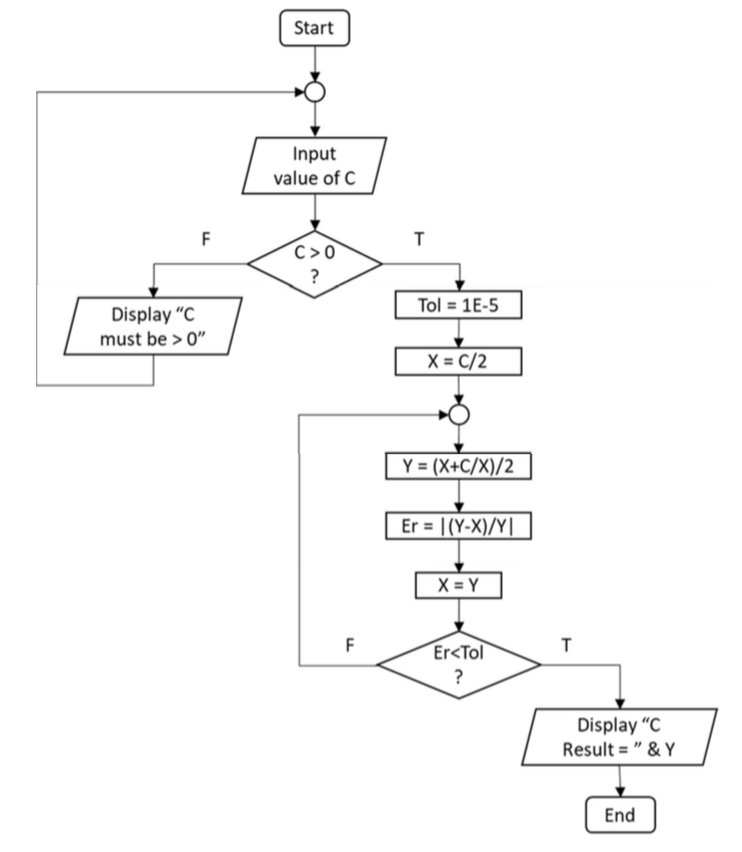
On the next page you will find a flowchart. Create a new VBA procedure (Sub) that implements this algorithm. The new Sub can be placed in the same module (below the previous code) as you used for part 1 or you can choose to create a new module. For the input of the C value, use an InputBox function. For display of the result, use a MsgBox function. You may want to first write out your VBA code on a separate sheet of paper. Make certain to start with the Option Explicit statement. This algorithm has two loop structures. Make sure you use the correct VBA loop statements for these structures. Make reference to the previous pages if you need to. You should have two Do... Loops d two If...Then statements Start Input value of C C>0 Tol = 1E-5 Display "C must be >0" Er = 11Y-X)/YI Er
Step by Step Solution
There are 3 Steps involved in it

Get step-by-step solutions from verified subject matter experts
 Study Help