Question: On the Transactions worksheet, in cell 110, replace the static value by entering a VLOOKUP function to fetrieve the Item's price from the Product_List table
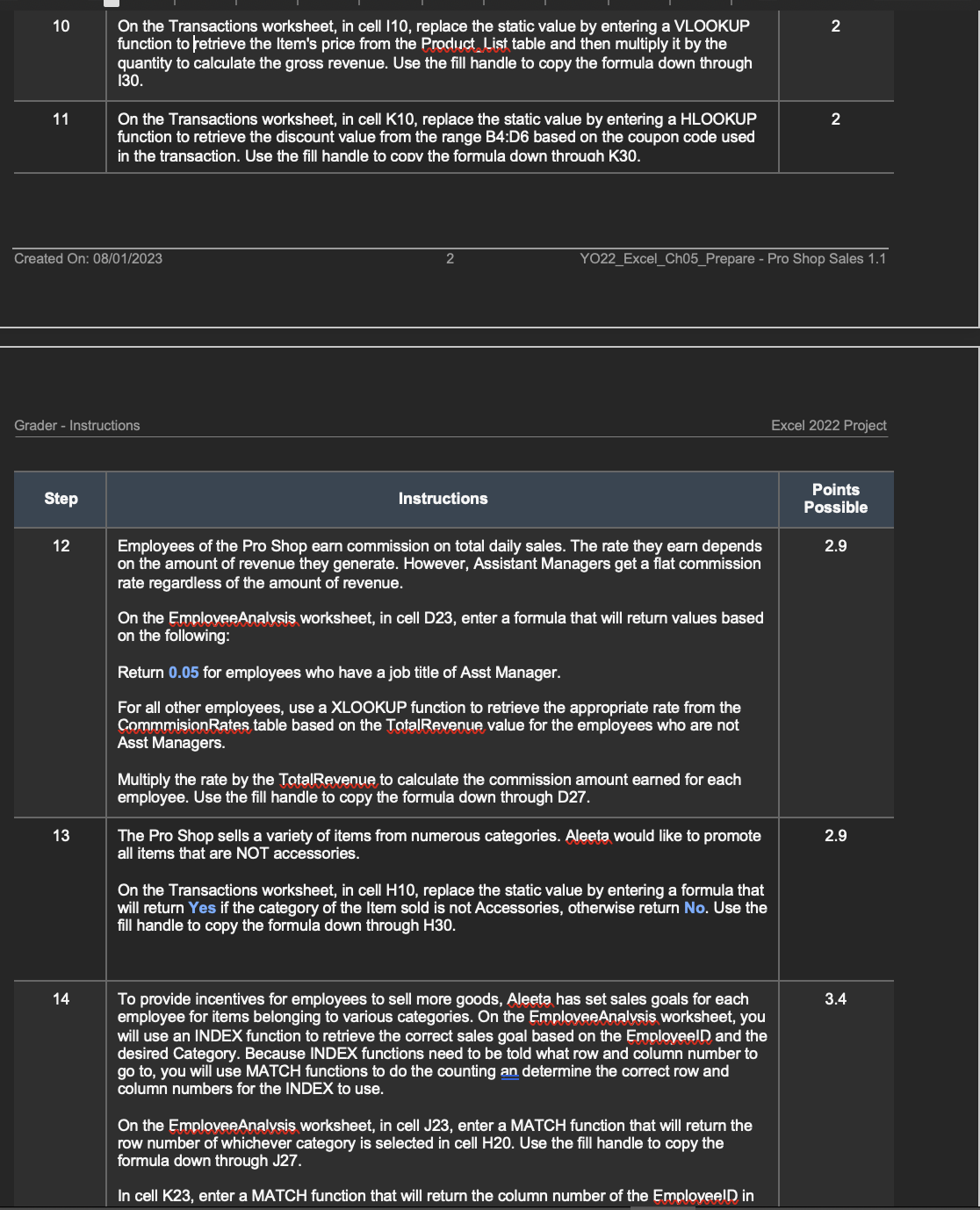
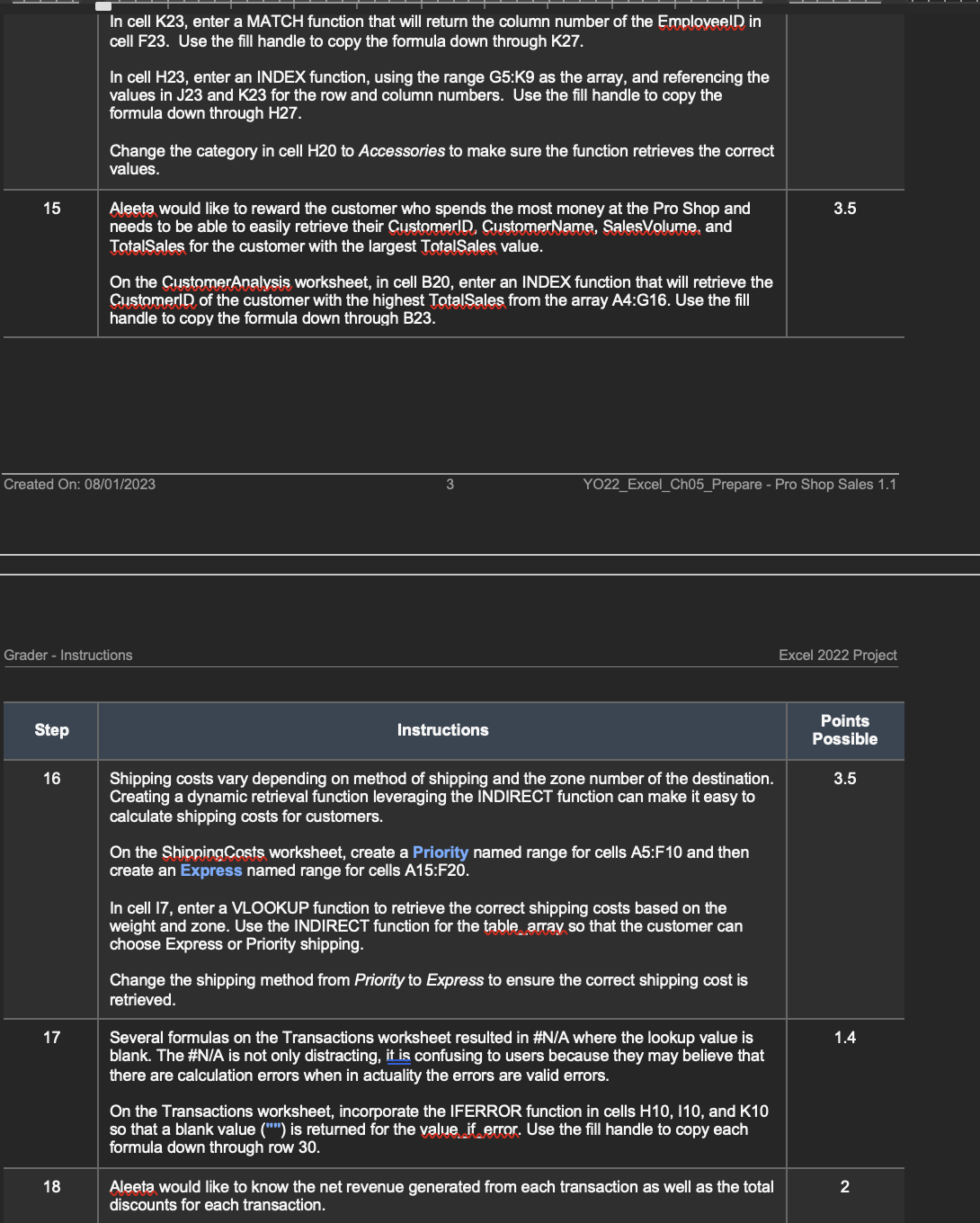
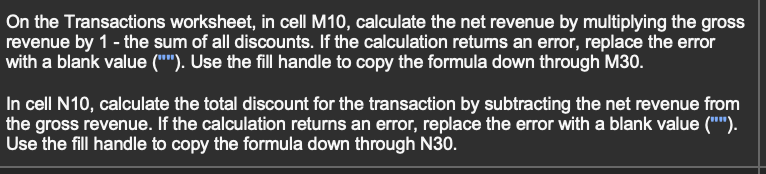
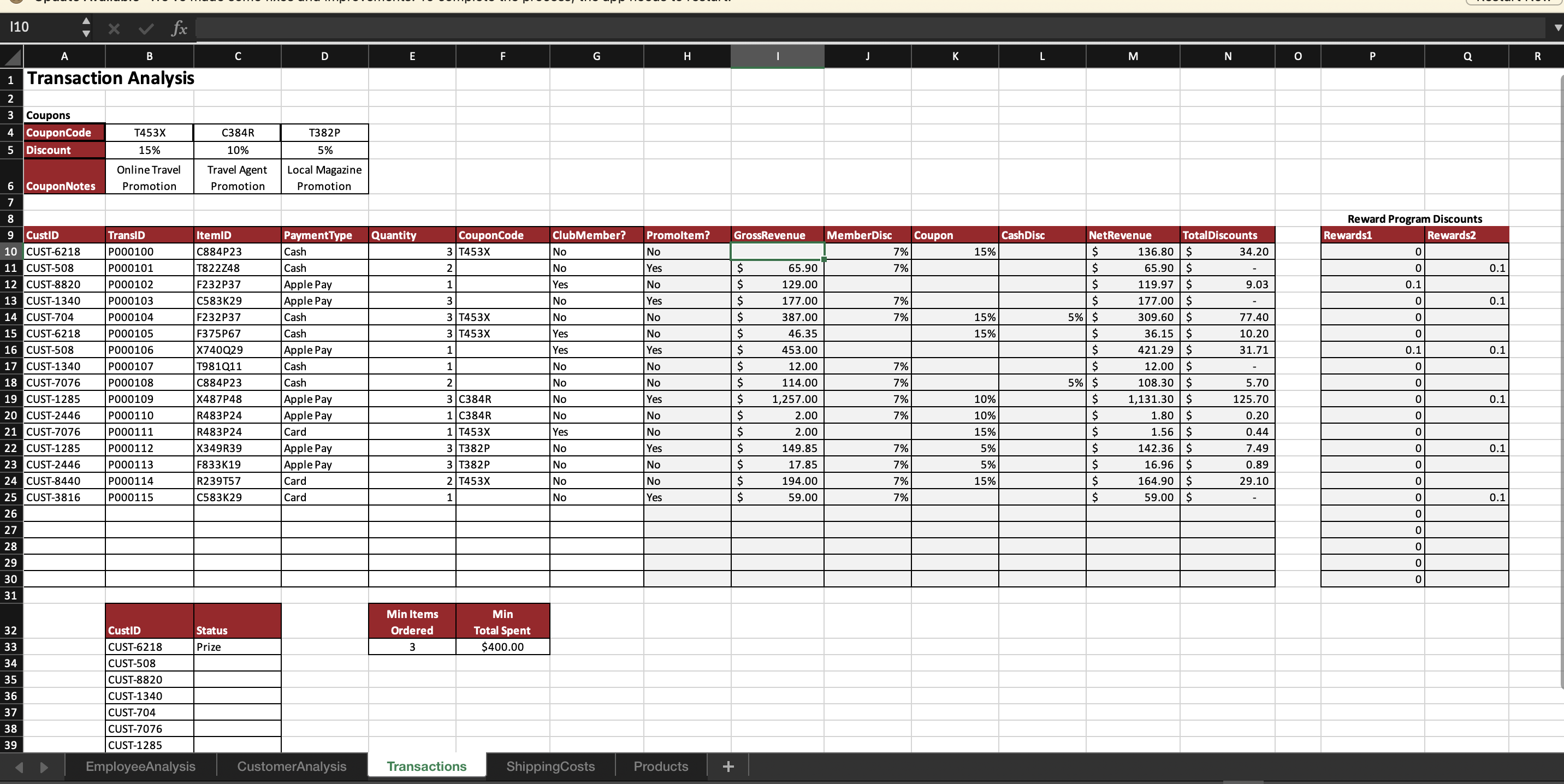
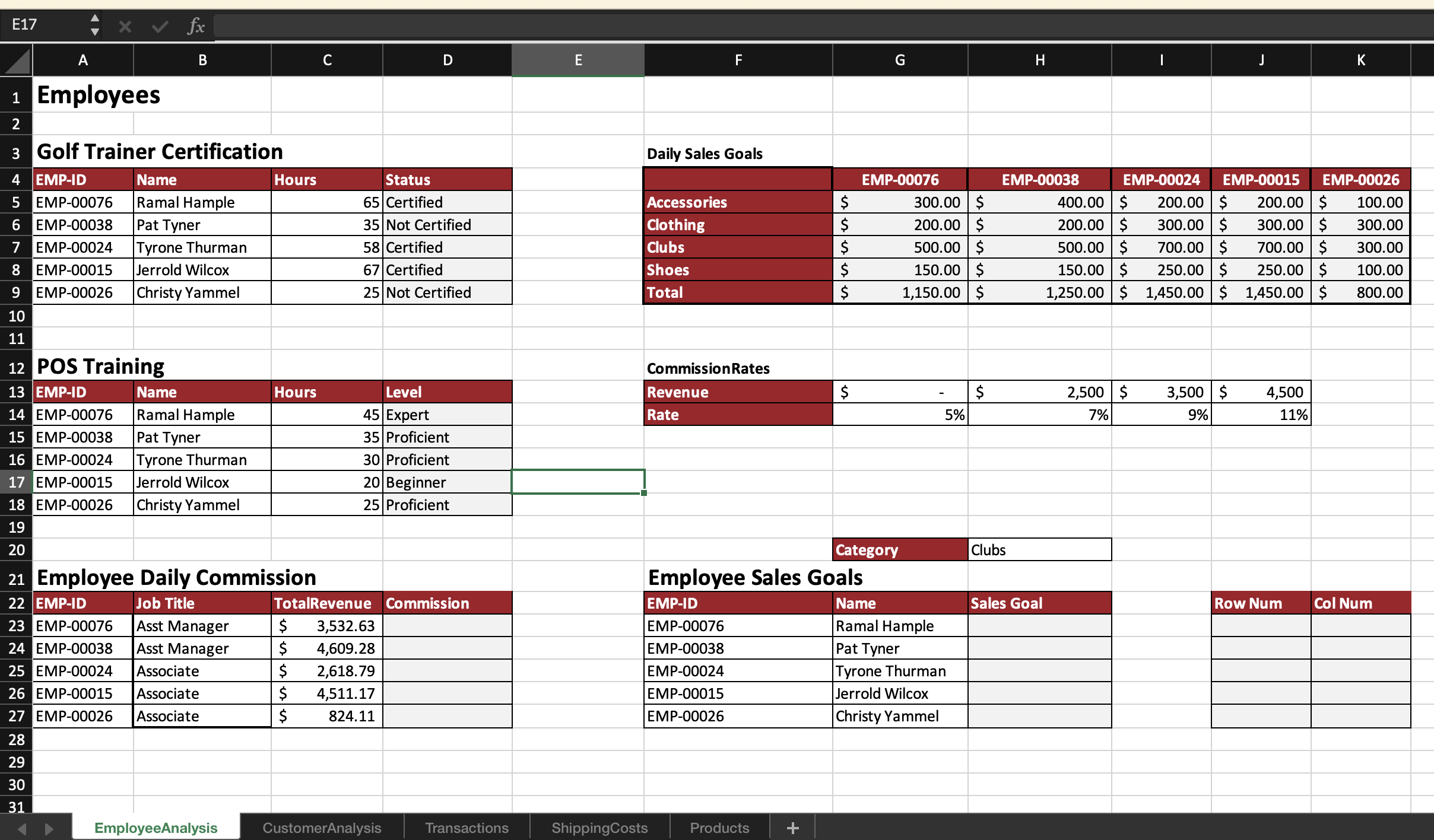
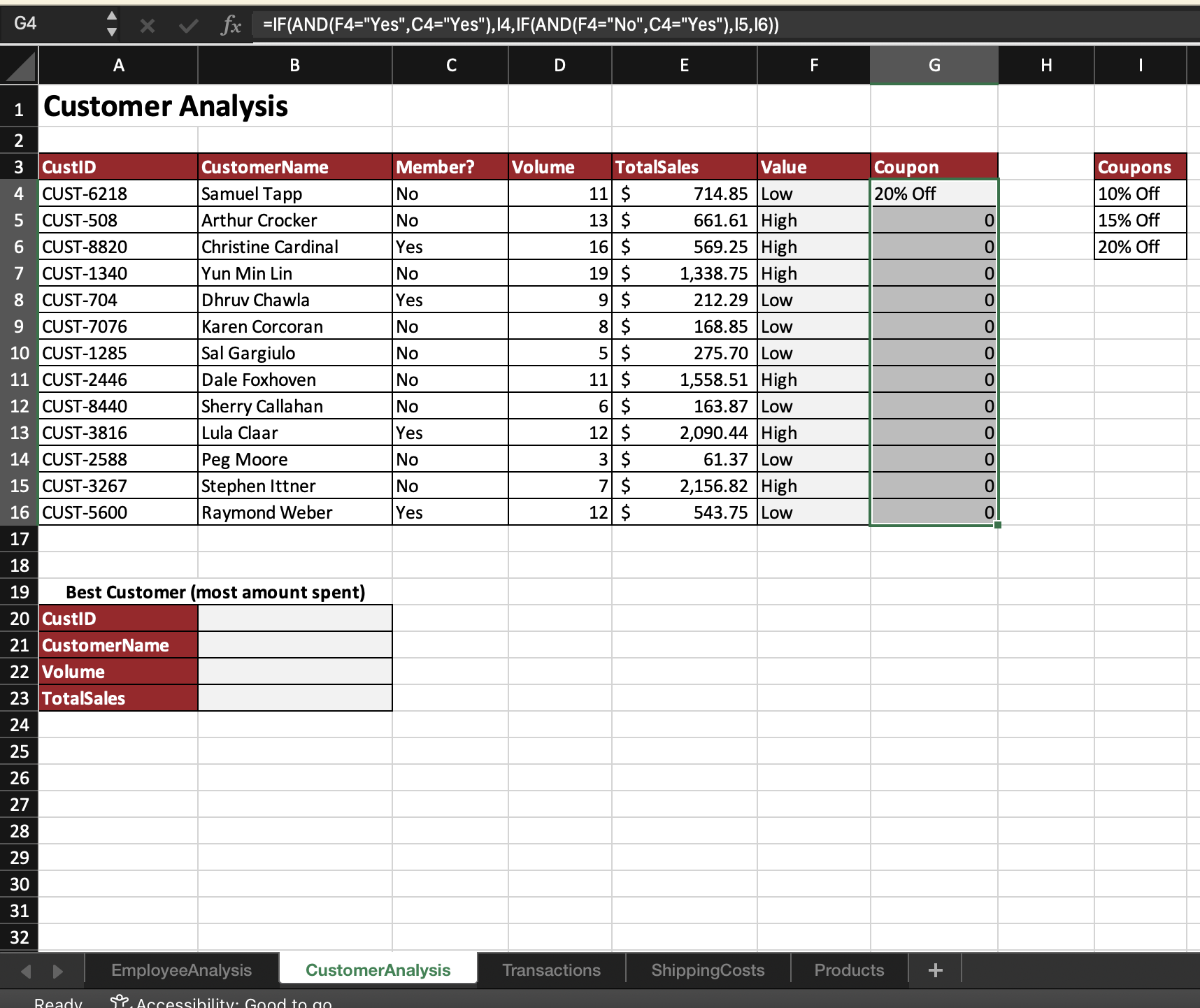
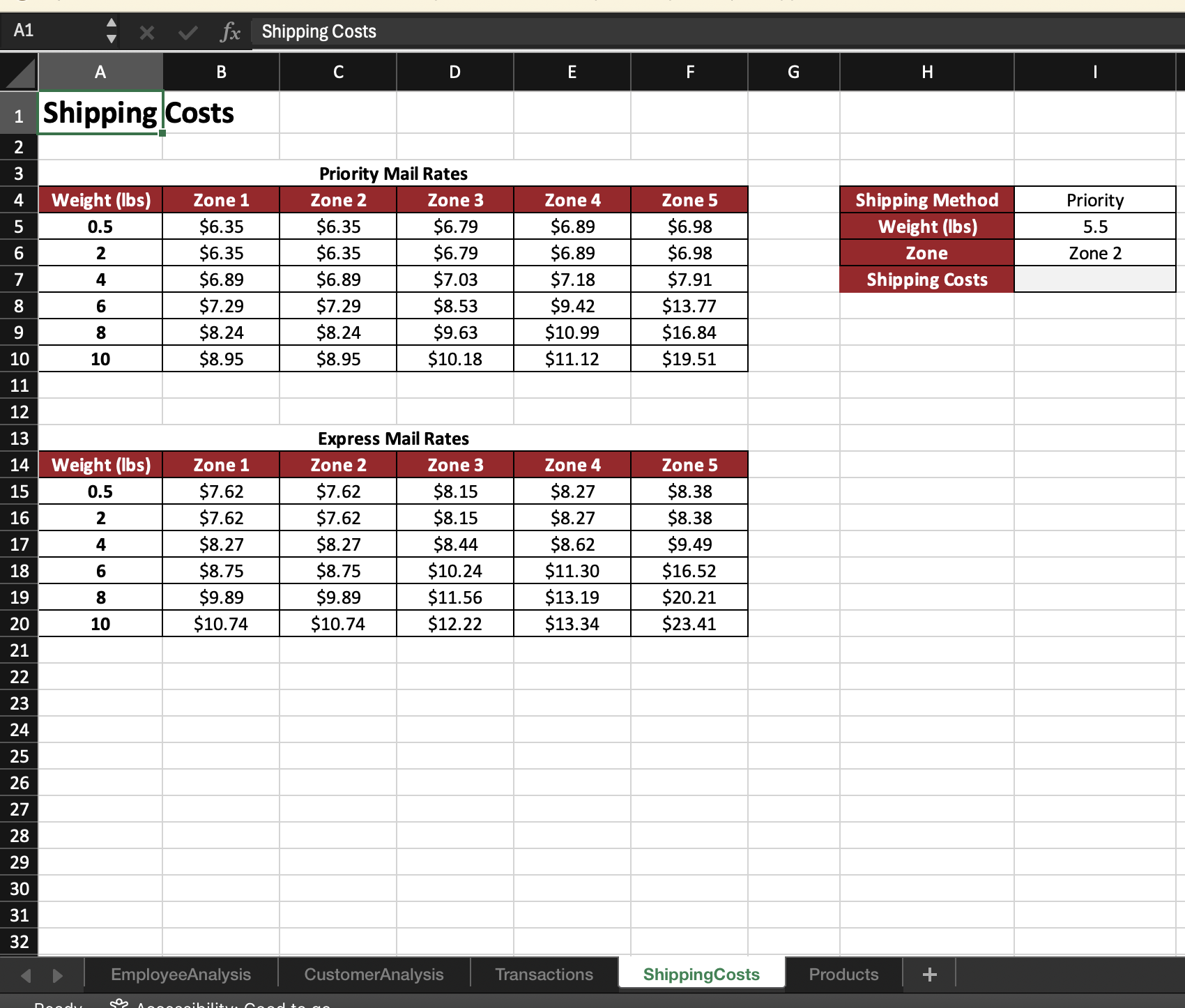
On the Transactions worksheet, in cell 110, replace the static value by entering a VLOOKUP function to fetrieve the Item's price from the Product_List table and then multiply it by the quantity to calculate the gross revenue. Use the fill handle to copy the formula down through 130. On the Transactions worksheet, in cell K10, replace the static value by entering a HLOOKUP function to retrieve the discount value from the range B4:D6 based on the coupon code used in the transaction. Use the fill handle to copv the formula down throuah K30. Created On: 08/01/2023 y, Y022 _Excel_Ch05_Prepare - Pro Shop Sales 1.1 Grader - Instructions Excel 2022 Project 3 1) . T8 Instructions Possible Employees of the Pro Shop earn commission on total daily sales. The rate they earn depends R on the amount of revenue they generate. However, Assistant Managers get a flat commission rate regardless of the amount of revenue. On the EmploveeAnalysis worksheet, in cell D23, enter a formula that will return values based on the following: Return 0.05 for employees who have a job title of Asst Manager. For all other employees, use a XLOOKUP function to retrieve the appropriate rate from the CommmisionRates table based on the TotalRevenue value for the employees who are not Asst Managers. Multiply the rate by the TotalRevenue to calculate the commission amount earned for each employee. Use the fill handle to copy the formula down through D27. The Pro Shop sells a variety of items from numerous categories. Aleeta would like to promote all items that are NOT accessories. On the Transactions worksheet, in cell H10, replace the static value by entering a formula that will return Yes if the category of the Item sold is not Accessories, otherwise return No. Use the fill handle to copy the formula down through H30. To provide incentives for employees to sell more goods, Aleeta has set sales goals for each employee for items belonging to various categories. On the EmploveeAnalvsis worksheet, you will use an INDEX function to retrieve the correct sales goal based on the EmployeelD) and the desired Category. Because INDEX functions need to be told what row and column number to go to, you will use MATCH functions to do the counting an determine the correct row and column numbers for the INDEX to use. On the EmploveeAnalysis worksheet, in cell J23, enter a MATCH function that will return the row number of whichever category is selected in cell H20. Use the fill handle to copy the formula down through J27. In cell K23, enter a MATCH function that will return the column number of the EmployeelD in In cell K23, enter a MATCH function that will return the column number of the EmployeelD in cell F23. Use the fill handle to copy the formula down through K27. In cell H23, enter an INDEX function, using the range G5:K9 as the array, and referencing the values in J23 and K23 for the row and column numbers. Use the fill handle to copy the formula down through H27. Change the category in cell H20 to Accessories to make sure the function retrieves the correct VTN Aleeta would like to reward the customer who spends the most money at the Pro Shop and needs to be able to easily retrieve their CustomerlD, CustomerName, SalesVolume, and TotalSales for the customer with the largest TotalSales value. On the CustomerAnalysis worksheet, in cell B20, enter an INDEX function that will retrieve the CustomerlD of the customer with the highest TotalSales from the array A4:G16. Use the fill handle to copy the formula down through B23. Created On: 08/01/2023 X Y022 Excel ChO5_Prepare - Pro Shop Sales 1.1 Grader - Instructions Excel 2022 Project Step . L Instructions Py Shipping costs vary depending on method of shipping and the zone number of the destination. 3.5 Creating a dynamic retrieval function leveraging the INDIRECT function can make it easy to calculate shipping costs for customers. On the ShippingCosts worksheet, create a Priority named range for cells A5:F10 and then create an Express named range for cells A15:F20. In cell 17, enter a VLOOKUP function to retrieve the correct shipping costs based on the weight and zone. Use the INDIRECT function for the table_array so that the customer can choose Express or Priority shipping. Change the shipping method from Priority to Express to ensure the correct shipping cost is retrieved. Several formulas on the Transactions worksheet resulted in #N/A where the lookup value is blank. The #N/A is not only distracting, it is confusing to users because they may believe that there are calculation errors when in actuality the errors are valid errors. On the Transactions worksheet, incorporate the IFERROR function in cells H10, 110, and K10 so that a blank value ("") is returned for the value_if_error. Use the fill handle to copy each formula down through row 30. Aleeta would like to know the net revenue generated from each transaction as well as the total discounts for each transaction. On the Transactions worksheet, in cell M10, calculate the net revenue by multiplying the gross revenue by 1 - the sum of all discounts. If the calculation retums an error, replace the error with a blank value (""). Use the fill handle to copy the formula down through M30. In cell N10, calculate the total discount for the transaction by subtracting the net revenue from the gross revenue. If the calculation returns an error, replace the error with a blank value (""). Use the fill handle to copy the formula down through N30. |10 x v fx B C D E F G H J K L M N O P Q R Transaction Analysis 2 3 Coupons 4 CouponCode T453X C384R T382P 5 Discount 15% 10% 5% Online Travel Travel Agent Local Magazine 6 CouponNotes Promotion Promotion Promotion 8 9 CustID Reward Program Discounts TransID temll PaymentType Quantity CouponCode ClubMember? Promoltem? GrossRevenue MemberDisc Coupon CashDisc NetRevenue TotalDiscounts 10 CUST-6218 Rewards1 P000100 C884P23 Rewards2 Cash 3 T453X No No 7% 15% 34.20 CUST-508 136.80 $ P000101 T822748 Cash IN No Yes 65.90 7% CUST-8820 65.90 $ P000102 0 0.1 F232P37 Apple Pay Yes No 129.00 119.97 $ 9.03 CUST-1340 0.1 P000103 C583K29 Apple Pay 3 No Yes 177.00 7% 177.00 $ CUST-704 P000104 F232P37 0 0.1 Cash 3 T453X No No 387.00 7% 15% 5% S 309.60 $ 77.40 15 CUST-6218 P000105 F375P67 0 Cash 3 T453X Yes No 46.35 15% 36.15 $ 16 CUST-508 10.20 P000106 X740Q29 Apple Pay Yes Yes 453.00 421.29 $ 0.1 CUST-1340 31.71 0.1 P000107 T981Q11 Cash 1 No No 12.00 7% 12.00 $ 18 CUST-7076 P000108 C884P23 Cash 2 No No 114.00 7% 5% $ 108.30 $ 5.70 19 CUST-1285 P000109 X487P48 Apple Pay 3 C384R No Yes 1,257.00 7% 10% 1,131.30 $ 0.1 20 CUST-2446 P000110 R483P24 125.70 Apple Pay 1 C384R No No 2.00 7% 10% 1.80 $ 0.20 21 CUST-7076 P000111 R483P24 Card 1 T453X Yes No 2.00 15% 1.56 $ 0.44 22 CUST-1285 P000112 X349R39 Apple Pay 3 T382P No Yes 149.85 7% 5% 142.36 $ 7.49 23 CUST-2446 0.1 P000113 F833K19 Apple Pay 3 T382P No No 17.85 7% 5% 16.96 $ 24 CUST-8440 0.89 P000114 R239757 Card 2 T453X No No 194.00 7% 15% 164.90 $ 25 CUST-3816 29.10 P000115 C583K29 Card No Yes 59.00 7% 59.00 S 0.1 28 29 30 31 Min Items Min 32 CustID Status Ordered Total Spent 33 CUST-6218 Prize 3 $400.00 34 CUST-508 35 CUST-8820 36 CUST-1340 37 CUST-704 38 CUST-7076 39 CUST-1285 EmployeeAnalysis CustomerAnalysis Transactions ShippingCosts Products +E17 VX V fx A B C D E F G H K Employees W Golf Trainer Certification Daily Sales Goals EMP-ID Name Hours Status EMP-00076 EMP-00038 EMP-00024 EMP-00015 EMP-00026 EMP-00076 Ramal Hample 65 Certified Accessories 300.00 $ 400.00 $ 200.00 $ 200.00 $ 100.00 UT 6 EMP-00038 Pat Tyne 35 Not Certified Clothing 200.00 $ 200.00 $ 300.00 $ 300.00 $ 300.00 EMP-00024 Tyrone Thurman 58 Certified Clubs 500.00 $ 500.00 $ 700.00 $ 700.00 $ 300.00 8 EMP-00015 Jerrold Wilcox 67 Certified Shoes 150.00 |$ 150.00 $ 250.00 $ 250.00 $ 100.00 9 EMP-00026 Christy Yammel 25 Not Certified Total 1,150.00 $ 1,250.00 $ 1,450.00 $ 1,450.00 S 300.00 10 11 12 POS Training Commission Rates 13 EMP-ID Name Hours Level Revenue $ 2,500 $ 3,500 $ 4,500 14 EMP-00076 Ramal Hample 45 Expert Rate 5% 7% 9% 11% 15 EMP-00038 Pat Tyner 35 Proficient 16 EMP-00024 Tyrone Thurman 30 Proficient 17 EMP-00015 Jerrold Wilcox 20 Beginner 18 EMP-00026 Christy Yammel 25 Proficient 19 20 Category Clubs 21 Employee Daily Commission Employee Sales Goals 22 EMP-ID Job Title TotalRevenue Commission EMP-ID Name Sales Goal Row Num Col Num 23 EMP-00076 Asst Manager $ 3,532.63 EMP-00076 Ramal Hample 24 EMP-00038 Asst Manager 4,609.28 EMP-00038 Pat Tyner 25 EMP-00024 Associate 2,618.79 EMP-00024 Tyrone Thurman 5 EMP-00015 Associate 4,511.17 EMP-00015 Jerrold Wilcox 27 EMP-00026 Associate 824.11 EMP-0002 Christy Yammel 28 29 30 31 EmployeeAnalysis CustomerAnalysis Transactions ShippingCosts ProductsG4 X V fx =IF(AND(F4="Yes",C4="Yes"), 14, IF(AND(F4="No",C4="Yes"), 15, 16)) A B C D E F G H Customer Analysis IN W CustID CustomerName Member? Volume TotalSales Value Coupon Coupons CUST-6218 Samuel Tapp No 11 $ 714.85 Low 20% Off 10% Off OUT P CUST-508 Arthur Crocker No 13 S 61.61 High 0 15% Off CUST-8820 Christine Cardinal Yes 16 $ 69.25 High 0 20% Off CUST-1340 Yun Min Lin No 19 $ 1,338.75 High 0 CUST-704 Dhruv Chawla Yes 9 $ 212.29 Low LO 00 CUST-7076 Karen Corcoran No 8 $ 168.85 Low 0 10 CUST-1285 Sal Gargiulo No 5 $ 275.70 Low 11 CUST-2446 Dale Foxhoven No 11 $ 1,558.51 High 0 12 CUST-8440 Sherry Callahan No 6 $ 163.87 Low 0 13 CUST-3816 Lula Claal Yes 12 $ 2,090.44 High 14 CUST-2588 Peg Moore No 3 $ 61.37 Low looool 15 CUST-3267 Stephen Ittner No 7 $ 2,156.82 High CUST-5600 Raymond Weber Yes 12 $ 543.75 Low 17 18 19 Best Customer (most amount spent) 20 CustID 21 CustomerName 22 Volume 23 TotalSales 24 25 26 27 28 29 30 31 32 EmployeeAnalysis CustomerAnalysis Transactions ShippingCosts Products +A1 x v fx Shipping Costs A B C D E F G H Shipping Costs W N Priority Mail Rates Weight (lbs) Zone 1 Zone 2 Zone 3 Zone 4 Zone 5 Shipping Method Priority ).5 $6.35 $6.35 $6.79 $6.89 $6.98 Weight (lbs) 5.5 2 $6.35 $6.35 $6.79 $6.89 $6.98 Zone Zone 2 4 $6.89 $6.89 $7.03 $7.18 $7.91 Shipping Costs 8 6 $7.29 $7.29 $8.53 $9.42 $13.77 9 8 $8.24 $8.24 $9.63 $10.99 $16.84 10 10 $8.95 $8.95 $10.18 $11.12 $19.51 11 12 13 Express Mail Rates 14 Weight (lbs) Zone 1 Zone 2 Zone 3 Zone 4 Zone 5 15 0.5 $7.62 $7.62 $8.15 $8.27 $8.38 16 2 $7.62 $7.62 $8.15 $8.27 $8.38 17 $8.27 $8.27 $8.44 $8.62 $9.49 18 $8.75 $8.75 $10.24 $11.30 $16.52 19 $9.89 $9.89 $11.56 $13.19 $20.21 20 10 $10.74 $10.74 $12.22 $13.34 $23.41 21 22 23 24 25 26 27 28 29 30 31 32 D EmployeeAnalysis CustomerAnalysis Transactions ShippingCosts Products +
Step by Step Solution
There are 3 Steps involved in it
1 Expert Approved Answer
Step: 1 Unlock
Question Has Been Solved by an Expert!
Get step-by-step solutions from verified subject matter experts
Step: 2 Unlock
Step: 3 Unlock
Students Have Also Explored These Related Accounting Questions!









 Study Help