



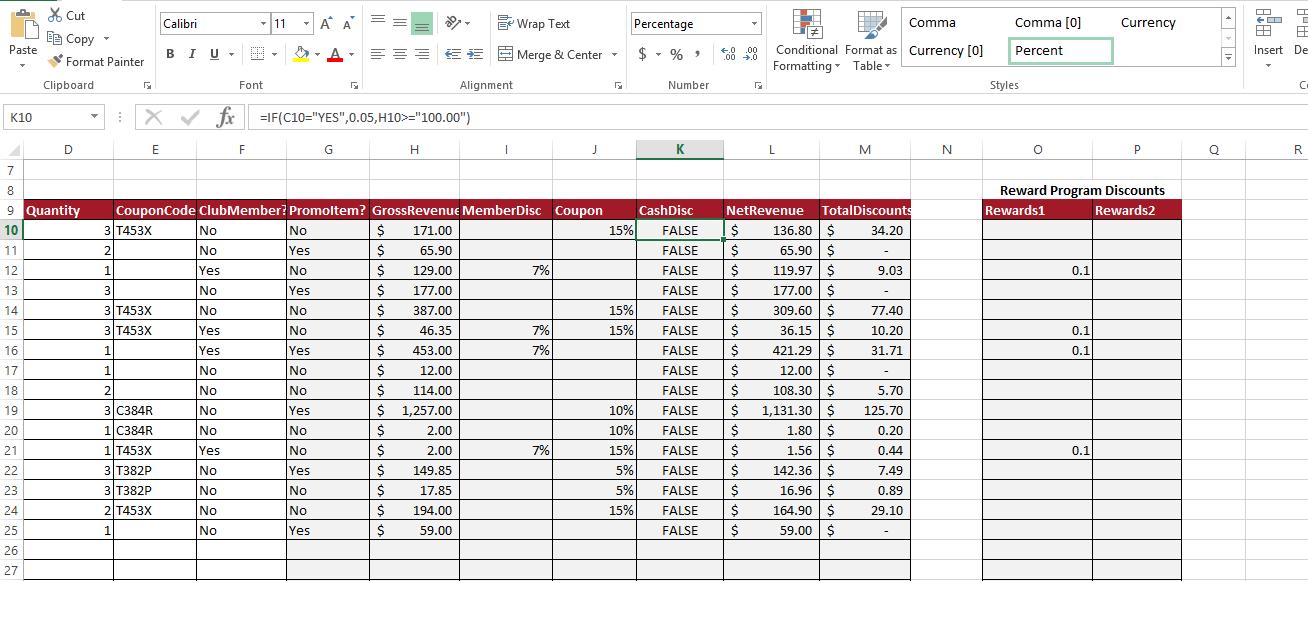
Question: On the Transactions worksheet, incorporate the IFERROR function in cells G10, H10, and J10 so that a blank value ( ) is returned for
On the Transactions worksheet, incorporate the IFERROR function in cells G10, H10, and J10 so that a blank value ("") is returned for the value_if_error
On the Transactions worksheet, in cell L10, calculate the net revenue by multiplying the gross revenue by 1 - the sum of all discounts. If the calculation returns an error, replace the error with a blank value (").
Paste K10 A 11 12 13 14 15 16 Cut E Copy 17 18 19 20 21 22 23 24 25 26 27 Format Painter 7 8 9 Quantity 10 Clipboard D : Calibri E BIU. X fx Font No No Yes No No Yes Yes No No No No Yes No No No No F 11 Y A A No Yes No Yes No No Yes No No Yes No No Yes No No Yes T =IF(C10="YES",0.05,H10>="100.00") G $ $ $ $ $ CouponCode ClubMember? Promoltem? GrossRevenue MemberDisc Coupon 3 T453X 2 171.00 65.90 129.00 1 3 177.00 3 T453X 387.00 3 T453X 46.35 1 $ 1 $ 453.00 12.00 114.00 2 $ 3 C384R $ 1,257.00 1 C384R 1 T453X 3 T382P 3 T382P 2 T453X 1 $ EE H $ $ $ $ $ $ Alignment 2.00 2.00 149.85 17.85 194.00 59.00 1 Wrap Text Merge & Center 7% 7% 7% J 7% G Percentage $%, 15% Number 15% 15% K +0.00 .00 .0 G Commal Conditional Format as Currency [0] Formatting Table Cash Disc FALSE $ 136.80 $ FALSE $ 65.90 $ FALSE $ 119.97 $ FALSE $ 177.00 $ FALSE $ 309.60 $ FALSE $ 36.15 $ FALSE $ 421.29 $ FALSE $ 12.00 $ FALSE $ 108.30 $ 10% FALSE $ 1,131.30 $ 10% FALSE $ 1.80 $ 15% FALSE $ 5% FALSE $ 5% FALSE $ 15% FALSE $ FALSE $ 1.56 $ 142.36 $ 16.96 $ 164.90 $ 59.00 $ L M NetRevenue TotalDiscounts 34.20 - 9.03 77.40 10.20 31.71 - 5.70 125.70 0.20 0.44 7.49 0.89 29.10 N Comma [0] Percent Styles O 0.1 Reward Program Discounts Rewards1 Rewards2 0.1 0.1 Currency 0.1 P Q 8 Insert De C R
Step by Step Solution
3.38 Rating (151 Votes )
There are 3 Steps involved in it
Ans 1 The question simply needs you to add the IFERROR function to your formula This will enable you ... View full answer

Get step-by-step solutions from verified subject matter experts