







Question: please answer #15 with all functions needed for a like. Thank You 15 Shipping costs vary depending on method of shipping and the zone number
please answer #15 with all functions needed for a like. Thank You
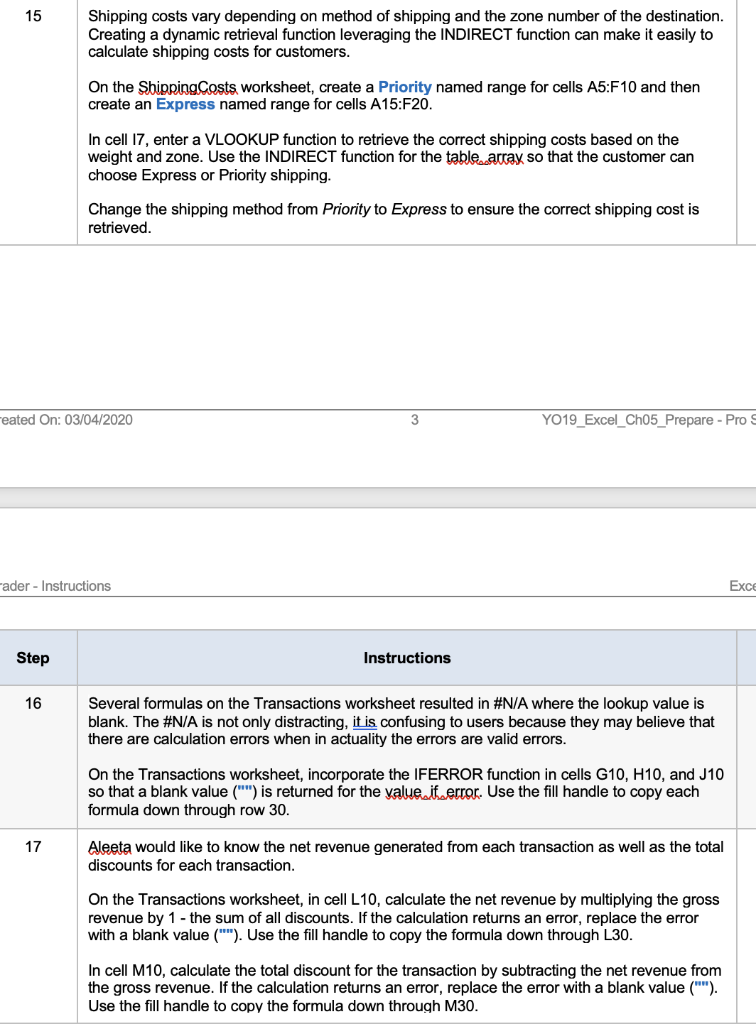
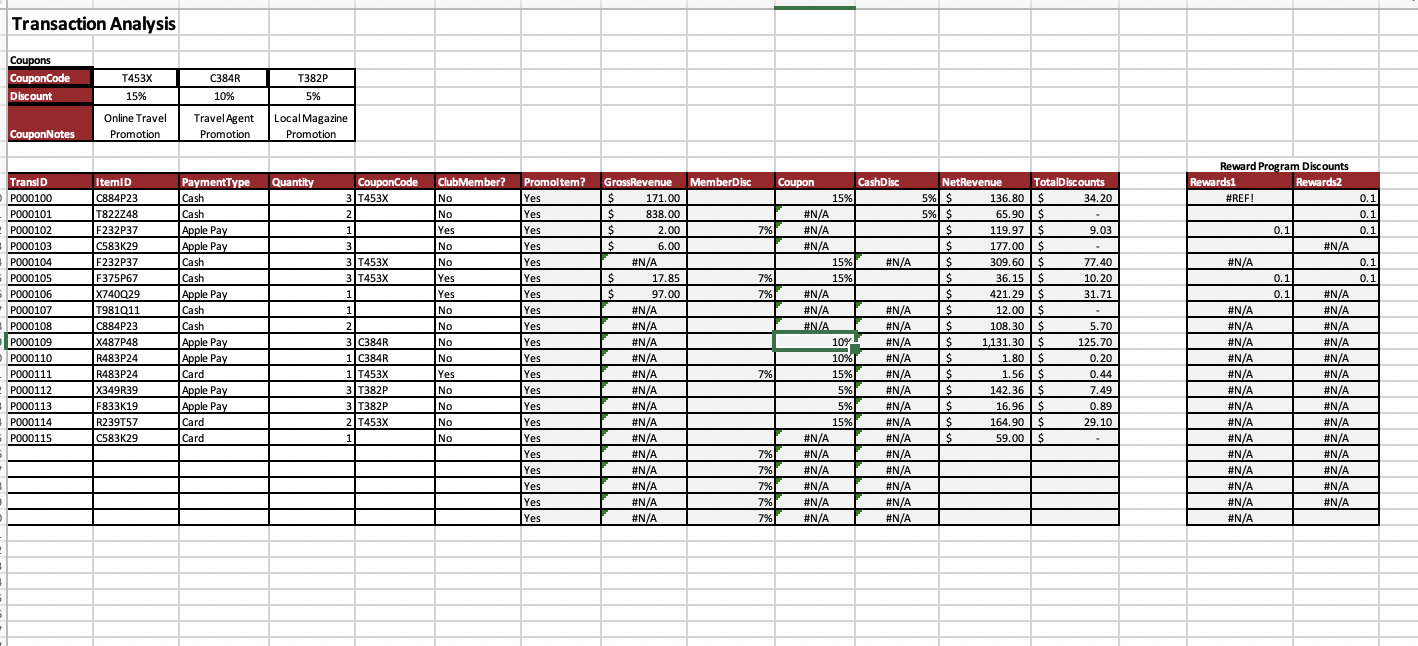
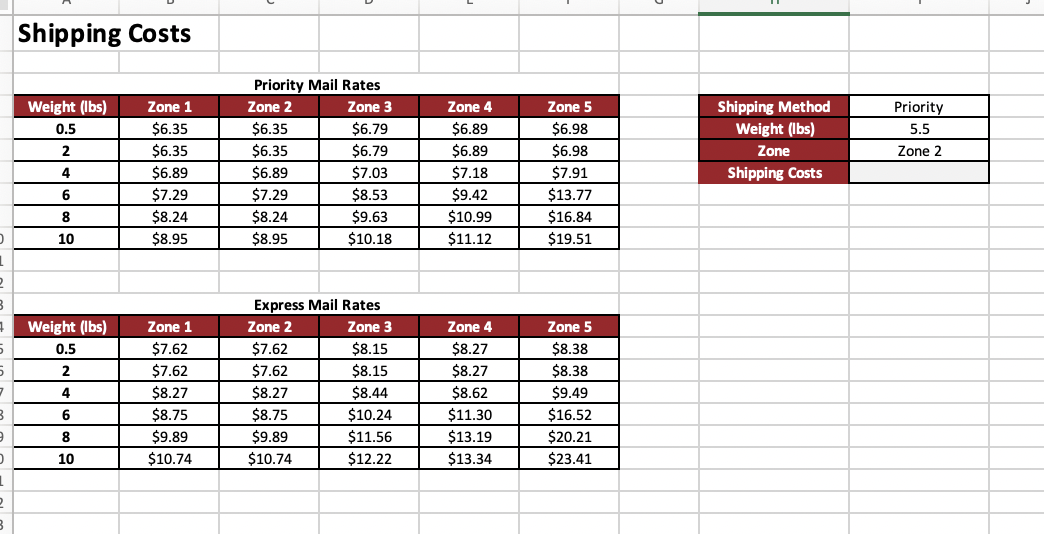
15 Shipping costs vary depending on method of shipping and the zone number of the destination. Creating a dynamic retrieval function leveraging the INDIRECT function can make it easily to calculate shipping costs for customers. On the Shipping Costs worksheet, create a Priority named range for cells A5:F10 and then create an Express named range for cells A15:F20. In cell 17, enter a VLOOKUP function to retrieve the correct shipping costs based on the weight and zone. Use the INDIRECT function for the table array so that the customer can choose Express or Priority shipping. Change the shipping method from Priority to Express to ensure the correct shipping cost is retrieved. eated On: 03/04/2020 3 YO19_Excel_Ch05_Prepare - Pro S Fader - Instructions Exce Step Instructions 16 Several formulas on the Transactions worksheet resulted in #N/A where the lookup value is blank. The #N/A is not only distracting, it is confusing to users because they may believe that there are calculation errors when in actuality the errors are valid errors. On the Transactions worksheet, incorporate the IFERROR function in cells G10, H10, and J10 so that a blank value ("") is returned for the value it error. Use the fill handle to copy each formula down through row 30. 17 Aleeta would like to know the net revenue generated from each transaction as well as the total discounts for each transaction. On the Transactions worksheet, in cell L10, calculate the net revenue by multiplying the gross revenue by 1 - the sum of all discounts. If the calculation returns an error, replace the error with a blank value (""). Use the fill handle to copy the formula down through 130. In cell M10, calculate the total discount for the transaction by subtracting the net revenue from the gross revenue. If the calculation returns an error, replace the error with a blank value (""). Use the fill handle to copy the formula down through M30. Transaction Analysis Coupons CouponCode Discount T453x C384R T382P 5% 15% 10% Online Travel Promotion Travel Agent Promotion Local Magazine Promotion CouponNotes Quantity Member Disc Cash Disc CouponCode 3 T453x Club Member? No Reward Program Discounts Rewards1 Rewards2 #REF! 2 No 0.1 0.1 0.1 1 7% 0.1 Yes - No #N/A #N/A #N/A 0.1 0.1 7% 7% TranslD P000100 P000101 ---- P000102 - P000103 P000104 P000105 P000106 P000107 24 PO00108 . P000109 --- PO00110 . P000111 P000112 P000113 P000114 P000115 0.1 0.1 ItemID C884P23 T822248 ---- F232P37 r! C583K29 F232P37 F375P67 VI X740029 ce T981Q11 C884P23 X487P48 R483P24 . R483P24 . X349R39 F833K19 R239T57 C583K29 No . Yes Yes No Payment Type Cash Cash 1. Apple Pay Apple Pay PG Cash Cash Apple Pay Apple Cash Cash Apple Apple Pay Apple Pay PC Card Apple Pay Apple Pay Card Card 3 3 T453X 3 T453X 1 1 2 3 C384R 1 C384R 1 T453X 3 T382P 3 T382P 2 T453X Promoltem? Yes Yes Yes Yes Yes Yes - Yes - Yes - Yes Yes - Yes Yes Yes Yes Yes Yes Yes Yes Yes Yes Yes No . No GrossRevenue $ 171.00 $ 838.00 $ 2.00 $ 6.00 #N/A $ 17.85 $ 97.00 #N/A #N/A #N/A #N/A #N/A #N/A #N/A #N/A #N/A #N/A #N/A #N/A #N/A #N #N/A Coupon 15% #N/A #N/A #N/A 15% % 15% #N/A #N/A #N/A 109 10% 15% 5% 5% 15% #N/A #N/A #N/A #N/A #N/A #N/A NetRevenue TotalDiscounts 5% $ 136.80$ 34.20 5% $ 65.90 $ $ 119.97 $ 9.03 $ 177.00 $ $ 309.60 $ 22.00 77.40 $ 36.15$ --- 10.20 0.24 $ 421.29 $ 2 31.71 . $ 12.00 $ $ 108.30 $ 5.70 10. $ 1,131.30 $ 125.70 e $ 1.80 $ 0.20 $ 1.56 $ 0.44 $ 142.36 $ 7.49 $ 16.96 $ 0.89 $ 164.90 $ 29.10 $ 59.00 $ No . Yes - No 7% #N/A #N/A #N/A w #N/A #N/A #N/A #N/A #N/A #N/A #N/A #N/A #N/A N/A #N/A #N/A No #N/A #N/A #N/A #N/A #N/A w #N/A . #N/A #N/A . #N/A #N/A #N/A #N/A #N/A #N/A #N/A #N/A #N/A . #N/A . #N/A . #N/A . #N/A . #N/A #N/A #N/A #N/A #/ #N/A #N/A #N/A No 1 No 7% 7% 7% 7% 7% Shipping Costs Weight (lbs) 0.5 2 4 Zone 1 $6.35 $6.35 $6.89 $7.29 $8.24 $8.95 Priority 5.5 Zone 2 Priority Mail Rates Zone 2 Zone 3 $6.35 $6.79 $6.35 $6.79 $6.89 $7.03 $7.29 $8.53 $8.24 $9.63 $8.95 $10.18 Zone 4 $6.89 $6.89 $7.18 $9.42 $10.99 $11.12 Zone 5 $6.98 $6.98 $7.91 $13.77 $16.84 $19.51 Shipping Method Weight (lbs) Zone Shipping Costs 6 8 10 1 2 B Weight (lbs) 0.5 2 4 Zone 4 $8.27 $8.27 5 7 Zone 1 $7.62 $7.62 $8.27 $8.75 $9.89 $10.74 Express Mail Rates Zone 2 Zone 3 $7.62 $8.15 $7.62 $8.15 $8.27 $8.44 $8.75 $10.24 $9.89 $11.56 $10.74 $12.22 $8.62 Zone 5 $8.38 $8.38 $9.49 $16.52 $20.21 $23.41 B 6 8 $11.30 $13.19 $13.34 10 1 2 15 Shipping costs vary depending on method of shipping and the zone number of the destination. Creating a dynamic retrieval function leveraging the INDIRECT function can make it easily to calculate shipping costs for customers. On the Shipping Costs worksheet, create a Priority named range for cells A5:F10 and then create an Express named range for cells A15:F20. In cell 17, enter a VLOOKUP function to retrieve the correct shipping costs based on the weight and zone. Use the INDIRECT function for the table array so that the customer can choose Express or Priority shipping. Change the shipping method from Priority to Express to ensure the correct shipping cost is retrieved. eated On: 03/04/2020 3 YO19_Excel_Ch05_Prepare - Pro S Fader - Instructions Exce Step Instructions 16 Several formulas on the Transactions worksheet resulted in #N/A where the lookup value is blank. The #N/A is not only distracting, it is confusing to users because they may believe that there are calculation errors when in actuality the errors are valid errors. On the Transactions worksheet, incorporate the IFERROR function in cells G10, H10, and J10 so that a blank value ("") is returned for the value it error. Use the fill handle to copy each formula down through row 30. 17 Aleeta would like to know the net revenue generated from each transaction as well as the total discounts for each transaction. On the Transactions worksheet, in cell L10, calculate the net revenue by multiplying the gross revenue by 1 - the sum of all discounts. If the calculation returns an error, replace the error with a blank value (""). Use the fill handle to copy the formula down through 130. In cell M10, calculate the total discount for the transaction by subtracting the net revenue from the gross revenue. If the calculation returns an error, replace the error with a blank value (""). Use the fill handle to copy the formula down through M30. Transaction Analysis Coupons CouponCode Discount T453x C384R T382P 5% 15% 10% Online Travel Promotion Travel Agent Promotion Local Magazine Promotion CouponNotes Quantity Member Disc Cash Disc CouponCode 3 T453x Club Member? No Reward Program Discounts Rewards1 Rewards2 #REF! 2 No 0.1 0.1 0.1 1 7% 0.1 Yes - No #N/A #N/A #N/A 0.1 0.1 7% 7% TranslD P000100 P000101 ---- P000102 - P000103 P000104 P000105 P000106 P000107 24 PO00108 . P000109 --- PO00110 . P000111 P000112 P000113 P000114 P000115 0.1 0.1 ItemID C884P23 T822248 ---- F232P37 r! C583K29 F232P37 F375P67 VI X740029 ce T981Q11 C884P23 X487P48 R483P24 . R483P24 . X349R39 F833K19 R239T57 C583K29 No . Yes Yes No Payment Type Cash Cash 1. Apple Pay Apple Pay PG Cash Cash Apple Pay Apple Cash Cash Apple Apple Pay Apple Pay PC Card Apple Pay Apple Pay Card Card 3 3 T453X 3 T453X 1 1 2 3 C384R 1 C384R 1 T453X 3 T382P 3 T382P 2 T453X Promoltem? Yes Yes Yes Yes Yes Yes - Yes - Yes - Yes Yes - Yes Yes Yes Yes Yes Yes Yes Yes Yes Yes Yes No . No GrossRevenue $ 171.00 $ 838.00 $ 2.00 $ 6.00 #N/A $ 17.85 $ 97.00 #N/A #N/A #N/A #N/A #N/A #N/A #N/A #N/A #N/A #N/A #N/A #N/A #N/A #N #N/A Coupon 15% #N/A #N/A #N/A 15% % 15% #N/A #N/A #N/A 109 10% 15% 5% 5% 15% #N/A #N/A #N/A #N/A #N/A #N/A NetRevenue TotalDiscounts 5% $ 136.80$ 34.20 5% $ 65.90 $ $ 119.97 $ 9.03 $ 177.00 $ $ 309.60 $ 22.00 77.40 $ 36.15$ --- 10.20 0.24 $ 421.29 $ 2 31.71 . $ 12.00 $ $ 108.30 $ 5.70 10. $ 1,131.30 $ 125.70 e $ 1.80 $ 0.20 $ 1.56 $ 0.44 $ 142.36 $ 7.49 $ 16.96 $ 0.89 $ 164.90 $ 29.10 $ 59.00 $ No . Yes - No 7% #N/A #N/A #N/A w #N/A #N/A #N/A #N/A #N/A #N/A #N/A #N/A #N/A N/A #N/A #N/A No #N/A #N/A #N/A #N/A #N/A w #N/A . #N/A #N/A . #N/A #N/A #N/A #N/A #N/A #N/A #N/A #N/A #N/A . #N/A . #N/A . #N/A . #N/A . #N/A #N/A #N/A #N/A #/ #N/A #N/A #N/A No 1 No 7% 7% 7% 7% 7% Shipping Costs Weight (lbs) 0.5 2 4 Zone 1 $6.35 $6.35 $6.89 $7.29 $8.24 $8.95 Priority 5.5 Zone 2 Priority Mail Rates Zone 2 Zone 3 $6.35 $6.79 $6.35 $6.79 $6.89 $7.03 $7.29 $8.53 $8.24 $9.63 $8.95 $10.18 Zone 4 $6.89 $6.89 $7.18 $9.42 $10.99 $11.12 Zone 5 $6.98 $6.98 $7.91 $13.77 $16.84 $19.51 Shipping Method Weight (lbs) Zone Shipping Costs 6 8 10 1 2 B Weight (lbs) 0.5 2 4 Zone 4 $8.27 $8.27 5 7 Zone 1 $7.62 $7.62 $8.27 $8.75 $9.89 $10.74 Express Mail Rates Zone 2 Zone 3 $7.62 $8.15 $7.62 $8.15 $8.27 $8.44 $8.75 $10.24 $9.89 $11.56 $10.74 $12.22 $8.62 Zone 5 $8.38 $8.38 $9.49 $16.52 $20.21 $23.41 B 6 8 $11.30 $13.19 $13.34 10 1 2
Step by Step Solution
There are 3 Steps involved in it

Get step-by-step solutions from verified subject matter experts
 Study Help