



Question: On the Year worksheet, enter a 3D formula in cell range C5:G19 to calculate the total items sold for each department. If you use the
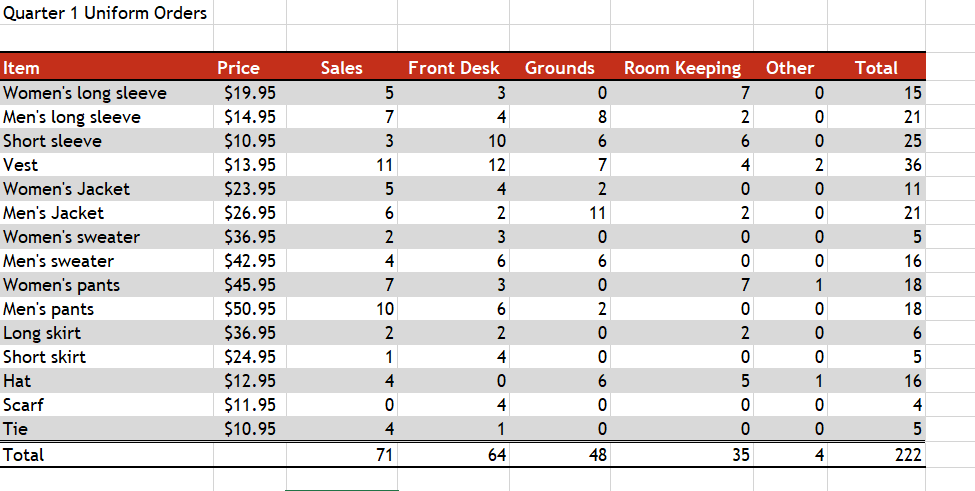
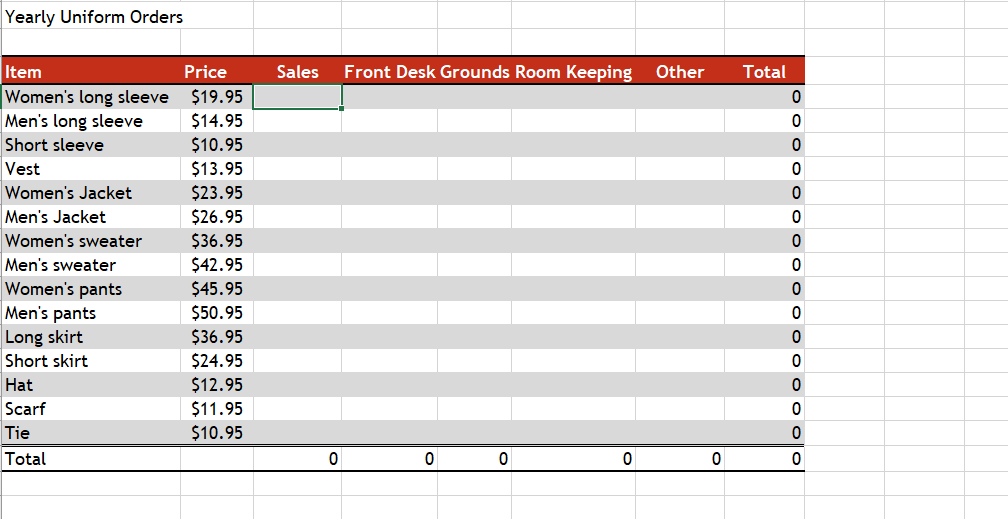
On the Year worksheet, enter a 3D formula in cell range C5:G19 to calculate the total items sold for each department. If you use the fill handle to copy the formulas, click the Auto Fill Options and choose Fill Without Formatting. Quarter 1 Uniform Orders Yearly Uniform Orders On the Year worksheet, enter a 3D formula in cell range C5:G19 to calculate the total items sold for each department. If you use the fill handle to copy the formulas, click the Auto Fill Options and choose Fill Without Formatting. Quarter 1 Uniform Orders Yearly Uniform Orders
Step by Step Solution
There are 3 Steps involved in it
1 Expert Approved Answer
Step: 1 Unlock

Question Has Been Solved by an Expert!
Get step-by-step solutions from verified subject matter experts
Step: 2 Unlock
Step: 3 Unlock