







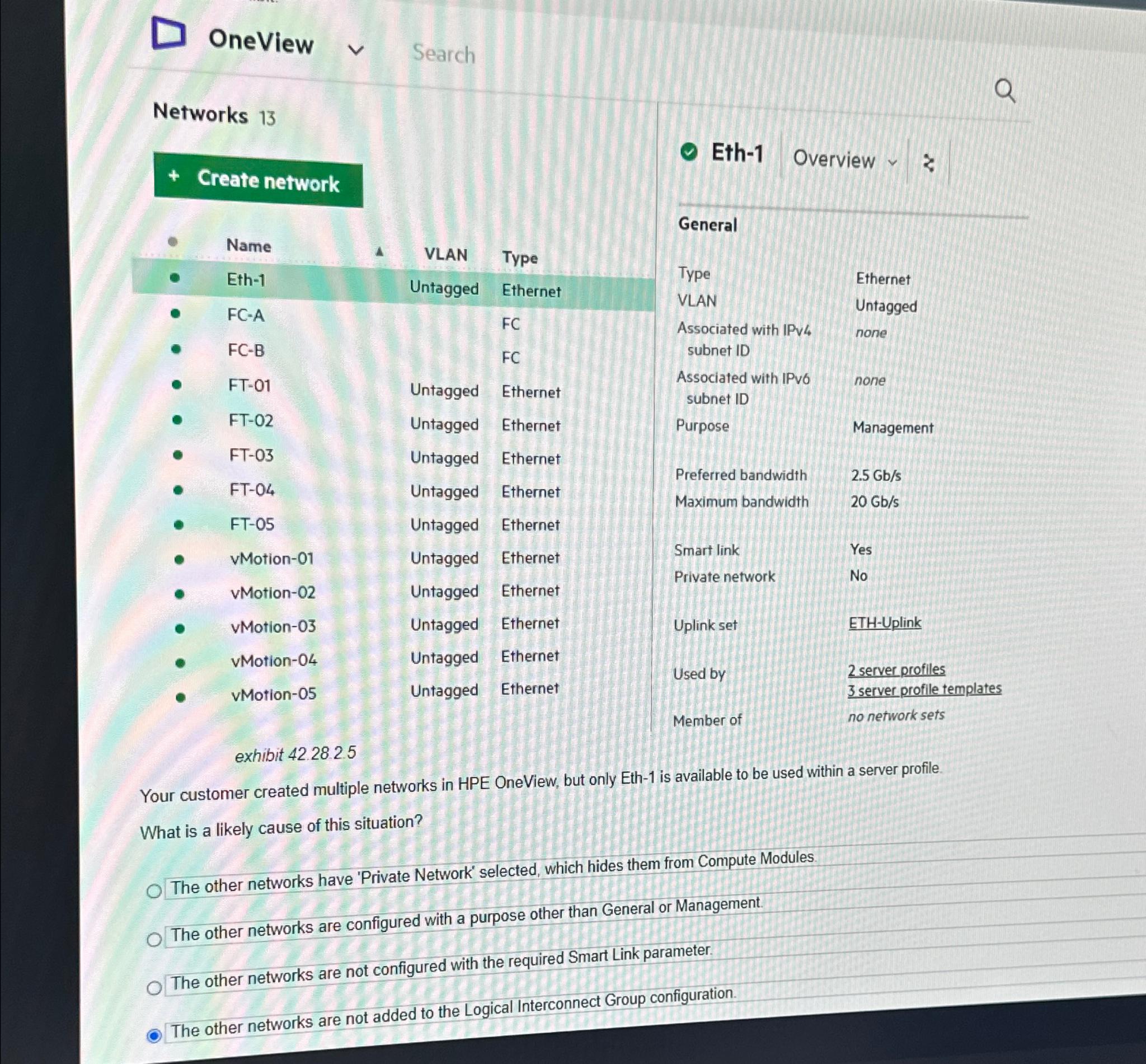
Question: OneView Search Networks 1 3 Create network exhibit 4 2 . 2 8 . 2 . 5 Eth - 1 Overview General Type VLAN Ethernet
OneView
Search
Networks
Create network
exhibit
Eth
Overview
General
Type
VLAN
Ethernet
Untagged
Associated with IPv none subnet ID
Associated with IPvo none subnet ID
Purpose
Management
Preferred bandwidth
Maximum bandwidth
Smart link
Yes
Private network
No
Uplink set
ETHUplink
Used by
Member of
server profiles
server profile templates
no network sets
Your customer created multiple networks in HPE OneView, but only Eth is available to be used within a server profile.
What is a likely cause of this situation?
The other networks have 'Private Network' selected, which hides them from Compute Modules.
The other networks are configured with a purpose other than General or Management.
The other networks are not configured with the required Smart Link parameter.
The other networks are not added to the Logical Interconnect Group configuration.
Step by Step Solution
There are 3 Steps involved in it
1 Expert Approved Answer
Step: 1 Unlock

Question Has Been Solved by an Expert!
Get step-by-step solutions from verified subject matter experts
Step: 2 Unlock
Step: 3 Unlock
 Study Help