







Question: Only need flow charts and test cases. Thank you. Task 1 of 3: Finding n in a Factorial Create a flowchart, test cases, and write

Only need flow charts and test cases. Thank you.
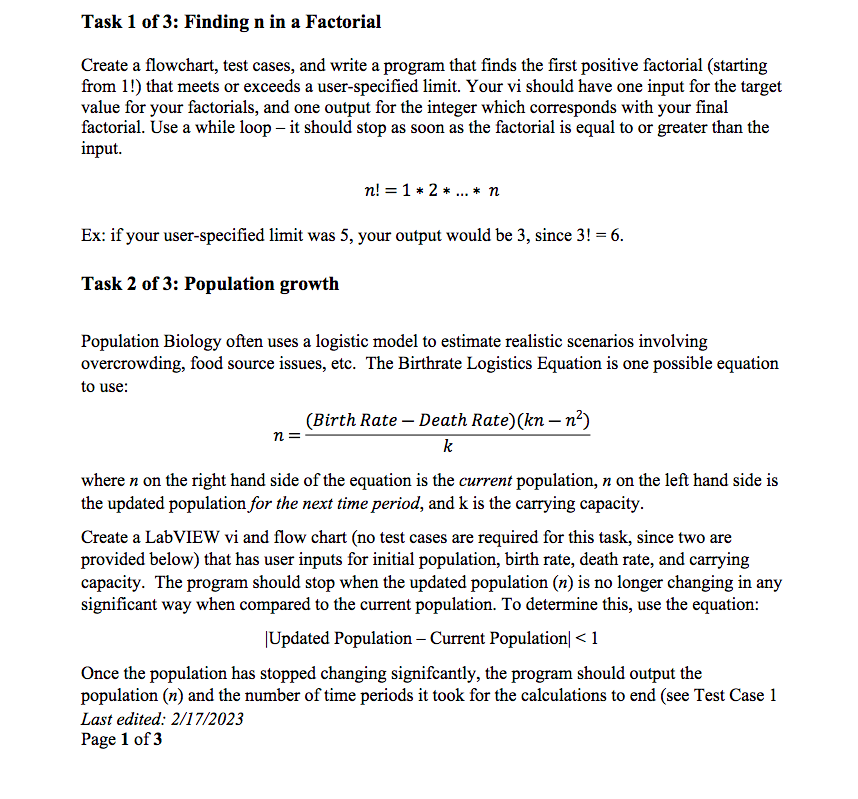
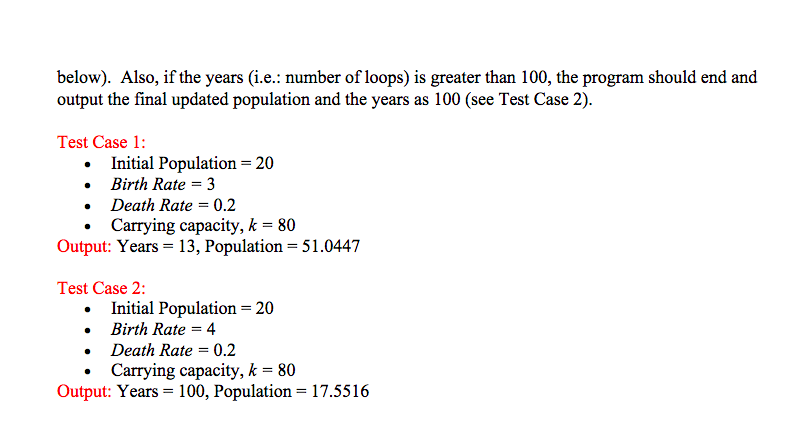
Task 1 of 3: Finding n in a Factorial Create a flowchart, test cases, and write a program that finds the first positive factorial (starting from 1!) that meets or exceeds a user-specified limit. Your vi should have one input for the target value for your factorials, and one output for the integer which corresponds with your final factorial. Use a while loop - it should stop as soon as the factorial is equal to or greater than the input. n!=12n Ex: if your user-specified limit was 5 , your output would be 3 , since 3!=6. Task 2 of 3: Population growth Population Biology often uses a logistic model to estimate realistic scenarios involving overcrowding, food source issues, etc. The Birthrate Logistics Equation is one possible equation to use: n=k(BirthRateDeathRate)(knn2) where n on the right hand side of the equation is the current population, n on the left hand side is the updated population for the next time period, and k is the carrying capacity. Create a LabVIEW vi and flow chart (no test cases are required for this task, since two are provided below) that has user inputs for initial population, birth rate, death rate, and carrying capacity. The program should stop when the updated population (n) is no longer changing in any significant way when compared to the current population. To determine this, use the equation: |Updated Population - Current Population
Step by Step Solution
There are 3 Steps involved in it

Get step-by-step solutions from verified subject matter experts
 Study Help