







Question: Open a blank Excel workbook and save it as a MACRO-ENABLED file. Your workbook must contain only one worksheet. Open the Visual Basic Editor (VBE)
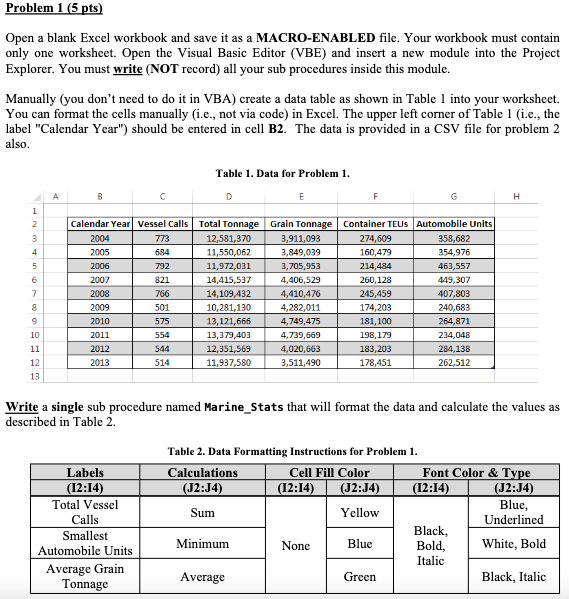
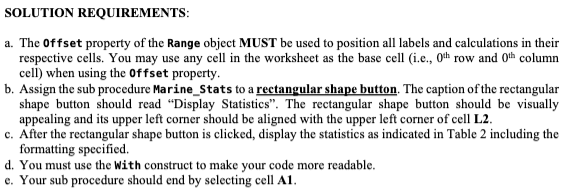
Open a blank Excel workbook and save it as a MACRO-ENABLED file. Your workbook must contain only one worksheet. Open the Visual Basic Editor (VBE) and insert a new module into the Project Explorer. You must write (NOT record) all your sub procedures inside this module. Manually (you don't need to do it in VBA) create a data table as shown in Table 1 into your worksheet. You can format the cells manually (i.e., not via code) in Excel. The upper left corner of Table 1 (i.e., the label "Calendar Year") should be entered in cell B2. The data is provided in a CSV file for problem 2 also. Table 1. Data for Problem 1. Write a single sub procedure named Marine_Stats that will format the data and calculate the values as described in Table 2. SOLUTION REQUIREMENTS: a. The Offset property of the Range object MUST be used to position all labels and calculations in their respective cells. You may use any cell in the worksheet as the base cell (i.e., 0th row and 0th column cell) when using the offset property. b. Assign the sub procedure Marine_Stats to a rectangular shape button. The caption of the rectangular shape button should read "Display Statistics". The rectangular shape button should be visually appealing and its upper left corner should be aligned with the upper left corner of cell L2. c. After the rectangular shape button is clicked, display the statistics as indicated in Table 2 including the formatting specified. d. You must use the With construct to make your code more readable. e. Your sub procedure should end by selecting cell A1
Step by Step Solution
There are 3 Steps involved in it

Get step-by-step solutions from verified subject matter experts
 Study Help