







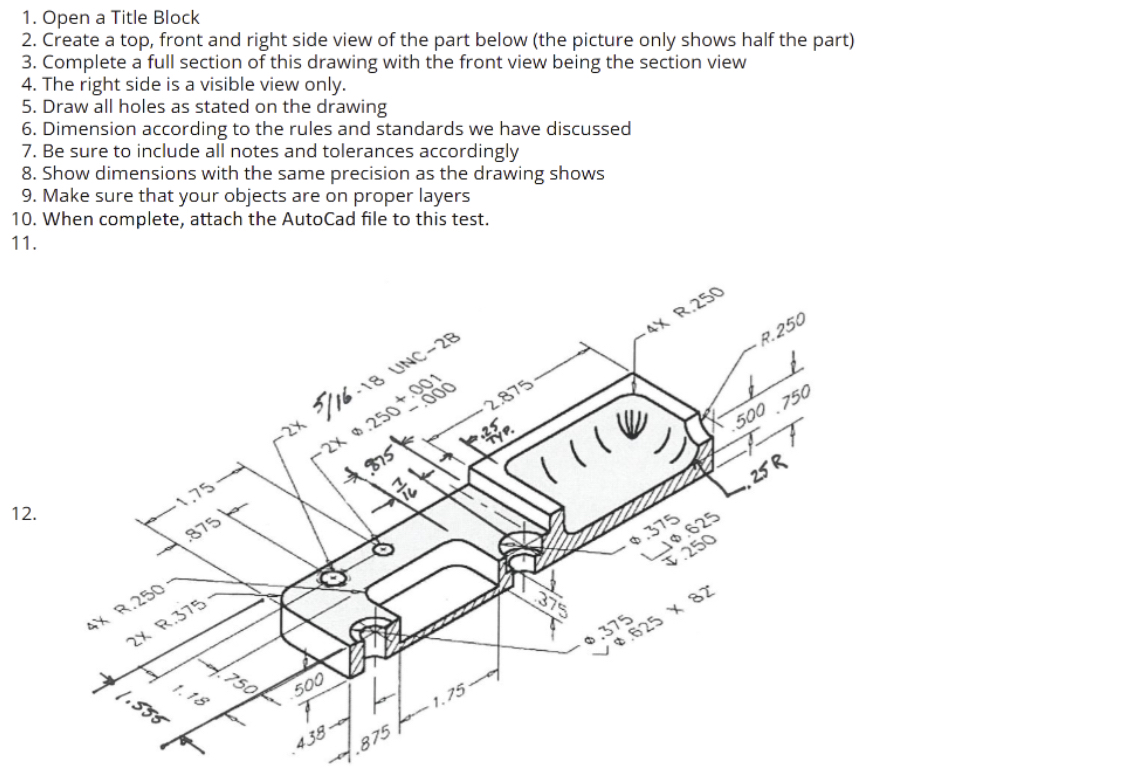
Question: Open a Title Block Create a top, front and right side view of the part below ( the picture only shows half the part )
Open a Title Block
Create a top, front and right side view of the part below the picture only shows half the part
Complete a full section of this drawing with the front view being the section view
The right side is a visible view only.
Draw all holes as stated on the drawing
Dimension according to the rules and standards we have discussed
Be sure to include all notes and tolerances accordingly
Show dimensions with the same precision as the drawing shows.
please make sure to explain each step as much as possible so That I draw it in the Autocad version
Step by Step Solution
There are 3 Steps involved in it
1 Expert Approved Answer
Step: 1 Unlock

Question Has Been Solved by an Expert!
Get step-by-step solutions from verified subject matter experts
Step: 2 Unlock
Step: 3 Unlock
 Study Help