







Question: Open Eclipse and create a new Java project. We'll be using StdDraw (which you should be familiar with from Intro 2), so make sure to
Open Eclipse and create a new Java project. We'll be using StdDraw (which you should be familiar with from Intro 2), so make sure to attach that library to your project.
Download the Starter Code, and add its source files to this project. In the starter code, you'll find three classes for creating and storing mazes and a TestMazeDriver class demonstrating their use.
Maze is an object for storing a maze. Mazes can be thought of as a 2d array of rooms. Each room may have exits to the north, south, east, and west. This class provides helper methods for modifying the walls in such a maze, as well as a method for drawing a maze using StdDraw.
Coord is an immutable object for storing a row and column of a room in a maze. This class contains a helper method to get coordinates in certain directions.
Direction is an enumeration (Links to an external site.)Links to an external site. specifying the cardinal directions (north, south, east, and west). We haven't mentioned enumerations much, but they are often used for small sets of constants. There are only four cardinal directions, so it makes sense to have a set of constants representing them. You can access them using Direction.NORTH,Direction.SOUTH,Direction.EAST, and Direction.WEST. Directions have some useful helper methods; for example,Direction.NORTH.getOpposite() returns Direction.SOUTH.
These classes are just provided to help you store and draw mazes easily. You should not modify any of these files.
Part I : Generating a Maze
Add a class MazeGenerator to your project. In this class, you will implement methods that take in aMazeobject, and set up walls and exits from each room to create an actual maze. You may use whatever process you like to generate a maze, but a generated maze should have two properties:
There should be a path from each cell to any other
There should be no loops in the maze
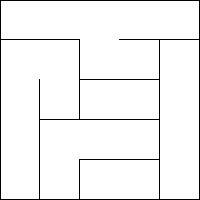 | 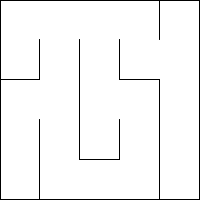 | 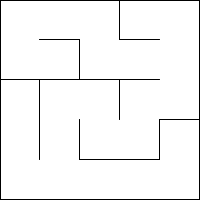 |
| Invalid Maze: Many cells are unconnected | Invalid Maze: Maze contains a loop | Valid Maze: All cells are connected and there are no loops |
There are a ton of ways to generate a maze. Wikipedia (Links to an external site.)Links to an external site. and one of its references (Links to an external site.)Links to an external site. offer quite a few different approaches, as well as comments about the structures they generate. Be creative and see what you can make!
In order to get full points on this section, your maze generation algorithm should have an element of randomness to it (it should be able to generate multiple different mazes). Like the valid maze in the above figure, it should have some twists and turns, so that the maze is not too easy to solve.
Part II: Solving a Maze
Once we have a maze, we'd like to be able to "solve it" by moving from some starting location to some target location. There are many ways of searching through a maze, but you'll be implementing two specific algorithms: depth-first search and breadth-first search. As you'll see below, these algorithms are very similar; the only difference is that one stores its data in a Stack, while the other stores its data a Queue.
Add a class MazeSolver to your project. In this class, you will implement two methods:
public static int solveDFS(Maze maze, Coord start, Coord target, boolean shouldDraw)
public static int solveBFS(Maze maze, Coord start, Coord target, boolean shoudDraw)
Note: "DFS" is short for "depth-first search", and "BFS" is short for "breadth-first search".
The basic idea behind these searches is to store a collection of rooms that we haven't explored yet, which starts out containing only the starting point. Each time we "explore" a room, we add its reachable neighbors to our collection. We keep going until either we run out of rooms to explore, or we find the target.
The basic pseudocode for one of these searches is below:
depthFirstSearch(maze, start, target, shouldDraw): // create a stack of rooms to explore, and start with the starting coordinate roomsToExplore is a new empty stack of Coords add start to the roomsToExplore roomsExplored = 0 // explore rooms until we have nothing left to explore while roomsToExplore is not empty: c is roomsToExplore.pop roomsExplored += 1 if c == target: return roomsExplored for every neighboring room n of c in maze: if n hasn't been explored yet: add n to the roomsToExplore if shouldDraw: draw a line from c to n
The only difference between this method and a breadth-first search is that a breadth-first search uses a Queue instead of a Stack. Other than that, the code is exactly the same! A few things to note:
Your solver returns an int representing the number of rooms explored. This isn't the actual path, but is instead the cost of performing the search. You'll use this in your analysis in Part III, below.
Your solver should draw the process it took to solve this maze if shouldDraw is true. The last line in the pseudocode above -- "draw a line from c to n" -- draws a line connecting each two cells the solver explores, so you should be able to see exactly what the code is doing.
One tricky part of the previous code is the 4th-to-last line: "if n hasn't been explored yet". You'll need some way of tracking which cells have been explored. Hint: could you keep a boolean for each cell?
In order to test your code, run your solvers on solve some of the mazes you generated in Part I, above.
Part III:: Driver and Efficiency Analysis
Include a Driver class, which performs the tests mentioned in the previous parts. Generate and display aMaze using some generation algorithm (Part I), and then solve that maze using one of your searches (Part II).
Once you're sure your generator and solver are working, you'll be able to watch how each solver tries to solve a maze. Now we're in a situation which should be becoming familiar: we have two different algorithms which solve the same problem, so let's find out which is faster!
Both of your methods from Part II return the number of rooms explored during their searches. Use that to measure their efficiency instead of timing them.
Add code which does the following:
Generates 100 random mazes of size 100 by 100.
Creates 100 random test problems on each maze, and runs depth-first search and breadth-first search on each one. Just pick a random start and target coordinate.
Keeps track of the number of the total number of rooms explored by each algorithm across all searches.
Print out the average number of rooms explored by each search. In a comment, try to explain any differences you see in the results between depth-first and breadth-first.
Note: your results in this part are highly dependent on the mazes you are testing on. Don't be surprised if your results differ from your friends' results if you are using different generation algorithms.
****Below is the starter code. Please separate the classes and label what they do.*******
public class Maze {
// member variables
// -- stores the dimensions
private int rows;
private int cols;
// -- stores the walls (vertical and horizontal walls stored separately)
private boolean[][] vertical;
private boolean[][] horizontal;
// constructor
public Maze(int rows, int cols) {
// validate rows and cols
if(rows
throw new IllegalArgumentException("invalid dimensions: " + rows + ", " + cols);
// set the dimension variables
this.rows = rows;
this.cols = cols;
// construct the arrays for the maze:
// an entry is true if there is a gap, otherwise false
vertical = new boolean[this.rows][this.cols + 1];
horizontal = new boolean[this.rows + 1][this.cols];
}
// getters
public int getRows() { return rows; }
public int getCols() { return cols; }
// checks whether a Coord is within the bounds of the maze
public boolean hasCoord(Coord c) {
return (0
}
// validates a Coord by throwing an exception if the Coord is out of bounds
private void validateCoord(Coord c) {
if(!hasCoord(c))
throw new IllegalArgumentException("invalid coordinates: " + c);
}
// checks whether there is an exit from a cell in a specified direction
public boolean hasExit(Coord c, Direction dir) {
validateCoord(c);
switch(dir) {
case NORTH: return horizontal[c.getRow()][c.getCol()];
case SOUTH: return horizontal[c.getRow() + 1][c.getCol()];
case EAST: return vertical[c.getRow()][c.getCol() + 1];
case WEST: return vertical[c.getRow()][c.getCol()];
default:
throw new AssertionError("unsupported direction: " + dir);
}
}
// setter for adding either a wall (value = false), or an exit
// (value = true) to a cell in a specified direction
public void setExit(Coord c, Direction dir, boolean value) {
validateCoord(c);
switch(dir) {
case NORTH: horizontal[c.getRow()][c.getCol()] = value; break;
case SOUTH: horizontal[c.getRow() + 1][c.getCol()] = value; break;
case EAST: vertical[c.getRow()][c.getCol() + 1] = value; break;
case WEST: vertical[c.getRow()][c.getCol()] = value; break;
default:
throw new AssertionError("unsupported direction: " + dir);
}
}
// returns the number of exits (directions without walls) from a given cell
public int getExitCount(Coord c) {
validateCoord(c);
// count up the exits
int exitCt = 0;
for(Direction dir : Direction.values()) {
if(hasExit(c, dir)) {
exitCt++;
}
}
// return that count
return exitCt;
}
// gets the directions of exits from the specified cell. if there are no
// exits, an array of length 0 is returned
public Direction[] getExits(Coord c) {
validateCoord(c);
// count the exits from that cell
int exitCt = getExitCount(c);
// fill array with directions
Direction[] exits = new Direction[exitCt];
int exitIdx = 0;
for(Direction dir : Direction.values()) {
if(hasExit(c, dir)) {
exits[exitIdx++] = dir;
}
}
// return exits
return exits;
}
// reset method
public void setAllExits(boolean value) {
// sets all of the exits to the specified value (false=wall, true=exit)
// -- sets all of the verticals
for(int i = 0; i
for(int j = 0; j
vertical[i][j] = value;
}
}
// -- sets all of the horizontals
for(int i = 0; i
for(int j = 0; j
horizontal[i][j] = value;
}
}
}
// method to display using StdDraw
public void draw() {
// draws each cell as a 1x1 square
// -- vertical lines
for(int i = 0; i
for(int j = 0; j
if(vertical[i][j] == false) {
// get the upper-left drawing coordinates of that cell
int x = j;
int y = rows - i;
// draw a line downwards to the lower-right corner
StdDraw.line(x, y, x, y - 1);
}
}
}
// -- horizontal lines
for(int i = 0; i
for(int j = 0; j
if(horizontal[i][j] == false) {
// get the upper-left drawing coordiantes of that cell
int x = j;
int y = rows - i;
// draw a horizontal line to the upper-right corner
StdDraw.line(x, y, x + 1, y);
}
}
}
}
}
***************************************************
public class Coord {
// stores the row and column of a cell
private final int row;
private final int col;
// constructor
public Coord(int row, int col) {
this.row = row;
this.col = col;
}
// getters
public int getRow() { return row; }
public int getCol() { return col; }
// getting a coord from a direction
public Coord getNeighbor(Direction dir) {
switch(dir) {
case NORTH: return new Coord(row - 1, col);
case SOUTH: return new Coord(row + 1, col);
case EAST: return new Coord(row, col + 1);
case WEST: return new Coord(row, col - 1);
default:
throw new AssertionError("unsupported direction: " + dir);
}
}
// method for printing
public String toString() {
return row + ", " + col;
}
// method for equals check
public boolean equals(Object other) {
// (1) check that the other object exists
if(other == null)
return false;
// (2) check that the other object is a Coord
if(this.getClass() != other.getClass())
return false;
// (3) downcast into a Coord, and compare 'row' and 'col' values
Coord otherCoord = (Coord)other;
return (this.row == otherCoord.row) && (this.col == otherCoord.col);
}
}
****************************************************************************************
public enum Direction {
// the available directions
NORTH, SOUTH, EAST, WEST;
// gets the direction that results from turning 180 degrees
public Direction getOpposite() {
switch(this) {
case NORTH: return SOUTH;
case EAST: return WEST;
case SOUTH: return NORTH;
case WEST: return EAST;
default:
throw new AssertionError("unsupported direction: " + this);
}
}
// gets the direction that results from turning left 90 degrees
public Direction getLeft() {
switch(this) {
case NORTH: return WEST;
case EAST: return NORTH;
case SOUTH: return EAST;
case WEST: return SOUTH;
default:
throw new AssertionError("unsupported direction: " + this);
}
}
// gets the direction that results from turning right 90 degrees
public Direction getRight() {
switch(this) {
case NORTH: return EAST;
case EAST: return SOUTH;
case SOUTH: return WEST;
case WEST: return NORTH;
default:
throw new AssertionError("unsupported direction: " + this);
}
}
}
*********************************************************************************
import edu.princeton.cs.introcs.StdDraw;
public class TestMazeDriver {
// some simple test methods
// -- just removes the walls from the center cell
public static void removeWallsFromCentralCell(Maze mz) {
// get the coords from the central cell
Coord center = new Coord(mz.getRows() / 2, mz.getCols() / 2);
// add exits in every direction
for(Direction dir : Direction.values()) {
mz.setExit(center, dir, true);
}
}
// -- more complicated: makes a 'comb' in the maze. that is, the cells in
// the top row are all connected left-to-right, and the cells of each
// column are connected top-to-bottom
public static void makeCombMaze(Maze mz) {
// (1) connect all cells in the first row horizontally
for(int col = 0; col
mz.setExit(new Coord(0, col), Direction.EAST, true);
}
// (2) connect all cells in each column vertically
for(int row = 0; row
for(int col = 0; col
mz.setExit(new Coord(row, col), Direction.SOUTH, true);
}
}
}
// main method
public static void main(String[] args) {
// specify the dimensions of a maze
final int rows = 10;
final int cols = 10;
final int pixelsPerCell = 50;
// create a maze of the specified dimensions
Maze mz = new Maze(rows, cols);
// choose your initialization method! without one of these methods,
// the maze will simply look like a grid, since no cell has any exits
//removeWallsFromCentralCell(mz);
//makeCombMaze(mz);
// set up StdDraw to display the maze
StdDraw.setCanvasSize(mz.getCols() * pixelsPerCell, mz.getRows() * pixelsPerCell);
StdDraw.setXscale(0, mz.getCols());
StdDraw.setYscale(0, mz.getRows());
StdDraw.enableDoubleBuffering();
// draw the maze, and show it!
mz.draw();
StdDraw.show();
}
}
Step by Step Solution
There are 3 Steps involved in it

Get step-by-step solutions from verified subject matter experts
 Study Help