Question: Open vba hwk4.xlsm workbook and using the Visual Basic Editor (VBE), open Modulel. You will see Macro10), which creates a Clustered Bar chart for a
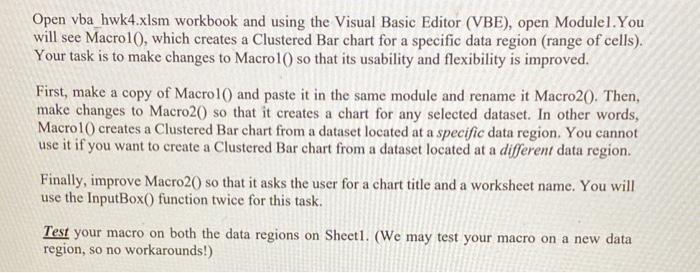
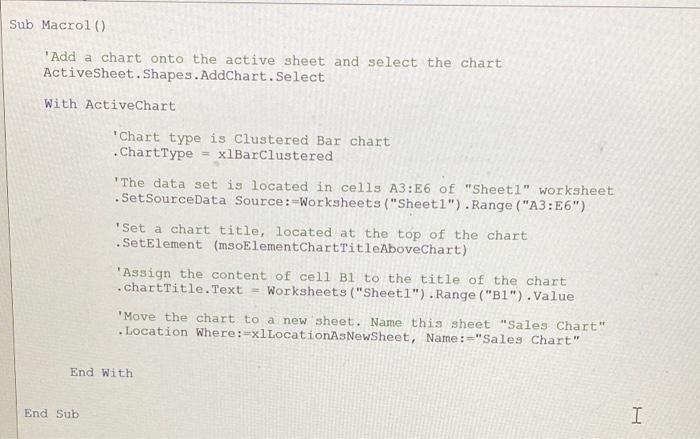
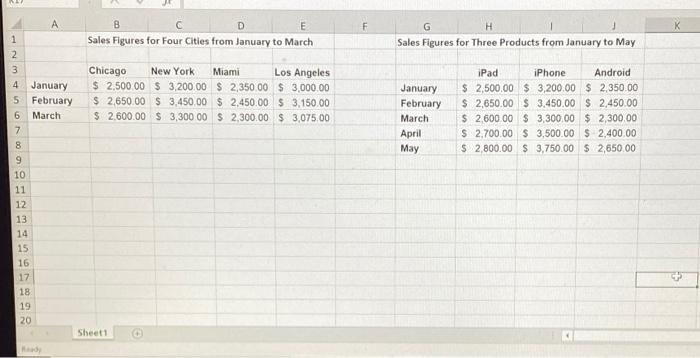
Open vba hwk4.xlsm workbook and using the Visual Basic Editor (VBE), open Modulel. You will see Macro10), which creates a Clustered Bar chart for a specific data region (range of cells). Your task is to make changes to Macrol() so that its usability and flexibility is improved. First, make a copy of Macrol() and paste it in the same module and rename it Macro20. Then, make changes to Macro20) so that it creates a chart for any selected dataset. In other words, Macro10) creates a Clustered Bar chart from a dataset located at a specific data region. You cannot use it if you want to create a Clustered Bar chart from a dataset located at a different data region. Finally, improve Macro20) so that it asks the user for a chart title and a worksheet name. You will use the InputBox() function twice for this task. Test your macro on both the data regions on Sheet1. (We may test your macro on a new data region, so no workarounds!) Sub Macrol) "Add a chart onto the active sheet and select the chart ActiveSheet.Shapes. AddChart.Select With ActiveChart Chart type is Clustered Bar chart .ChartType xlBarClustered "The data set is located in cells A3:E6 of "Sheetl" worksheet .SetSourceData Source :-Worksheets ("Sheet1").Range("A3:56") "Set a chart title, located at the top of the chart .SetElement (msoElementChartTitleAboveChart) Assign the content of cell Bl to the title of the chart .chartTitle.Text = Worksheets("Sheet1").Range("B1").Value 'Move the chart to a new sheet. Name this sheet "Sales Chart" Location Where:=xllocationAsNewSheet, Name: -"Sales Chart" End With End Sub I A F K B D E Sales Figures for Four Cities from January to March 1 G H Sales Figures for Three Products from January to May N 3 4 January 5 February 6 March 7 Chicago New York Miami Los Angeles $ 2,500.00 $ 3,200.00 $ 2,350.00 $ 3,000.00 $ 2,650.00 $ 3,450.00 $ 2.450.00 $ 3.150.00 $ 2.600.00 $ 3,300.00 $ 2,300.00 $ 3.075.00 January February March April May iPad iPhone Android $ 2,500.00 $ 3,200.00 $ 2.350.00 $ 2,650.00 $ 3.450.00 $ 2,450.00 $ 2.60000 $ 3,300.00 $ 2,300.00 $ 2.700.00 $ 3,500.00 $ 2,400.00 $ 2,800.00 $ 3,750.00 $ 2,650.00 8 9 10 11 12 13 14 15 16 17 18 19 20 Sheet1









 Study Help