







Question: Open vba_hwk4.xlsm workbook and using the Visual Basic Editor (VBE), open Module1. You will see Macro1(), which creates a Clustered Bar chart for a specific
Open vba_hwk4.xlsm workbook and using the Visual Basic Editor (VBE), open Module1. You will see Macro1(), which creates a Clustered Bar chart for a specific data region (range of cells). Your task is to make changes to Macro1() so that its usability and flexibility is improved. First, make a copy of Macro1() and paste it in the same module and rename it Macro2(). Then, make changes to Macro2() so that it creates a chart for any selected dataset. In other words, Macro1() creates a Clustered Bar chart from a dataset located at a specific data region. You cannot use it if you want to create a Clustered Bar chart from a dataset located at a different data region. Finally, improve Macro2() so that it asks the user for a chart title and a worksheet name. You will use the InputBox() function twice for this task. Test your macro on both the data regions on Sheet1. (We may test your macro on a new data region, so no workarounds!)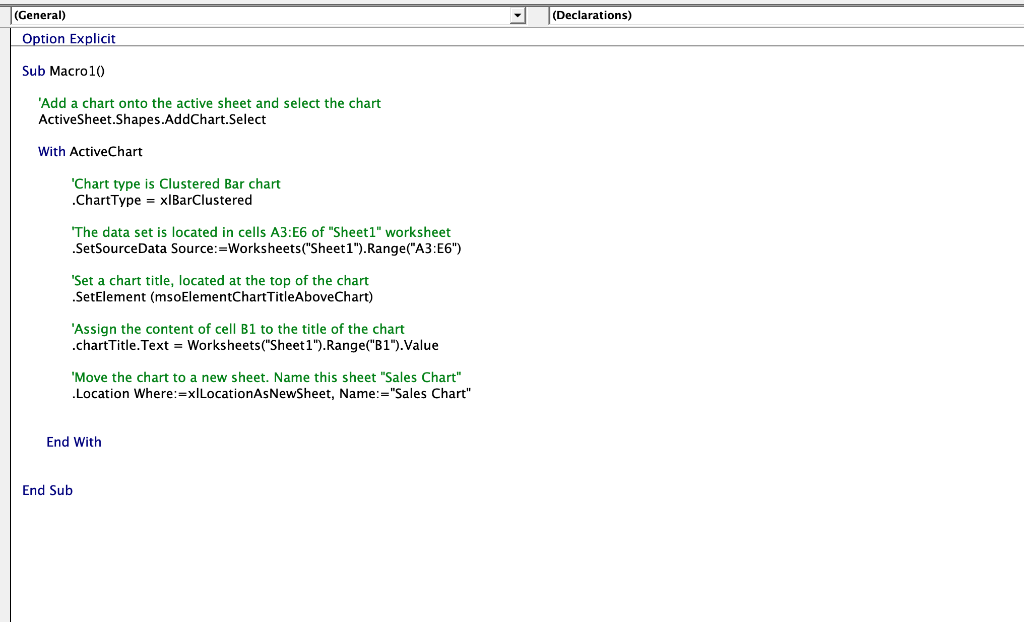
Step by Step Solution
There are 3 Steps involved in it

Get step-by-step solutions from verified subject matter experts
 Study Help