







Question: ******OpenGL******* can someone help writing openGL code for making a clock 1. (3pt) Draw the clock face. Your clock face can be a white (or
******OpenGL******* can someone help writing openGL code for making a clock
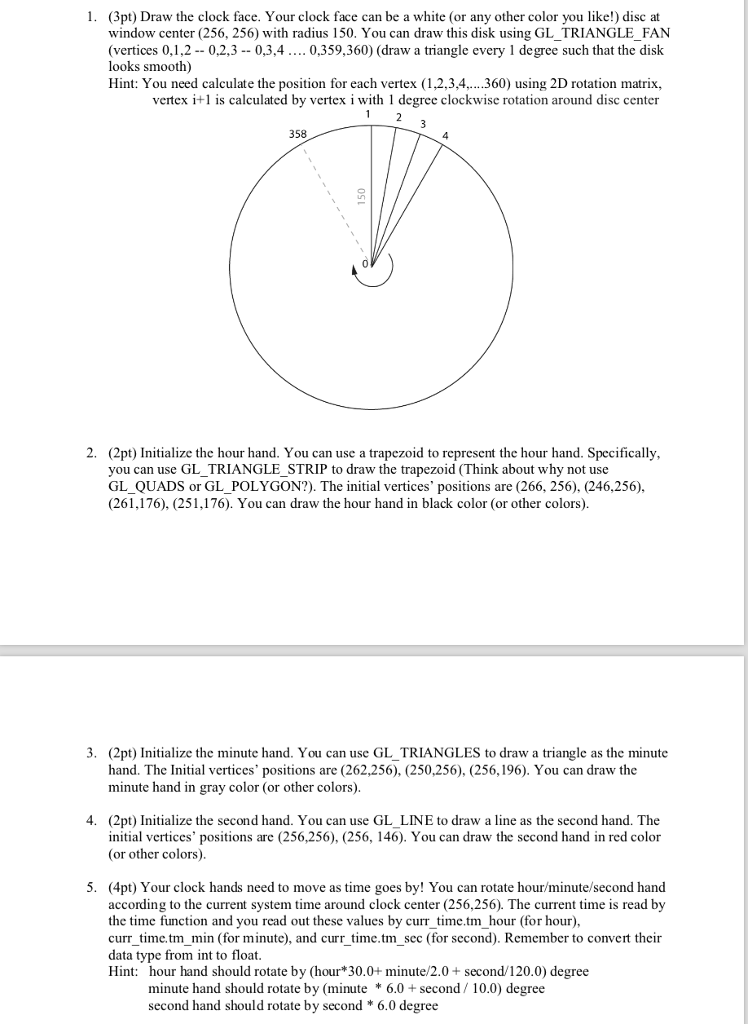
1. (3pt) Draw the clock face. Your clock face can be a white (or any other color you like!) disc at window center (256, 256) with radius 150. You can draw this disk using GL_TRIANGLE_FAN (vertices 0,1,2 0,2,3-- 0,3,4 0,359,360) (draw a triangle every 1 degree such that the dislk looks smooth) Hint: You need calculate the position for each vertex (1,2,3,4. 360 using 2D rotation matrix, vertex i+1 is calculated by vertex i with l degree clockwise rotation around disc center 358 2. (2pt) Initialize the hour hand. You can use a trapezoid to represent the hour hand. Specifically, you can use GL_TRIANGLE STRIP to draw the trapezoid (Think about why not use GL_QUADS or GL_POLYGON?). The initial vertices' positions are (266, 256). (246,256), (261,176), (251,176). You can draw the hour hand in black color (or other colors). 3. (2pt) Initialize the minute hand. You can use GL_TRIANGLES to draw a triangle as the minute hand. The Initial vertices' positions are (262,256), (250,256), (256,196). You can draw the minute hand in gray color (or other colors) 4. (2pt) Initialize the second hand. You can use GL_LINE to draw a line as the second hand. The initial vertices' positions are (256,256), (256, 146). You can draw the second hand in red color (or other colors) 5. (4pt) Your clock hands need to move as time goes by! You can rotate hour/minute/second hand according to the current system time around clock center (256,256). The current time is read by the time function and you read out these values by currtime.tm hour (for hour), curr time.tm min (for minute), and curr time.tm sec (for second). Remember to convert their data type from int to float Hint: hour hand should rotate by (hour*30.0+ minute/2.0+ second/120.0) degree minute hand should rotate by (minute * 6.0 second/ 10.0) degree second hand should rotate by second 6.0 degree 1. (3pt) Draw the clock face. Your clock face can be a white (or any other color you like!) disc at window center (256, 256) with radius 150. You can draw this disk using GL_TRIANGLE_FAN (vertices 0,1,2 0,2,3-- 0,3,4 0,359,360) (draw a triangle every 1 degree such that the dislk looks smooth) Hint: You need calculate the position for each vertex (1,2,3,4. 360 using 2D rotation matrix, vertex i+1 is calculated by vertex i with l degree clockwise rotation around disc center 358 2. (2pt) Initialize the hour hand. You can use a trapezoid to represent the hour hand. Specifically, you can use GL_TRIANGLE STRIP to draw the trapezoid (Think about why not use GL_QUADS or GL_POLYGON?). The initial vertices' positions are (266, 256). (246,256), (261,176), (251,176). You can draw the hour hand in black color (or other colors). 3. (2pt) Initialize the minute hand. You can use GL_TRIANGLES to draw a triangle as the minute hand. The Initial vertices' positions are (262,256), (250,256), (256,196). You can draw the minute hand in gray color (or other colors) 4. (2pt) Initialize the second hand. You can use GL_LINE to draw a line as the second hand. The initial vertices' positions are (256,256), (256, 146). You can draw the second hand in red color (or other colors) 5. (4pt) Your clock hands need to move as time goes by! You can rotate hour/minute/second hand according to the current system time around clock center (256,256). The current time is read by the time function and you read out these values by currtime.tm hour (for hour), curr time.tm min (for minute), and curr time.tm sec (for second). Remember to convert their data type from int to float Hint: hour hand should rotate by (hour*30.0+ minute/2.0+ second/120.0) degree minute hand should rotate by (minute * 6.0 second/ 10.0) degree second hand should rotate by second 6.0 degree
Step by Step Solution
There are 3 Steps involved in it

Get step-by-step solutions from verified subject matter experts
 Study Help