







Question: Operation This application accepts user entries and validates them according to the specifications below. If the data is valid, this app displays a dialog box
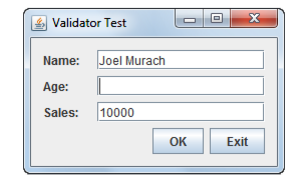
Operation This application accepts user entries and validates them according to the specifications below. If the data is valid, this app displays a dialog box with the message Data accepted and clears the
text fields. Otherwise, this app displays a dialog box with an appropriate error message and moves the focus to the text field with the invalid data.
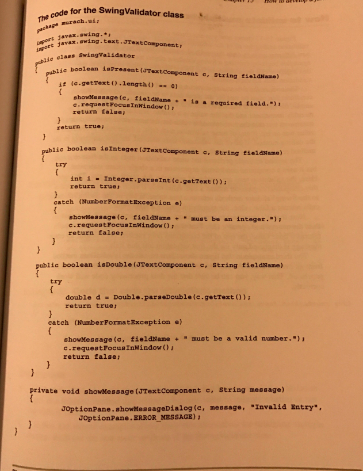
Specifications Use the SwingValidator class shown in chapter 15 to perform the validation. The Name field is required. The Age field is required and must be an integer from 0 to 120. The Sales field is required and must be a valid double value.
Enhancement Modify the SwingValidator class so that it displays error messages in labels on the panel instead of displaying error messages in a dialog box. To do that, you can modify the validation methods so they accept a JLabel parameter. You can modify the showMessage method so it places the error message in the specified label. And you can continue validating fields even after it encounters an invalid field. However ,you can still set the focus to the first invalid field.
Needed for JAVA, working with netbeans
code for the Swingvalidator class elaas String tial duaae fiel durana La required tield. In window return true booleaa ie Integer laTi 8tring fieldName Integer Pate age public boolean isDouble13Textcomponent c. String fieldName double d Double Para Double le return true eateh asumberFormstRxception must be a valid numbe Private void showMenoage (JTextcoaponent e, String mee age) Invalid Entry showMeaaageDialeg (e JoptionPau ERROR MESSAGE) JoptionPani
Step by Step Solution
There are 3 Steps involved in it

Get step-by-step solutions from verified subject matter experts
 Study Help