



Question: optional spreadsheet activity 2-B 3840 3841 $2,054.38 3,150.00 9: Display the bank reconcillation report. 2o: Save your data file (with a file name of 02-BBC
optional spreadsheet activity 2-B
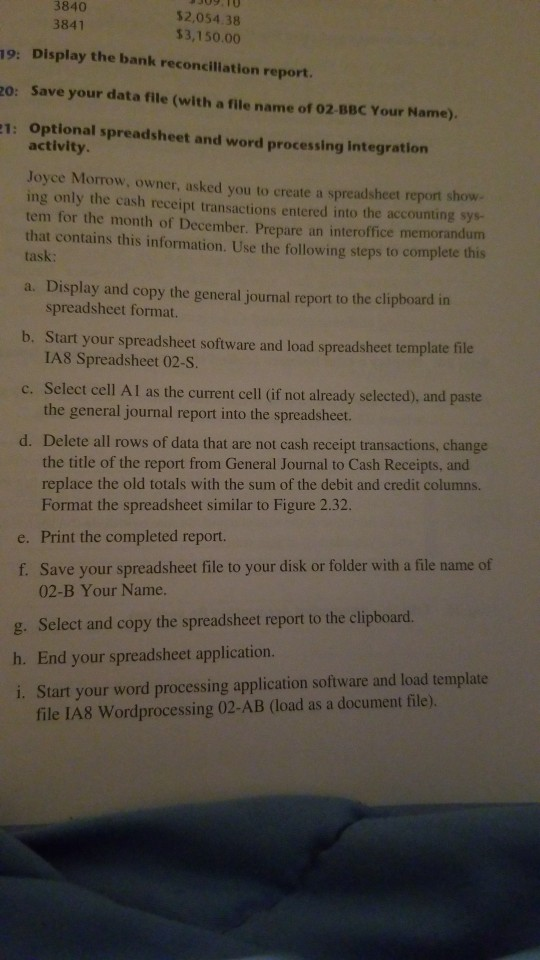
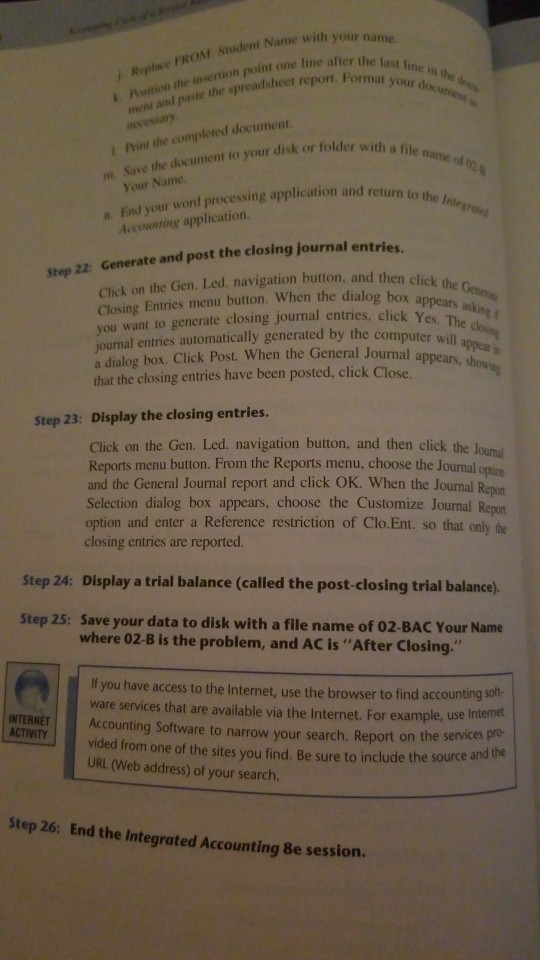
3840 3841 $2,054.38 3,150.00 9: Display the bank reconcillation report. 2o: Save your data file (with a file name of 02-BBC Your Name). 1: Optional spreadsheet and word processing Integration activity. Joyce Morrow, owner, asked you to create a spreadsheet report show ing only the cash receipt transactions entered into the accounting sys- tem for the month of December. Prepare an interoffice memorandum that contains this information. Use the following steps to complete this task: a. Display and copy the general journal report to the clipboard in spreadsheet format. b. Start your spreadsheet software and load spreadsheet template file IA8 Spreadsheet 02-S. c. Select cell Al as the current cell (if not already selected), and paste the general journal report into the spreadsheet d. Delete all rows of data that are not cash receipt transactions, change the title of the report from General Journal to Cash Receipts, and replace the old totals with the sum of the debit and credit columns. Format the spreadsheet similar to Figure 2.32. e. Print the completed report. f. Save your spreadsheet file to your disk or folder with a file name of 02-B Your Name. g. Select and copy the spreadsheet report to the clipboard. h. End your spreadsheet application. i. Start your word processing application software and load template file IA8 Wordprocessing 02-AB (load as a document file). Psition the insertion point one line aftere Re inverticn poheet report. Format your doun ment and paste the last line in the d Format your documen e FROM Student Name with 1 Print the completed document ime of Save the document to your disk or folder with af m. Your Name the Integr n. End your wond processing application and return to Accounting application. step 22. Generate and post the closing journal entries Click on the Gen. Led. navigation button, and then click h Closing Entries menu button. When the dialog boxa you want to generate closing journal entries, click Yes. Tan joumal entries automatically generated by the computer will a dialog box. Click Post. When the General Journalar that the closing entries have been posted, click Close. h ars appears, Step 23: Display the closing entries. Click on the Gen. Led. navigation button, and then click the louna Reports menu button. From the Reports menu, choose the Joumal option and the General Journal report and click OK. When the Journal Repon Selection dialog box appears, choose the Customize Journal Repan option and enter a Reference restriction of Clo.Ent. so that only the closing entries are reported Step 24: Display a trial balance (called the post-closing trial balance). Step 25: Save your data to disk with a file name of 02-BAC Your Name where 02-B is the problem, and AC is "After Closing. If you have access to the Internet, use the browser to find accounting solt- ware services that are available via the Internet. For example, use In NTERNET Accounting Software to narrow your search. Report on the services pro ACTIVITY vided from one of the sites you find. Be sure to include the source and URL (Web address) of your search. Step 26: End the Integrated Accounting 8e session. 3840 3841 $2,054.38 3,150.00 9: Display the bank reconcillation report. 2o: Save your data file (with a file name of 02-BBC Your Name). 1: Optional spreadsheet and word processing Integration activity. Joyce Morrow, owner, asked you to create a spreadsheet report show ing only the cash receipt transactions entered into the accounting sys- tem for the month of December. Prepare an interoffice memorandum that contains this information. Use the following steps to complete this task: a. Display and copy the general journal report to the clipboard in spreadsheet format. b. Start your spreadsheet software and load spreadsheet template file IA8 Spreadsheet 02-S. c. Select cell Al as the current cell (if not already selected), and paste the general journal report into the spreadsheet d. Delete all rows of data that are not cash receipt transactions, change the title of the report from General Journal to Cash Receipts, and replace the old totals with the sum of the debit and credit columns. Format the spreadsheet similar to Figure 2.32. e. Print the completed report. f. Save your spreadsheet file to your disk or folder with a file name of 02-B Your Name. g. Select and copy the spreadsheet report to the clipboard. h. End your spreadsheet application. i. Start your word processing application software and load template file IA8 Wordprocessing 02-AB (load as a document file). Psition the insertion point one line aftere Re inverticn poheet report. Format your doun ment and paste the last line in the d Format your documen e FROM Student Name with 1 Print the completed document ime of Save the document to your disk or folder with af m. Your Name the Integr n. End your wond processing application and return to Accounting application. step 22. Generate and post the closing journal entries Click on the Gen. Led. navigation button, and then click h Closing Entries menu button. When the dialog boxa you want to generate closing journal entries, click Yes. Tan joumal entries automatically generated by the computer will a dialog box. Click Post. When the General Journalar that the closing entries have been posted, click Close. h ars appears, Step 23: Display the closing entries. Click on the Gen. Led. navigation button, and then click the louna Reports menu button. From the Reports menu, choose the Joumal option and the General Journal report and click OK. When the Journal Repon Selection dialog box appears, choose the Customize Journal Repan option and enter a Reference restriction of Clo.Ent. so that only the closing entries are reported Step 24: Display a trial balance (called the post-closing trial balance). Step 25: Save your data to disk with a file name of 02-BAC Your Name where 02-B is the problem, and AC is "After Closing. If you have access to the Internet, use the browser to find accounting solt- ware services that are available via the Internet. For example, use In NTERNET Accounting Software to narrow your search. Report on the services pro ACTIVITY vided from one of the sites you find. Be sure to include the source and URL (Web address) of your search. Step 26: End the Integrated Accounting 8e session
Step by Step Solution
There are 3 Steps involved in it

Get step-by-step solutions from verified subject matter experts