







Question: ormal Problem: To understand File VO operations: a. Writing data to one or more external filen b. Reading from an external file and computing statistics.
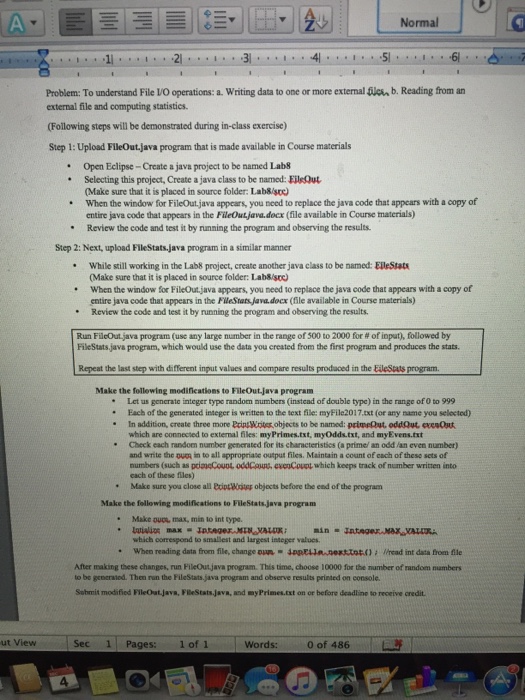
ormal Problem: To understand File VO operations: a. Writing data to one or more external filen b. Reading from an external file and computing statistics. (Following steps will be demonstrated during in-class exercise) Step 1: Upload FlleOut.java program that is made available in Course materials Open Eclipse-Create a java project to be named Lab8 Selecting this project, Create a java class to be named: Eileout Make sure that it is placed in source folder: Lab&/stc) When the window for FileOut java appears, you need to replace the java code that appears with a copy of entire java code that appcars in the FileOut java.docx (file available in Course materials) Review the code and test it by running the program and observing the results. Step 2: Next, upload FleStats java program in a similar manner While still working in the Lab8 project, create another java class to be named: ElleStats (Make sure that it is placed in source folder: Lab&/soc When the window for FileOut,java appears, you need to replace the java code that appears with a copy of entire java code that appears in the FleStats java docx (file available in Course materials) Review the code and test it by running the program and observing the results * Run FileOut java program (use any large number in the range of g00 to 2000 for #0f input), followed by FileStats java program, which would use the data you created from the first program and produces the stats Repeat the last step with different input values and compare results prodaced in the EileStats program. Make the follewing modifications to FileOut.java program " Let us generate integer type random numbers (instead of double type) in the range of 0 to 999 " In addition, create three more Eint Wites, objects to be named: primeQut oddQout, evesOut Check each random number generated for its characteristics (a prime, an odd an even number) Fach of the generated integer is written to the text file: myFile2017.xt (or any name you selected) which are connected to external files: my Primes.tst, myOdds.txt, and myEvens.txt and write the ouer in to all appropriate output files. Maintain a count of cach of these sets of numbers (such as pda acouoL oddClucuocoup lwhich keeps track of number written into each of these files) Make sure you close all ExiptWeg objocts before the end of the program Make the following modifications to FileStatsjava program Make OuDL, max, min to int type. which correspond to smallest and largest integer values. When reading data from file, change oun JpRELla nexttot)Wread int data from file " After making these changes, run FilleOut java program. This time, choose 10000 for the mumber of random numbers to be generaied. Then run the FileStats java peogram and observe results printed on console. Sebmit modified FlleOut.java, PBeStats Java, and myPrimes.txt on or before deadline to receive credit | . ut View Sec 11 Pages: 1of1 | Words: 00f 486 A
Step by Step Solution
There are 3 Steps involved in it

Get step-by-step solutions from verified subject matter experts
 Study Help