



Question: our professor gave us a template and here it is: import java.awt.BorderLayout; import java.awt.GridLayout; import javax.swing.JButton; import javax.swing.JFrame; import javax.swing.JLabel; import javax.swing.JPanel; import javax.swing.JTextField; public
our professor gave us a template and here it is:
import java.awt.BorderLayout; import java.awt.GridLayout;
import javax.swing.JButton; import javax.swing.JFrame; import javax.swing.JLabel;
import javax.swing.JPanel; import javax.swing.JTextField;
public class Lab14 extends JFrame {
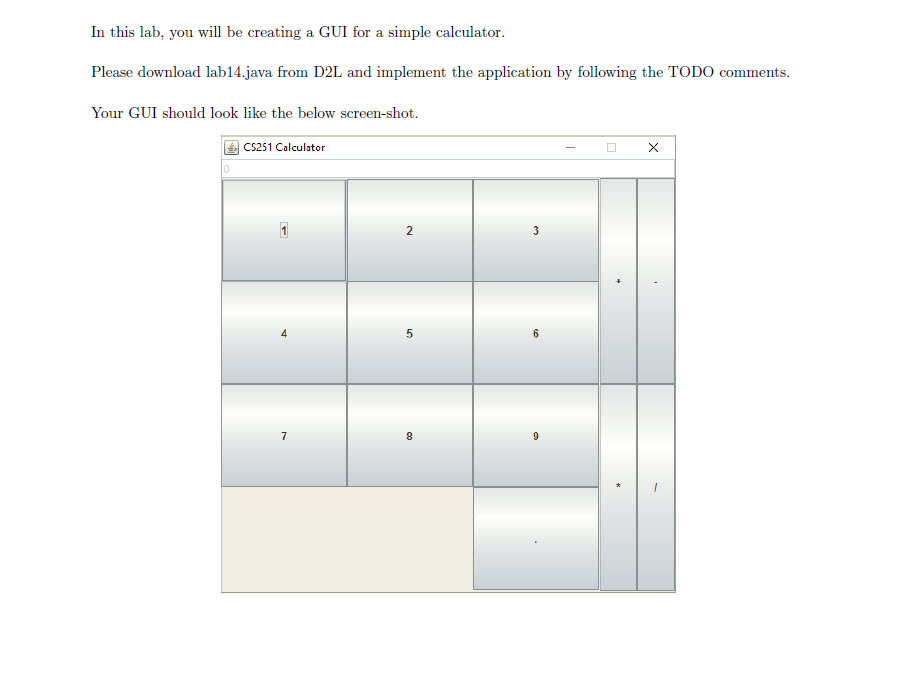
public Lab14() { // TODO Set the title of the Frame to CS251 Calculator // TODO set the size of the Frame to 600 x 600 // TODO Make the Frame non-resizable // TODO place the frame in the middle of the screen // TODO Terminate the program, if we click on the close button of the titlebar. createComponents(); // TODO set the frame to visible }
public void createComponents() {
JPanel numKeysPanel = new JPanel(/* TODO set the layout to a grid layout 4x3*/); JPanel operationKeysPanel = new JPanel(/*TODO set the layout to a grid layout 2x2*/); JButton num1 = new JButton("1"); JButton num2 = new JButton("2"); JButton num3 = new JButton("3"); JButton num4 = new JButton("4"); JButton num5 = new JButton("5"); JButton num6 = new JButton("6"); JButton num7 = new JButton("7"); JButton num8 = new JButton("8"); JButton num9 = new JButton("9"); JLabel emptyCell1 = new JLabel(""); JLabel emptyCell2 = new JLabel(""); JButton decimalPoint = new JButton(".");
// TODO Add num1, num2,....decimalPoint to the numKeysPanel panel
// TODO Create four JButtons with + - * / // TODO Add the JButtons you have created to the operationKeysPanel panel
//TODO Add numKeysPanel to the center region of the JFrame //TODO Add operationKeysPanel to the East region of the JFrame //TODO Create a JTextField object with text "0" and make the JTextField disabled //TODO add the JTextField object to the North region of the JFrame }
public static void main(String[]args){ new Lab14(); }
 }
}
In this lab, you will be creating a GUI for a simple calculator. Please download lab14.java from D2L and implement the application by following the TODO comments Your GUI should look like the below screen-shot. CS251 Calculator
Step by Step Solution
There are 3 Steps involved in it

Get step-by-step solutions from verified subject matter experts