







Question: Outcomes Parsing user input from text boxes Using the assignment and arithmetic operators Develop, test, and debug computer programs Problem Description: A local shoe
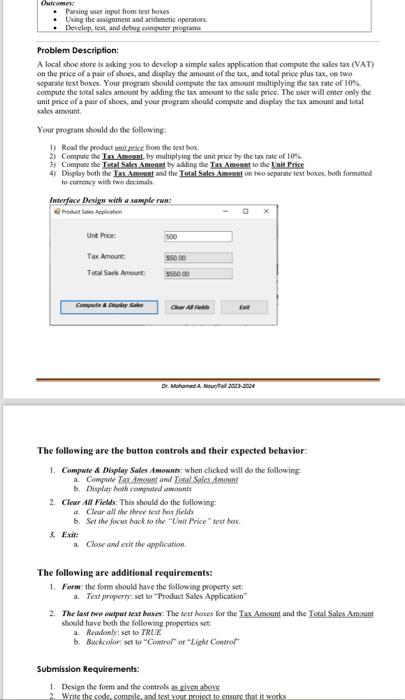
Outcomes Parsing user input from text boxes Using the assignment and arithmetic operators Develop, test, and debug computer programs Problem Description: A local shoe store is asking you to develop a simple sales application that compute the sales tax (VAT) on the price of a pair of shoes, and display the amount of the tax, and total price plus tax, on two separate text boxes. Your program should compute the tax amount multiplying the tax rate of 10% compute the total sales amount by adding the tax amount to the sale price. The user will enter only the unit price of a pair of shoes, and your program should compute and display the tax amount and total sales amount. Your program should do the following: 1) Read the product unit price from the text box. 2) Compute the Tax Amount, by multiplying the unit price by the tax rate of 10% 3) Compute the Total Sales Amount by adding the Tax Amount to the Unit Price 4) Display both the Tax Amount and the Total Sales Amount on two separate text boxes, both formatted to currency with two decimals Interface Design with a sample run: Unit Price: Tax Amount: Total SalsAmount: Compute&play Sales 500 $50.00 $550.00 Clear All Ext Dr. Mohamed A Nou/Foll2023 2024 The following are the button controls and their expected behavior: 1. Compute & Display Sales Amounts: when clicked will do the following a. Compute Tax Amount and Total Sales Amount b. Display both computed amounts 2. Clear All Fields: This should do the following: a. Clear all the three text box fields b. Set the focus back to the "UnitPrice" text box. a. Close and exit the application. The following are additional requirements: 1. Form: the form should have the following property set a. Text property set to "Product Sales Application" 2. The last two output text boxes: The text boxes for the Tax Amount and the Total Sales Amount should have both the following properties set a. Readonly: set to TRUE b. Backcolor: set to "Control" or "Light Control Submission Requirements: 1. Design the form and the controls as given above 2. Write the code, compile, and test your project to ensure that it works
Step by Step Solution
3.50 Rating (157 Votes )
There are 3 Steps involved in it
Based on the requirements youve provided heres an example of how you might design the form and write the code for this simple sales application in a language like C assuming a Windows Forms Applicatio... View full answer

Get step-by-step solutions from verified subject matter experts
 Study Help