







Question: OVERVIEW Please help with this application which helps an organization calculate the cost of expenses. This Visual Basic program implements a budget application from the
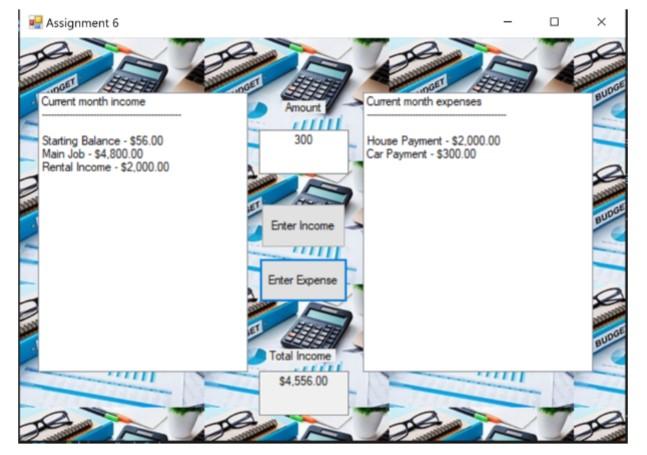
OVERVIEW Please help with this application which helps an organization calculate the cost of expenses. This Visual Basic program implements a budget application from the form below. The program has a class called BudgetReceipts that keeps track of the balance and provides the ability to add to the income and subtract to the expenses.
The application is designed with a two listboxes named lstIncome and lstExpenses, two textboxes named txtAmount and txtIncome, two buttons named btnIncome and btnExpense, and a close button named btnClose. After an initial amount is entered by a user, the total dollar amount is shown in the txtIncome textbox. When the bntIncome button is clicked, the user enters a description of the income and the amount is added to the total. Please edit the code below so that the description of the income and the amount is show in a static list to the user in the lstIncome listbox.
When the btnExpense button is clicked, the user enters a description of the expense and the the amount is subtracted from the total. Please edit the code below so that the description of the expense and the amount is show in a static list to the user in the lstIncome listbox.
Please add comments throughout each sub of the code.
CODE
Public Class Form1 Private budget As BudgetReceipts
Private Sub Form1_Load(sender As Object, e As EventArgs) Handles MyBase.Load Dim initialBalance As Double Do initialBalance = InputBox("Enter starting balance:", "Starting Balance") Loop While initialBalance
Private Sub btnIncome_Click(sender As Object, e As EventArgs) Handles btnIncome.Click If Not IsNumeric(txtAmount.Text) Then MessageBox.Show("Please enter a valid amount.", "Invalid Amount") Return End If
Dim description As String = InputBox("Enter income description:", "Income Description") If description.Trim() = "" Then MessageBox.Show("Please enter a description.", "Invalid Description") Return End If
Dim amount As Double = CDbl(txtAmount.Text) budget.AddIncome(description, amount) txtIncome.Text = budget.Balance.ToString("C") txtAmount.Text = "" End Sub
Private Sub btnExpense_Click(sender As Object, e As EventArgs) Handles btnExpense.Click If Not IsNumeric(txtAmount.Text) Then MessageBox.Show("Please enter a valid amount.", "Invalid Amount") Return End If
Dim description As String = InputBox("Enter expense description:", "Expense Description") If description.Trim() = "" Then MessageBox.Show("Please enter a description.", "Invalid Description") Return End If
Dim amount As Double = CDbl(txtAmount.Text) budget.SubtractExpense(description, amount) txtIncome.Text = budget.Balance.ToString("C") txtAmount.Text = "" End Sub
Private Sub btnClose_Click(sender As Object, e As EventArgs) Handles btnClose.Click Me.Close() End Sub End Class Public Class BudgetReceipts Private _balance As Double
Public Sub New(initialBalance As Double) _balance = initialBalance End Sub
Public ReadOnly Property Balance() As Double Get Return _balance End Get End Property
Public Sub AddIncome(description As String, amount As Double) _balance += amount MessageBox.Show(String.Format("Income added: {0} - {1:C}", description, amount)) End Sub
Public Sub SubtractExpense(description As String, amount As Double) If _balance - amount
Final design
Step by Step Solution
There are 3 Steps involved in it

Get step-by-step solutions from verified subject matter experts
 Study Help