







Question: P 17. Change the mask value for the current shell so any new directory would have th STE permissions: drwxr-x STEP 18. Based on the
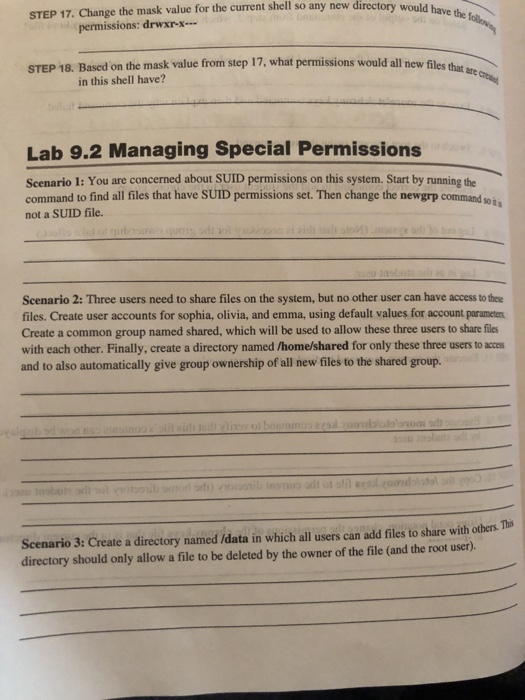
P 17. Change the mask value for the current shell so any new directory would have th STE permissions: drwxr-x STEP 18. Based on the mask value from step 17, what permissions would all new files that are crea in this shell have? Lab 9.2 Managing Special Permissions Scenario 1: You are concerned about SUID permissions on this system. Start by running the command to find all files that have SUID permissions set. Then change the newgrp command woi not a SUID file. Scenario 2: Three users need to share files on the system, but no other user can have access to these files. Create user accounts for sophia, olivia, and emma, using default values for account paramete Create a common group named shared, which will be used to allow these three users to share files with each other. Finally, create a directory named /home/shared for only these three users to acces and to also automatically give group ownership of all new files to the shared group. Scenario 3: Create a directory named /data in which all users can add files to share with others Ths directory should only allow a file to be deleted by the owner of the file (and the root user). P 17. Change the mask value for the current shell so any new directory would have th STE permissions: drwxr-x STEP 18. Based on the mask value from step 17, what permissions would all new files that are crea in this shell have? Lab 9.2 Managing Special Permissions Scenario 1: You are concerned about SUID permissions on this system. Start by running the command to find all files that have SUID permissions set. Then change the newgrp command woi not a SUID file. Scenario 2: Three users need to share files on the system, but no other user can have access to these files. Create user accounts for sophia, olivia, and emma, using default values for account paramete Create a common group named shared, which will be used to allow these three users to share files with each other. Finally, create a directory named /home/shared for only these three users to acces and to also automatically give group ownership of all new files to the shared group. Scenario 3: Create a directory named /data in which all users can add files to share with others Ths directory should only allow a file to be deleted by the owner of the file (and the root user)
Step by Step Solution
There are 3 Steps involved in it

Get step-by-step solutions from verified subject matter experts
 Study Help