







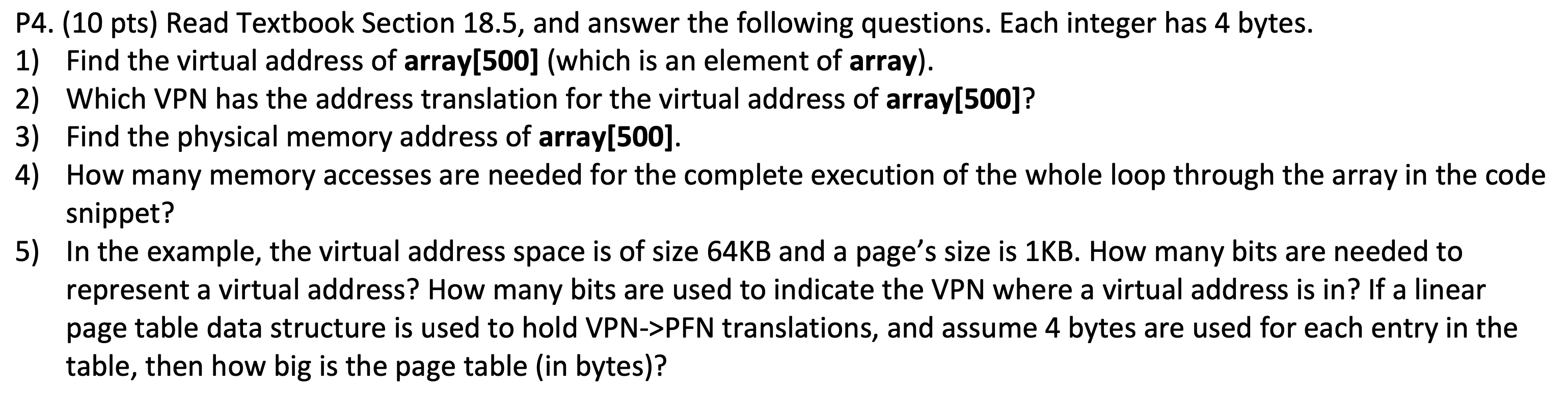
Question: P4. (10 pts) Read Textbook Section 18.5, and answer the following questions. Each integer has 4 bytes. 1) Find the virtual address of array[500] (which
![array[500] (which is an element of array). 2) Which VPN has the](https://dsd5zvtm8ll6.cloudfront.net/si.experts.images/questions/2024/09/66f4e0c6a45e2_35866f4e0c6150a7.jpg)
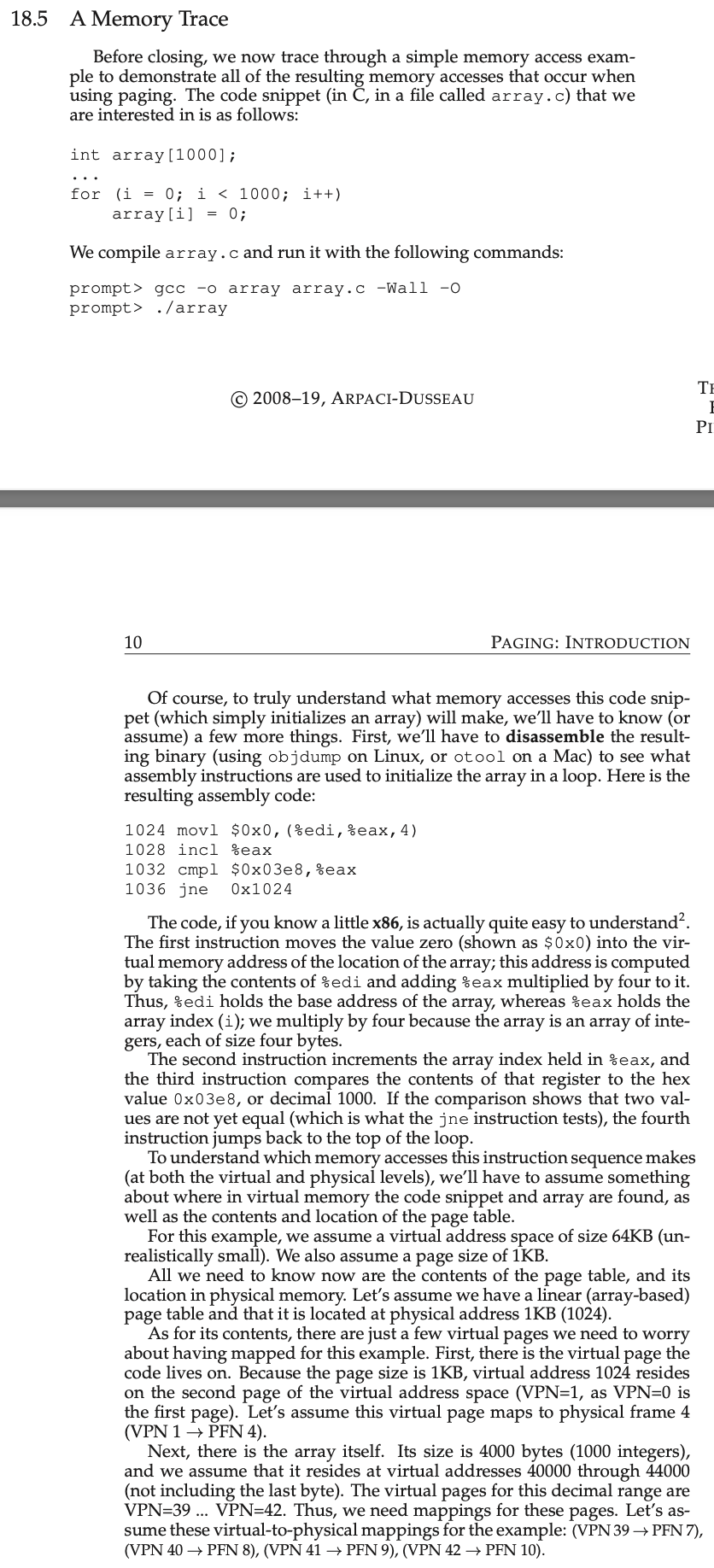
P4. (10 pts) Read Textbook Section 18.5, and answer the following questions. Each integer has 4 bytes. 1) Find the virtual address of array[500] (which is an element of array). 2) Which VPN has the address translation for the virtual address of array[500]? 3) Find the physical memory address of array[500]. 4) How many memory accesses are needed for the complete execution of the whole loop through the array in the code snippet? 5) In the example, the virtual address space is of size 64KB and a page's size is 1KB. How many bits are needed to represent a virtual address? How many bits are used to indicate the VPN where a virtual address is in? If a linear page table data structure is used to hold VPN->PFN translations, and assume 4 bytes are used for each entry in the table, then how big is the page table (in bytes)? 8.5 A Memory Trace Before closing, we now trace through a simple memory access example to demonstrate all of the resulting memory accesses that occur when using paging. The code snippet (in C, in a file called array.c) that we are interested in is as follows: int array[1000]; .0;i=0;i gcc -o array array.c -Wall -o prompt> ./array (c) 2008-19, ARPACI-DUSSEAU 10 PAGING: INTRODUCTION Of course, to truly understand what memory accesses this code snippet (which simply initializes an array) will make, we'll have to know (or assume) a few more things. First, we'll have to disassemble the resulting binary (using objdump on Linux, or otool on a Mac) to see what assembly instructions are used to initialize the array in a loop. Here is the resulting assembly code: 1024movl$00,(%edi,%eax,4)1028incl%eax1032cmpl$003e8,eax1036jne0x1024 The code, if you know a little x86, is actually quite easy to understand 2. The first instruction moves the value zero (shown as $00 ) into the virtual memory address of the location of the array; this address is computed by taking the contents of % edi and adding eax multiplied by four to it. Thus, odi holds the base address of the array, whereas eax holds the array index (i); we multiply by four because the array is an array of integers, each of size four bytes. The second instruction increments the array index held in \%eax, and the third instruction compares the contents of that register to the hex value 003e8, or decimal 1000. If the comparison shows that two values are not yet equal (which is what the j ne instruction tests), the fourth instruction jumps back to the top of the loop. To understand which memory accesses this instruction sequence makes (at both the virtual and physical levels), we'll have to assume something about where in virtual memory the code snippet and array are found, as well as the contents and location of the page table. For this example, we assume a virtual address space of size 64KB (unrealistically small). We also assume a page size of 1KB. All we need to know now are the contents of the page table, and its location in physical memory. Let's assume we have a linear (array-based) page table and that it is located at physical address 1KB (1024). As for its contents, there are just a few virtual pages we need to worry about having mapped for this example. First, there is the virtual page the code lives on. Because the page size is 1KB, virtual address 1024 resides on the second page of the virtual address space (VPN =1, as VPN=0 is the first page). Let's assume this virtual page maps to physical frame 4 (VPN 1 PFN 4 ). Next, there is the array itself. Its size is 4000 bytes (1000 integers), and we assume that it resides at virtual addresses 40000 through 44000 (not including the last byte). The virtual pages for this decimal range are VPN =39. VPN =42. Thus, we need mappings for these pages. Let's assume these virtual-to-physical mappings for the example: (VPN 39 PFN 7), We are now ready to trace the memory references of the program. When it runs, each instruction fetch will generate two memory references: one to the page table to find the physical frame that the instruction resides within, and one to the instruction itself to fetch it to the CPU for processing. In addition, there is one explicit memory reference in the form of the mov instruction; this adds another page table access first (to translate the array virtual address to the correct physical one) and then the array access itself. The entire process, for the first five loop iterations, is depicted in Figure 18.7 (page 11). The bottom most graph shows the instruction memory references on the y-axis in black (with virtual addresses on the left, and the actual physical addresses on the right); the middle graph shows array accesses in dark gray (again with virtual on left and physical on right); finally, the topmost graph shows page table memory accesses in light gray (just physical, as the page table in this example resides in physical memory). The x-axis, for the entire trace, shows memory accesses across the first five iterations of the loop; there are 10 memory accesses per loop, which includes four instruction fetches, one explicit update of memory, and five page table accesses to translate those four fetches and one explicit update. (c) 2008-19, ARPACI-DUSSEAU 12 PAGING: INTRODUCTION See if you can make sense of the patterns that show up in this visualization. In particular, what will change as the loop continues to run beyond these first five iterations? Which new memory locations will be accessed? Can you figure it out? This has just been the simplest of examples (only a few lines of C code), and yet you might already be able to sense the complexity of understanding the actual memory behavior of real applications. Don't worry: it definitely gets worse, because the mechanisms we are about to introduce only complicate this already complex machinery. Sorry 3
Step by Step Solution
There are 3 Steps involved in it

Get step-by-step solutions from verified subject matter experts
 Study Help