







Question: ..P68 The following code creates two objects representing a dipole oriented along the y axis. (a) Extend the program to calculate and display (using arrows)
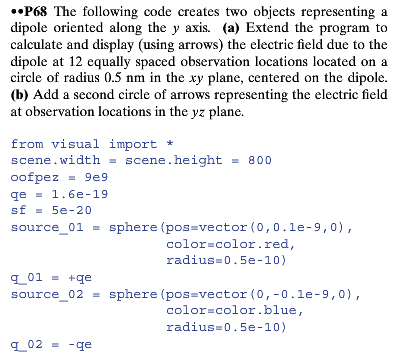
..P68 The following code creates two objects representing a dipole oriented along the y axis. (a) Extend the program to calculate and display (using arrows) the electric field due to the dipole at 12 equally spaced observation locations located on a circle of radius 0.5 nm in the xy plane, centered on the dipole. (b) Add a second circle of arrows representing the electric field at observation locations in the yz plane. from visual import + scene.width = scene.height = 800 oofpez = 9e9 qe - 1.6e-19 sf = 5e-20 source_01 = sphere (pos=vector(0,0.le-9,0), color=color.red, radius=0.5e-10) q_01 = +qe source_02 - sphere (pos=vector (0,-0.1e-9,0), color=color blue, radius=0.5e-10) q_02 = -qe ..P68 The following code creates two objects representing a dipole oriented along the y axis. (a) Extend the program to calculate and display (using arrows) the electric field due to the dipole at 12 equally spaced observation locations located on a circle of radius 0.5 nm in the xy plane, centered on the dipole. (b) Add a second circle of arrows representing the electric field at observation locations in the yz plane. from visual import + scene.width = scene.height = 800 oofpez = 9e9 qe - 1.6e-19 sf = 5e-20 source_01 = sphere (pos=vector(0,0.le-9,0), color=color.red, radius=0.5e-10) q_01 = +qe source_02 - sphere (pos=vector (0,-0.1e-9,0), color=color blue, radius=0.5e-10) q_02 = -qe
Step by Step Solution
There are 3 Steps involved in it

Get step-by-step solutions from verified subject matter experts
 Study Help