







Question: Pacific trails resort case study chapter 5 Thank you for your time, i need to update my external style sheet to have the following And
Pacific trails resort case study chapter 5
Thank you for your time, i need to update my external style sheet to have the following
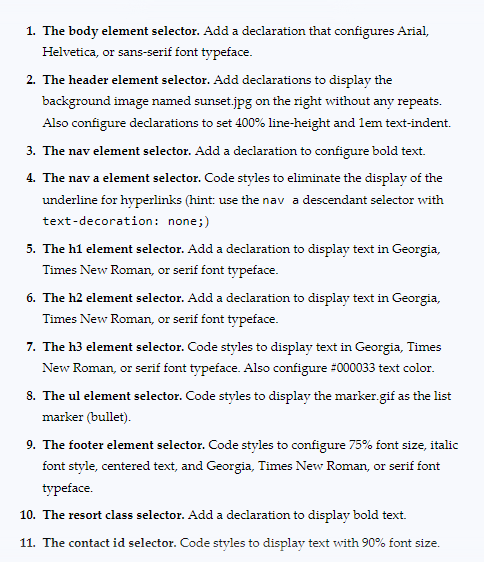
And here is my external style sheet
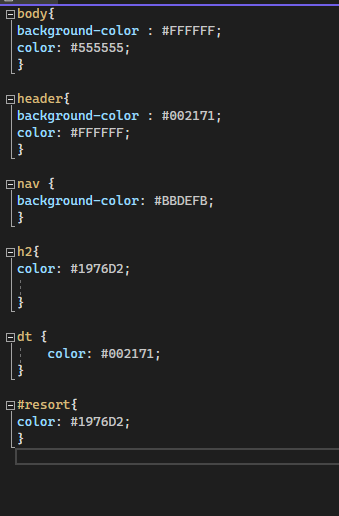
again, thank you for time to help with this problem
1. The body element selector. Add a declaration that configures Arial, Helvetica, or sans-serif font typeface. 2. The header element selector. Add declarations to display the background image named sunset.jpg on the right without any repeats. Also configure declarations to set 400% line-height and lem text-indent. 3. The nav element selector. Add a declaration to configure bold text. 4. The nav a element selector. Code styles to eliminate the display of the underline for hyperlinks (hint: use the nav a descendant selector with text-decoration: none;) 5. The h1 element selector. Add a declaration to display text in Georgia, Times New Roman, or serif font typeface. 6. The h2 element selector. Add a declaration to display text in Georgia, Times New Roman, or serif font typeface. 7. The h3 element selector. Code styles to display text in Georgia, Times New Roman, or serif font typeface. Also configure #000033 text color. 8. The ul element selector. Code styles to display the marker.gif as the list marker (bullet). 9. The footer element selector. Code styles to configure 75% font size, italic font style, centered text, and Georgia, Times New Roman, or serif font typeface. 10. The resort class selector. Add a declaration to display bold text. 11. The contact id selector. Code styles to display text with 90% font size. Gbody background-color:#FFFFFF;color:}555555; header \{ background-color : \#002171; color: \#FFFFFF; 3 avav \{ background-color: \#BBDEFB; h2{ color: \#1976D2; is
Step by Step Solution
There are 3 Steps involved in it

Get step-by-step solutions from verified subject matter experts
 Study Help