







Question: package Filter; import java.awt.*; import java.awt.event.*; import java.awt.image.*; import java.io.*; import javax.imageio.*; // Canvas for image display class ImageCanvas extends Canvas { BufferedImage image; //
package Filter;
import java.awt.*;
import java.awt.event.*;
import java.awt.image.*;
import java.io.*;
import javax.imageio.*;
// Canvas for image display
class ImageCanvas extends Canvas {
BufferedImage image;
// initialize the image and mouse control
public ImageCanvas(BufferedImage input) {
image = input;
addMouseListener(new ClickListener());
}
// redraw the canvas
public void paint(Graphics g) {
// draw boundary
g.setColor(Color.gray);
g.drawRect(0, 0, getWidth()-1, getHeight()-1);
// compute the offset of the image.
int xoffset = (getWidth() - image.getWidth()) / 2;
int yoffset = (getHeight() - image.getHeight()) / 2;
g.drawImage(image, xoffset, yoffset, this);
}
// change the image and redraw the canvas
public void resetImage(Image input) {
image = new BufferedImage(input.getWidth(null), input.getHeight(null), BufferedImage.TYPE_INT_RGB);
Graphics2D g2D = image.createGraphics();
g2D.drawImage(input, 0, 0, null);
repaint();
}
// listen to mouse click
class ClickListener extends MouseAdapter {
public void mouseClicked(MouseEvent e) {
if ( e.getClickCount() == 2 && e.getButton() == MouseEvent.BUTTON3 )
try {
ImageIO.write(image, "png", new File("saved.png"));
} catch ( Exception ex ) {
ex.printStackTrace();
}
}
}
}
package Filter;
import java.util.*;
import java.awt.*;
import java.awt.event.*;
import java.awt.image.*;
import java.io.*;
import javax.imageio.*;
// Main class
public class SmoothingFilter extends Frame implements ActionListener {
BufferedImage input;
ImageCanvas source, target;
TextField texSigma;
int width, height;
// Constructor
public SmoothingFilter(String name) {
super("Smoothing Filters");
// load image
try {
input = ImageIO.read(new File(name));
}
catch ( Exception ex ) {
ex.printStackTrace();
}
width = input.getWidth();
height = input.getHeight();
Panel main = new Panel();
source = new ImageCanvas(input);
target = new ImageCanvas(input);
main.setLayout(new GridLayout(1, 2, 10, 10));
main.add(source);
main.add(target);
Panel controls = new Panel();
Button button = new Button("Add noise");
button.addActionListener(this);
controls.add(button);
button = new Button("5x5 mean");
button.addActionListener(this);
controls.add(button);
controls.add(new Label("Sigma:"));
texSigma = new TextField("1", 1);
controls.add(texSigma);
button = new Button("5x5 Gaussian");
button.addActionListener(this);
controls.add(button);
button = new Button("5x5 median");
button.addActionListener(this);
controls.add(button);
button = new Button("5x5 Kuwahara");
button.addActionListener(this);
controls.add(button);
// add two panels
add("Center", main);
add("South", controls);
addWindowListener(new ExitListener());
setSize(width*2+100, height+100);
setVisible(true);
}
class ExitListener extends WindowAdapter {
public void windowClosing(WindowEvent e) {
System.exit(0);
}
}
// Action listener for button click events
public void actionPerformed(ActionEvent e) {
// example -- add random noise
if ( ((Button)e.getSource()).getLabel().equals("Add noise") ) {
Random rand = new Random();
int dev = 64;
for ( int y=0, i=0 ; y
for ( int x=0 ; x
Color clr = new Color(source.image.getRGB(x, y));
int red = clr.getRed() + (int)(rand.nextGaussian() * dev);
int green = clr.getGreen() + (int)(rand.nextGaussian() * dev);
int blue = clr.getBlue() + (int)(rand.nextGaussian() * dev);
red = red 255 ? 255 : red;
green = green 255 ? 255 : green;
blue = blue 255 ? 255 : blue;
source.image.setRGB(x, y, (new Color(red, green, blue)).getRGB());
}
source.repaint();
}
}
public static void main(String[] args) {
new SmoothingFilter(args.length==1 ? args[0] : "baboo.png");
}
}
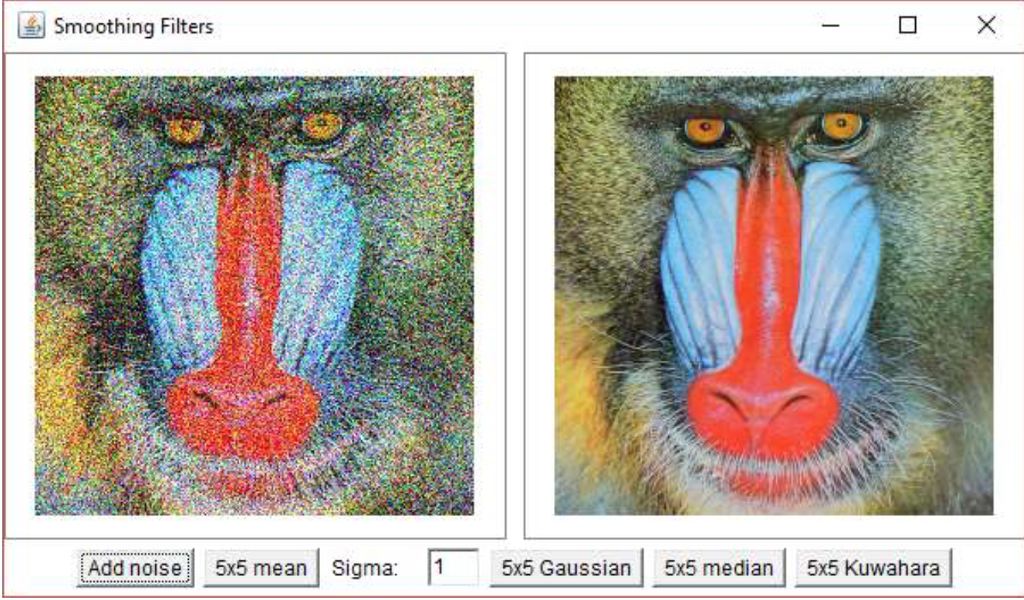 The four image smoothing filters you need to implement are 55 mean filter, 55 Gaussian
filter with user-specified parameter, 55 median filter, and 55 Kuwahara filter. Making use
of the most efficient implementation based on the property of the filters is required. Be careful
when handling pixels near the boundaries of the image. If a pixel is outside of the image, the
closest pixel that is in the image should be used.
Smoothing Filters Add noise 515 mean Sigma 5i5 Gaussian 5k5 median 5x5 Kuwahara 5x5 Gaussian 5x5 median 5x5 Kuwahara Smoothing Filters Add noise 515 mean Sigma 5i5 Gaussian 5k5 median 5x5 Kuwahara 5x5 Gaussian 5x5 median 5x5 Kuwahara
Step by Step Solution
There are 3 Steps involved in it

Get step-by-step solutions from verified subject matter experts
 Study Help