







Question: page should look like something like this: given html code: First Loop function greetMeThreeTimes() { var name = document.getElementById('txtName').value; for (var counter=0; counter { $('#greetings').append(Hello,
page should look like something like this:
given html code:
function greetMeThreeTimes()
{
var name = document.getElementById('txtName').value;
for (var counter=0; counter
{
$('#greetings').append("Hello, " + name + "
");
}
} //end greetMeThreeTimes
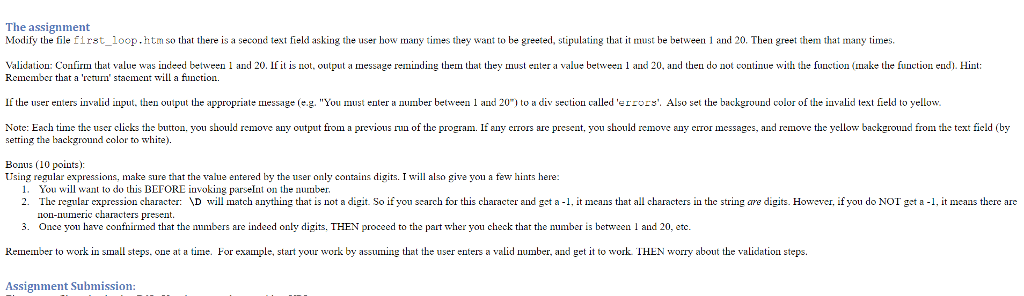
Type in your name and I will greet you 3 times!
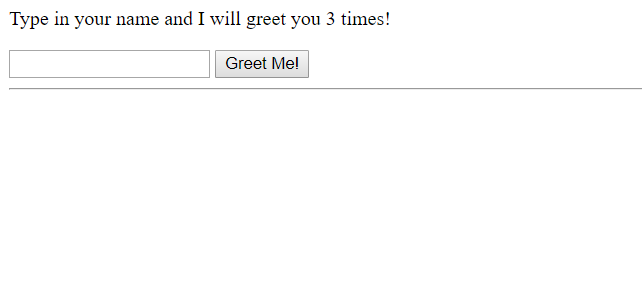
The assignment Modify the file first_loop.htm so that there is a second text field asking the user how many times they want to be greeted, stipulanat t must be between 1 and 20. Then greet them that many times Validation: Confirm that value was iudeed between 1 and 20. If it is not, output aessage reinding them that they must enter a value between 1 aud 20, and theu do not coutinue with the fuaction (make the function eud). Hint tu' stacment vill a function. Remember that a 're If the user enters invalid iuput, then output the appropriate iessage (e.g. "You must enter a nuuber betwe1 aud 20) to a div sectiou called 'errors'. Also set the background color of the invalid text field to yellow. Note: Each time the user clicks the button, you should remove any output from a previous run of the program. If any errors are present, you should remove any error messages, and remove the yellow backgrouad from the text field (by setring the background color to white). Bonus (10 points): Using regular expressions, make sure that the value entered by the user only contains digits. I will also give you a few hints here: 1. You will want to do this BEFORE iuvoking parsel on theumber 2. The regular expression character: VD will match anything that is not a digit. So if you search for this character and get a-1, it means that all characters in the string are digits. However, if you do NOT get a 1 it means there are non-numeric characters present. . Oace you have confnirmed that the aumbers are indeed only digits. THEN proceed to the part wher you check that the number is between 1 and 20, etc Keuem er to wor in sma steps. one at a tune. For example, start your wor by assunung t at te user en ers a va duumber, and get towork EM won about eva da on ste s. Assignment Submission: The assignment Modify the file first_loop.htm so that there is a second text field asking the user how many times they want to be greeted, stipulanat t must be between 1 and 20. Then greet them that many times Validation: Confirm that value was iudeed between 1 and 20. If it is not, output aessage reinding them that they must enter a value between 1 aud 20, and theu do not coutinue with the fuaction (make the function eud). Hint tu' stacment vill a function. Remember that a 're If the user enters invalid iuput, then output the appropriate iessage (e.g. "You must enter a nuuber betwe1 aud 20) to a div sectiou called 'errors'. Also set the background color of the invalid text field to yellow. Note: Each time the user clicks the button, you should remove any output from a previous run of the program. If any errors are present, you should remove any error messages, and remove the yellow backgrouad from the text field (by setring the background color to white). Bonus (10 points): Using regular expressions, make sure that the value entered by the user only contains digits. I will also give you a few hints here: 1. You will want to do this BEFORE iuvoking parsel on theumber 2. The regular expression character: VD will match anything that is not a digit. So if you search for this character and get a-1, it means that all characters in the string are digits. However, if you do NOT get a 1 it means there are non-numeric characters present. . Oace you have confnirmed that the aumbers are indeed only digits. THEN proceed to the part wher you check that the number is between 1 and 20, etc Keuem er to wor in sma steps. one at a tune. For example, start your wor by assunung t at te user en ers a va duumber, and get towork EM won about eva da on ste s. Assignment Submission
Step by Step Solution
There are 3 Steps involved in it

Get step-by-step solutions from verified subject matter experts
 Study Help