







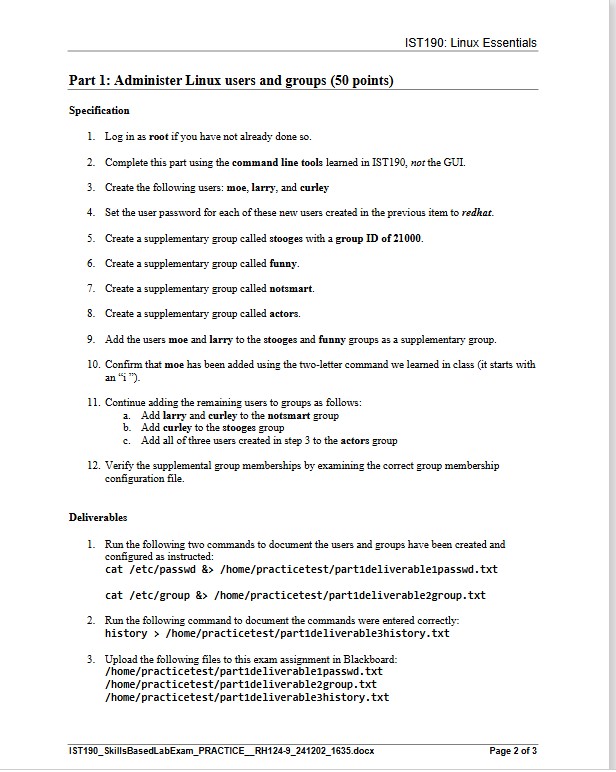
Question: Part 1 : Administer Linux users and groups ( 5 0 points ) Specification Log in as root if you have not already done so
Part : Administer Linux users and groups points
Specification
Log in as root if you have not already done so
Complete this part using the command line tools learned in IST not the GUI.
Create the following users: moe, larry, and curley
Set the user password for each of these new users created in the previous item to redhat.
Create a supplementary group called stooges with a group ID of
Create a supplementary group called funny.
Create a supplementary group called notsmart.
Create a supplementary group called actors.
Add the users moe and larry to the stooges and funny groups as a supplementary group.
Confirm that moe has been added using the twoletter command we learned in class it starts with
an i
Continue adding the remaining users to groups as follows:
a Add larry and curley to the notsmart group
b Add curley to the stooges group
c Add all of three users created in step to the actors group
Verify the supplemental group memberships by examining the correct group membership
configuration file.
Deliverables
Run the following two commands to document the users and groups have been created and
configured as instructed:
cat etcpasswd &homepracticetestpartdeliverablepasswd.txt
cat etcgroup &homepracticetestpartdeliverablegroup.txt
Run the following command to document the commands were entered correctly:
history homepracticetestpartdeliverablehistory.txt
Upload the following files to this exam assignment in Blackboard:
homepracticetestpartdeliverablepasswd.txt
homepracticetestpartdeliverablegroup.txt
homepracticetestpartdeliverablehistory.txt
give me the codes step by step and how I have to write it
Step by Step Solution
There are 3 Steps involved in it
1 Expert Approved Answer
Step: 1 Unlock

Question Has Been Solved by an Expert!
Get step-by-step solutions from verified subject matter experts
Step: 2 Unlock
Step: 3 Unlock
 Study Help