







Question: Part 1: Draw a Trace Table Create a trace table that has: - A column labeled Line for the line number. - A column labeled
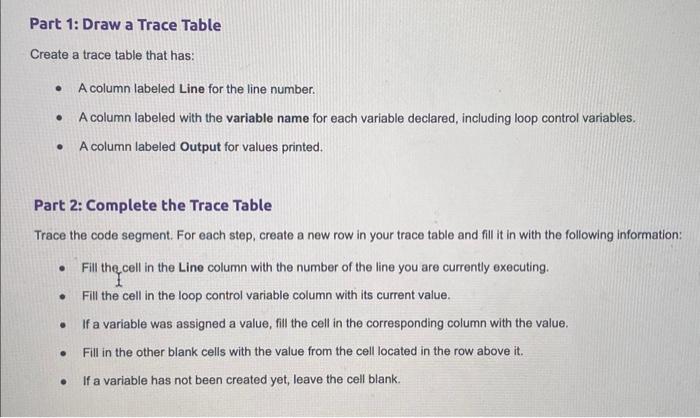
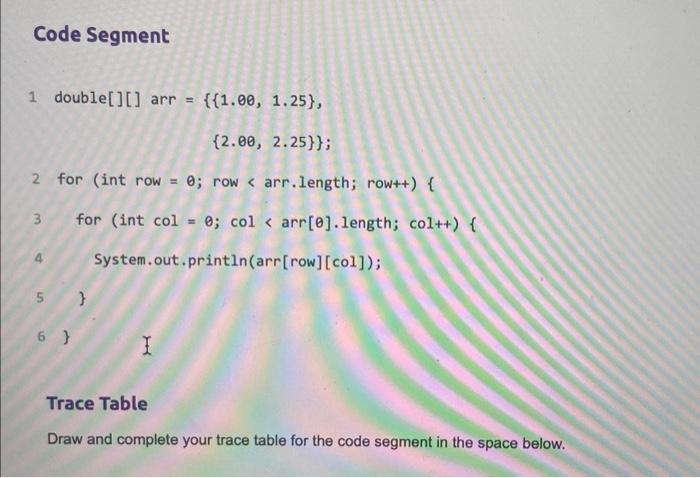
Part 1: Draw a Trace Table Create a trace table that has: - A column labeled Line for the line number. - A column labeled with the variable name for each variable declared, including loop control variables. - A column labeled Output for values printed. Part 2: Complete the Trace Table Trace the code segment. For each step, create a new row in your trace table and fill it in with the following information: - Fill the cell in the Line column with the number of the line you are currently executing. - Fill the cell in the loop control variable column with its current value. - If a variable was assigned a value, fill the cell in the corresponding column with the value. - Fill in the other blank cells with the value from the cell located in the row above it. - If a variable has not been created yet, leave the cell blank. code Segment 1double[][]arr={{1.00,1.25},{2.00,2.25}}; 2for(introw=0;row
Step by Step Solution
There are 3 Steps involved in it

Get step-by-step solutions from verified subject matter experts
 Study Help