







Question: Part 1: Identify the Questions Because this lab is focused on mastering the data, the question has been identified for you. We will begin
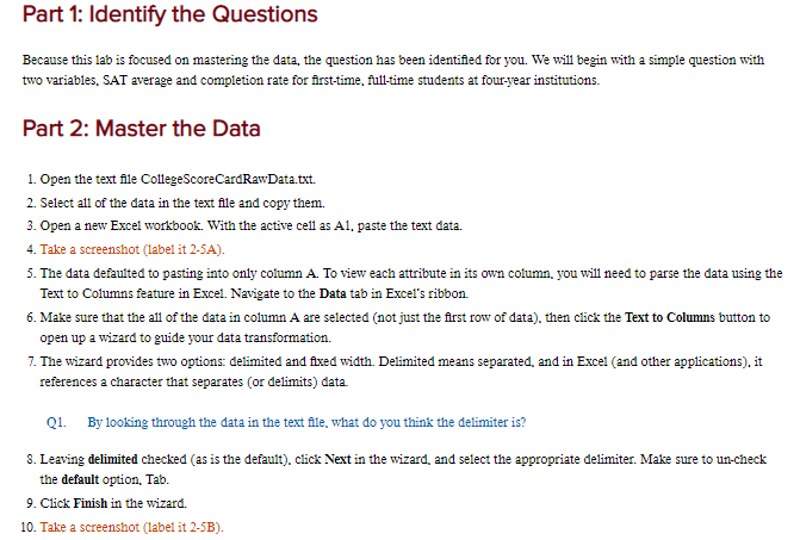
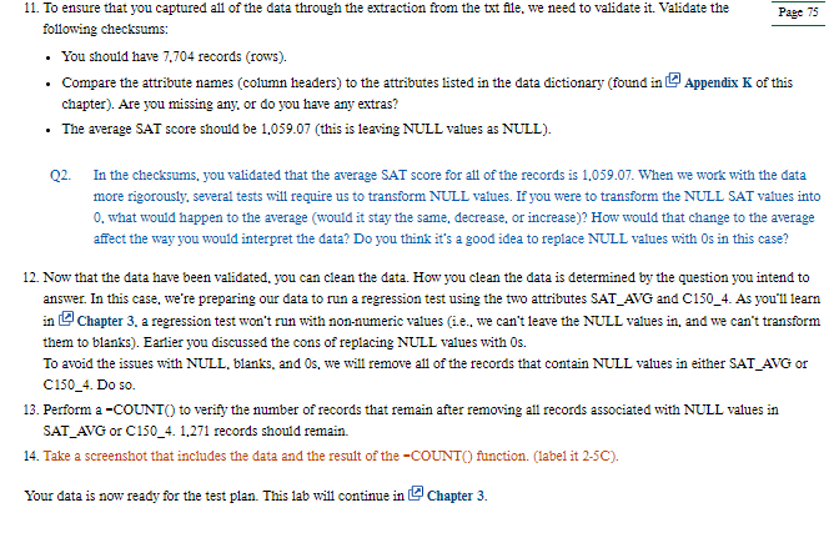
Part 1: Identify the Questions Because this lab is focused on mastering the data, the question has been identified for you. We will begin with a simple question with two variables, SAT average and completion rate for first-time, full-time students at four-year institutions. Part 2: Master the Data 1. Open the text file CollegeScore CardRawData.txt. 2. Select all of the data in the text file and copy them. 3. Open a new Excel workbook. With the active cell as A1, paste the text data. 4. Take a screenshot (label it 2-5A). 5. The data defaulted to pasting into only column A. To view each attribute in its own column, you will need to parse the data using the Text to Columns feature in Excel. Navigate to the Data tab in Excel's ribbon. 6. Make sure that the all of the data in column A are selected (not just the first row of data), then click the Text to Columns button to open up a wizard to guide your data transformation. 7. The wizard provides two options: delimited and fixed width. Delimited means separated, and in Excel (and other applications), it references a character that separates (or delimits) data. Q1. By looking through the data in the text file, what do you think the delimiter is? 8. Leaving delimited checked (as is the default), click Next in the wizard, and select the appropriate delimiter. Make sure to un-check the default option. Tab. 9. Click Finish in the wizard. 10. Take a screenshot (label it 2-5B).
Step by Step Solution
There are 3 Steps involved in it
Lets go stepbystep through the instructions provided in the images Part 1 Identify the Questions The question identified for you involves two variable... View full answer

Get step-by-step solutions from verified subject matter experts
 Study Help