







Question: Part 1 - Implement a digital low-pass filter Using the supplied template code Part1 low pass template.m implement a digital low-pass filter. Plot the results
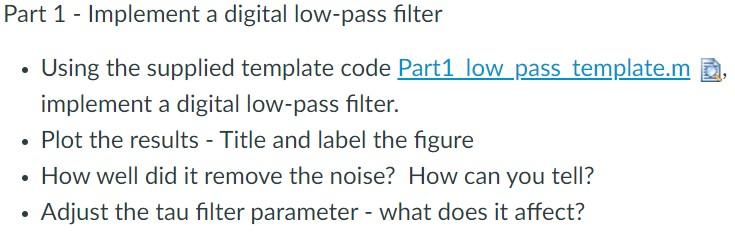
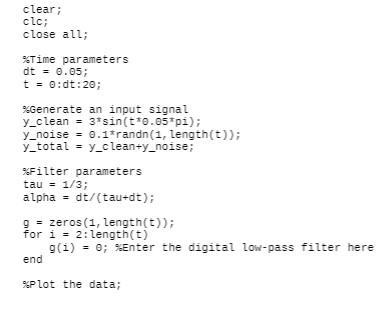
Part 1 - Implement a digital low-pass filter Using the supplied template code Part1 low pass template.m implement a digital low-pass filter. Plot the results - Title and label the figure How well did it remove the noise? How can you tell? Adjust the tau filter parameter - what does it affect? . clear; clc; close all; %Time parameters dt = 0.05; t = 0:dt:20; Generate an input signal Y_clean = 3* sin(t*0.05*pi); Y_noise = 0.1*randn(1, length(t)); y_total = y_clean+y_noise; Filter parameters tau = 1/3; alpha = d(tau+d); g = zeros (1, length(t)); For i = 2: length(t) g(i) = 0; XEnter the digital low-pass filter here end Plot the data; Part 1 - Implement a digital low-pass filter Using the supplied template code Part1 low pass template.m implement a digital low-pass filter. Plot the results - Title and label the figure How well did it remove the noise? How can you tell? Adjust the tau filter parameter - what does it affect? . clear; clc; close all; %Time parameters dt = 0.05; t = 0:dt:20; Generate an input signal Y_clean = 3* sin(t*0.05*pi); Y_noise = 0.1*randn(1, length(t)); y_total = y_clean+y_noise; Filter parameters tau = 1/3; alpha = d(tau+d); g = zeros (1, length(t)); For i = 2: length(t) g(i) = 0; XEnter the digital low-pass filter here end Plot the data
Step by Step Solution
There are 3 Steps involved in it

Get step-by-step solutions from verified subject matter experts
 Study Help