







Question: Part 1: Please help me modify my code to make my Loan Calculator look exactly like the calculator below: My code so far: *************************************************************** import
Part 1:
Please help me modify my code to make my Loan Calculator look exactly like the calculator below:
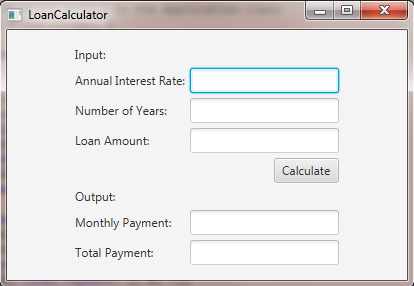
My code so far:
***************************************************************
import javafx.application.Application;
import javafx.geometry.Pos;
import javafx.geometry.HPos;
import javafx.scene.Scene;
import javafx.scene.control.Button;
import javafx.scene.control.Label;
import javafx.scene.control.TextField;
import javafx.scene.layout.GridPane;
import javafx.stage.Stage;
public class LoanCalculator extends Application {
private TextField tfAnnualInterestRate = new TextField();
private TextField tfNumberOfYears = new TextField();
private TextField tfLoanAmount = new TextField();
private TextField tfMonthlyPayment = new TextField();
private TextField tfTotalPayment = new TextField();
private Button btCalculate = new Button("Calculate");
@Override // Override the start method in the Application class
public void start(Stage primaryStage) {
// Create UI
GridPane gridPane = new GridPane();
gridPane.setHgap(5);
gridPane.setVgap(5);
gridPane.add(new Label("Annual Interest Rate:"), 0, 0);
gridPane.add(tfAnnualInterestRate, 1, 0);
gridPane.add(new Label("Number of Years:"), 0, 1);
gridPane.add(tfNumberOfYears, 1, 1);
gridPane.add(new Label("Loan Amount:"), 0, 2);
gridPane.add(tfLoanAmount, 1, 2);
gridPane.add(new Label("Monthly Payment:"), 0, 3);
gridPane.add(tfMonthlyPayment, 1, 3);
gridPane.add(new Label("Total Payment:"), 0, 4);
gridPane.add(tfTotalPayment, 1, 4);
gridPane.add(btCalculate, 1, 5);
// Set properties for UI
gridPane.setAlignment(Pos.CENTER);
tfAnnualInterestRate.setAlignment(Pos.BOTTOM_RIGHT);
tfNumberOfYears.setAlignment(Pos.BOTTOM_RIGHT);
tfLoanAmount.setAlignment(Pos.BOTTOM_RIGHT);
tfMonthlyPayment.setAlignment(Pos.BOTTOM_RIGHT);
tfTotalPayment.setAlignment(Pos.BOTTOM_RIGHT);
tfMonthlyPayment.setEditable(false);
tfTotalPayment.setEditable(false);
GridPane.setHalignment(btCalculate, HPos.RIGHT);
// Process events, set up handler
btCalculate.setOnAction(e -> calculateLoanPayment());
// Create a scene and place it in the stage
Scene scene = new Scene(gridPane, 400, 250);
primaryStage.setTitle("LoanCalculator"); // Set title
primaryStage.setScene(scene); // Place the scene in the stage
primaryStage.show(); // Display the stage
}
private void calculateLoanPayment() {
// Get values from text fields
double interest =
Double.parseDouble(tfAnnualInterestRate.getText());
int year = Integer.parseInt(tfNumberOfYears.getText());
double loanAmount =
Double.parseDouble(tfLoanAmount.getText());
// Create a loan object. Loan defined in Listing 10.2
Loan loan = new Loan(interest, year, loanAmount);
// Display monthly payment and total payment
tfMonthlyPayment.setText(String.format("$%.2f",
loan.getMonthlyPayment()));
tfTotalPayment.setText(String.format("$%.2f",
loan.getTotalPayment()));
}
/**
* The main method is only needed for the IDE with limited
* JavaFX support. Not needed for running from the command line.
*/
public static void main(String[] args) {
launch(args);
}
}
Part 2: Simple Calculator
Write a javafx program that performs addition, subtraction, multiplication and division. You need four buttons, three labels, and three text fields. You can design the layout of your calculator as you like
LoanCalculator Input: Annual Interest Rate: Number of Years Loan Amount: Calculate Output Monthly Payment Total Payment
Step by Step Solution
There are 3 Steps involved in it

Get step-by-step solutions from verified subject matter experts
 Study Help