



Question: Part 2: Configure VLAN and Inter-VLAN Routing Step 1: Configure VLANs on Switches a. Configure VLANS: VLAN 10, 20 and 50 b. Configure trunk
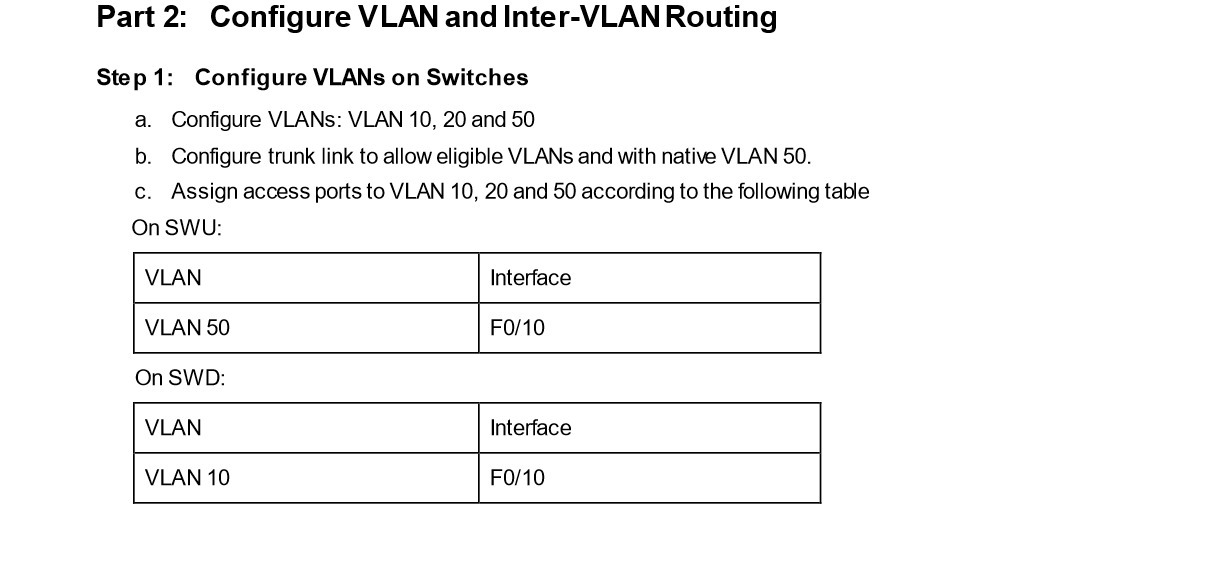
Part 2: Configure VLAN and Inter-VLAN Routing Step 1: Configure VLANs on Switches a. Configure VLANS: VLAN 10, 20 and 50 b. Configure trunk link to allow eligible VLANs and with native VLAN 50. c. Assign access ports to VLAN 10, 20 and 50 according to the following table On SWU: VLAN VLAN 50 On SWD: VLAN Interface F0/10 Interface VLAN 10 F0/10
Step by Step Solution
There are 3 Steps involved in it
1 Expert Approved Answer
Step: 1 Unlock

Question Has Been Solved by an Expert!
Get step-by-step solutions from verified subject matter experts
Step: 2 Unlock
Step: 3 Unlock