





Question: Part 2: Default and Static Routing Total configuration items/points: 8 Step 1: Configure Default Routes on R1 (your device in the Packet Tracer topology will
Part 2: Default and Static Routing Total
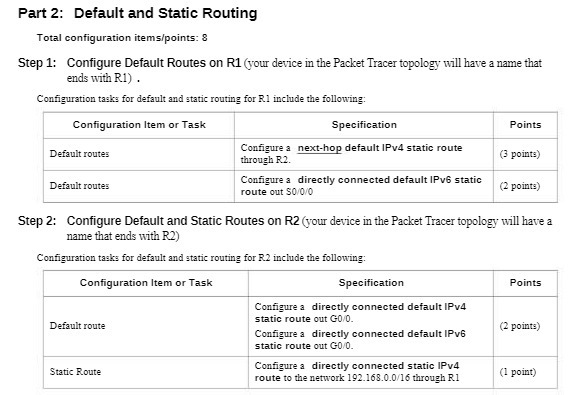
Part 2: Default and Static Routing Total configuration items/points: 8 Step 1: Configure Default Routes on R1 (your device in the Packet Tracer topology will have a name that ends with RI) . Configuration tasks for default and static routing for RI include the following: Configuration Item or Task Specification Points Default routes Configure a next-hop default IPv4 static route through R.2. (3 points) Default routes Configure a directly connected default IPV6 static route out 50/0/0 (2 points) Step 2: Configure Default and Static Routes on R2 (your device in the Packet Tracer topology will have a name that ends with R2) Configuration tasks for default and static routing for R.2 include the following: Configuration Item or Task Specification Points Configure a directly connected default IPv4 Default route static route out GO/0. Configure a directly connected default IPV6 (2 points) static route out GO/0. Static Route Configure a directly connected static IPv4 route to the network 192.168.0.0/16 through R.1 (1 point)

Step by Step Solution

There are 3 Steps involved in it

1 Expert Approved Answer
Step: 1 Unlock blur-text-image

Question Has Been Solved by an Expert!

Get step-by-step solutions from verified subject matter experts

Step: 2 Unlock
Step: 3 Unlock

Students Have Also Explored These Related Mathematics Questions!