



Question: Part 2: Views You notice that you are constantly doing the above 2 joins. You decide to create views to easily have the above
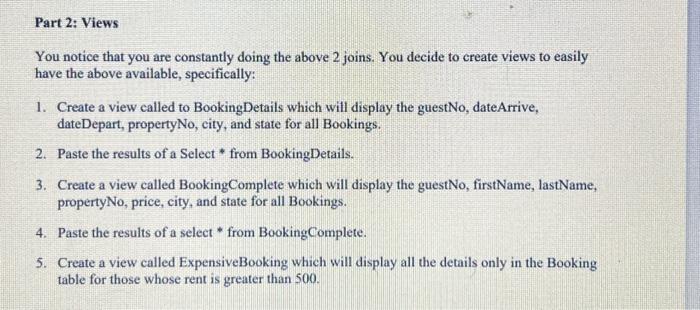
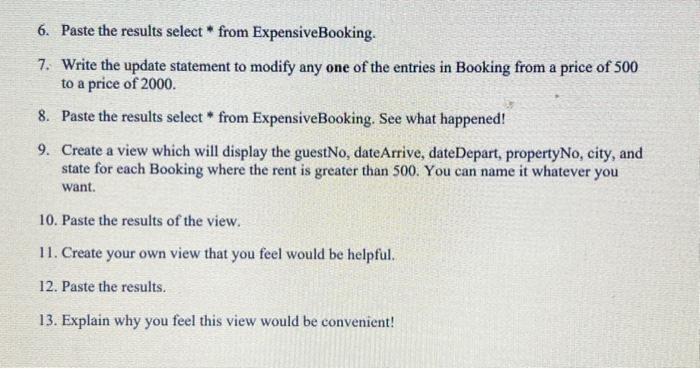
Part 2: Views You notice that you are constantly doing the above 2 joins. You decide to create views to easily have the above available, specifically: 1. Create a view called to BookingDetails which will display the guestNo, dateArrive, date Depart, propertyNo, city, and state for all Bookings. 2. Paste the results of a Select from BookingDetails. 3. Create a view called BookingComplete which will display the guestNo, firstName, lastName, propertyNo, price, city, and state for all Bookings. 4. Paste the results of a select * from BookingComplete. 5. Create a view called ExpensiveBooking which will display all the details only in the Booking table for those whose rent is greater than 500. 6. Paste the results select * from Expensive Booking. 7. Write the update statement to modify any one of the entries in Booking from a price of 500 to a price of 2000. 8. Paste the results select* from ExpensiveBooking. See what happened! 9. Create a view which will display the guestNo, dateArrive, dateDepart, propertyNo, city, and state for each Booking where the rent is greater than 500. You can name it whatever you want. 10. Paste the results of the view. 11. Create your own view that you feel would be helpful. 12. Paste the results. 13. Explain why you feel this view would be convenient!
Step by Step Solution
There are 3 Steps involved in it
The questions youre looking at pertain to SQL views in a database system Youre tasked with creating views and also interacting with them through selec... View full answer

Get step-by-step solutions from verified subject matter experts